
The best smart home hub for most people is Homey Pro (2026), thanks to its broad device support and flexible automation options. For a simpler control point, the Amazon Echo Hub puts Alexa routines and compatible devices on a dedicated screen, while Home Assistant Green suits buyers who want more control and can handle extra setup. The main tradeoffs are compatibility, local versus cloud-dependent operation, and how much configuration you want to manage. A display hub may be easier to use day to day, while a more flexible hub can take more work to configure. Read on for the full breakdown of 15 picks and guidance on matching a hub to your home.

Get home appliances delivered free with Prime
- Fast, free delivery on millions of items
- Prime Video, Amazon Music and more included
- Member-only deals all year
Complete the kit


Key Takeaways
- Homey Pro (2026) is the broad-compatibility pick: its range of connected-device options makes it a stronger all-around choice than hubs focused on one brand or protocol.
- Dedicated control screens serve a different purpose from automation-first hubs: the Echo Hub and Echo Show 15 prioritize visible Alexa control, while Home Assistant Green and Hubitat put more emphasis on custom automation.
- Protocol support does not guarantee every device will work as expected: check the hub’s supported standards and product compatibility before buying, especially when mixing brands.
- Specialist hubs can be the better fit for a focused setup: Lutron Caséta targets lighting, YoLink addresses long-range sensor connections, and SwitchBot Hub 2 adds IR control and room readings.
- More capable hubs can ask more of their owners: Home Assistant Green and Hubitat offer more room to tailor automations, but buyers seeking a low-effort setup may prefer an Alexa or Aqara hub.
| Amazon Echo Show 15 (2nd Gen) 15.6-inch Full HD Smart Display with Fire TV and Alexa |  | Best Smart Display Hub for Family Spaces | Display: 15.6-inch, 1920 x 1080 | Dimensions: 16.1 x 10.1 x 1.4 inches | Weight: 4.96 lb | VIEW LATEST PRICE | See Our Full Breakdown |
| Homey Pro mini Smart Home Hub with Zigbee, Ethernet, Matter, and Thread |  | Best Compact Hub for Multi-Brand Automations | Model: HOMEY-PRO-MINI-US-01 | Connectivity: Zigbee, Matter, Thread, Ethernet | Voice assistant compatibility: Siri, Alexa, Google Assistant | VIEW LATEST PRICE | See Our Full Breakdown |
| Home Assistant Green Smart Home Hub |  | Best for Home Assistant Beginners | Operating system: Home Assistant OS | Processor: Quad-core | Memory: 4 GB LPDDR4X | VIEW LATEST PRICE | See Our Full Breakdown |
| Homey Pro (2026) Smart Home Hub |  | Best Overall for Mixed-Protocol Homes | Connectivity: Wi-Fi, Zigbee, Z-Wave Plus, infrared, BLE, Matter, Thread | Voice assistant compatibility: Siri, Alexa, Google Home | Device compatibility: More than 50,000 devices from over 1,000 brands | VIEW LATEST PRICE | See Our Full Breakdown |
| Aqara Smart Home Hub M3 Matter Controller with Zigbee, Thread, and IR Blaster |  | Best Aqara Hub for Local Control and Infrared Devices | Model: HM-G01E | Protocols: Zigbee, Thread, Matter, Bluetooth, Wi-Fi | Zigbee device capacity: Up to 127 Aqara Zigbee devices | VIEW LATEST PRICE | See Our Full Breakdown |
| Hubitat Elevation C-8 Pro Smart Home Hub |  | Best for Local Automation | Model: C-8 Pro | Supported protocols: Matter 1.5, Z-Wave 800 Series with Long Range, Zigbee 3.0, Bluetooth | Voice assistant compatibility: Amazon Alexa, Google Home, Apple HomeKit | VIEW LATEST PRICE | See Our Full Breakdown |
| Amazon Echo Hub 8-Inch Smart Home Control Panel |  | Best Smart Home Control Panel | Display: 8-inch touchscreen, 1280 x 800 resolution | Connectivity: Dual-band Wi-Fi, Bluetooth, Zigbee, Matter, Thread, Sidewalk | Audio: Pair of top-ported full-range speakers with stereo playback | VIEW LATEST PRICE | See Our Full Breakdown |
| Aqara Smart Hub M100 Matter Controller with Wi-Fi and Thread |  | Best Compact Aqara Starter Hub | Supported protocols: Aqara Zigbee and Thread | Device capacity: Up to 20 Aqara Zigbee devices and 20 Thread devices | Wi-Fi: 2.4 GHz Wi-Fi 6 (802.11ax) | VIEW LATEST PRICE | See Our Full Breakdown |
| Lutron Caséta Smart Hub, Compatible with Alexa, Apple HomeKit, Google Assistant, and More | 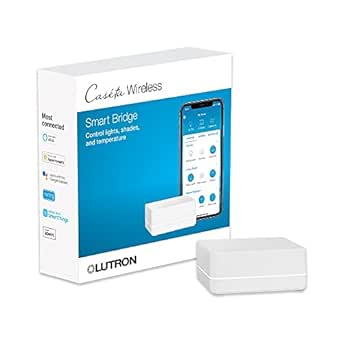 | Best for Caséta Lighting Systems | Model: L-BDG2-WH | Connectivity: Router connection; Clear Connect technology | Compatible platforms: Amazon Alexa, Apple HomeKit, Google Assistant, Ring, Serena shades, Sonos, and others | VIEW LATEST PRICE | See Our Full Breakdown |
| Aqara Smart Hub M200 Matter Controller |  | Best Feature-Rich Aqara Hub | Model: HM-G03E | Dimensions: 3.93 x 3.93 x 1.21 inches | Weight: 4.6 ounces | VIEW LATEST PRICE | See Our Full Breakdown |
| YoLink Smart Home Hub (YS1603) |  | Best for Long-Range YoLink Sensors | Model: YS1603 | Protocol: YoLink LoRa | Connectivity: Wi-Fi or Ethernet | VIEW LATEST PRICE | See Our Full Breakdown |
| SwitchBot Hub 2 Smart Home Hub with Thermometer, Hygrometer, IR Remote, and Light Sensor |  | Best for Climate Sensing and IR Control | Connectivity: 2.4 GHz Wi-Fi and Bluetooth | Sensors: Temperature, humidity, and light | Temperature accuracy: ±0.36°F | VIEW LATEST PRICE | See Our Full Breakdown |
| SONOFF Bridge-M Smart Home Hub |  | Best for Local Ecosystem Bridging | Device role: Zigbee hub and Matter bridge | Supported protocols: Zigbee, BTHome, eWeLink, Matter | Matter controller support: Not supported | VIEW LATEST PRICE | See Our Full Breakdown |
| Aqara Smart Hub M2 with IR Remote Control |  | Best for Aqara Zigbee Homes | Model: HM2-G01 | Connectivity: 2.4 GHz Wi-Fi, Ethernet RJ45, Zigbee | Compatible platforms: Apple HomeKit, Alexa, Google Assistant, IFTTT | VIEW LATEST PRICE | See Our Full Breakdown |
| Aeotec Smart Home Hub 2 (V4) with Matter and Zigbee Support |  | Best for SmartThings Local Automations | Model: V4 – Smart Home Hub 2 (2025) | Model number: GP-AEOHUBV4US | Connectivity: Wi-Fi and Ethernet | VIEW LATEST PRICE | See Our Full Breakdown |
| smart home hub | Connectivity | Dimensions | Model |
|---|---|---|---|
| Amazon Echo Show 15 | — | 16.1 x 10.1 x 1.4 inches | — |
| Homey Pro mini Smart Home Hub | Zigbee, Matter, Thread, Ethernet | — | HOMEY-PRO-MINI-US-01 |
| Home Assistant Green Smart Hom | Ethernet, USB, Bluetooth | 4.41 x 4.41 x 1.26 inches | — |
| Homey Pro | Wi-Fi, Zigbee, Z-Wave Plus, infrared, BLE, Matter, Thread | 4.9 x 4.9 x; remaining measurement not provided | — |
| Aqara Smart Home Hub M3 Matter | — | — | HM-G01E |
| Hubitat Elevation C-8 Pro Smar | — | 2.95 x 3.23 x 0.67 inches | C-8 Pro |
| Amazon Echo Hub 8-Inch Smart H | Dual-band Wi-Fi, Bluetooth, Zigbee, Matter, Thread, Sidewalk | — | — |
| Aqara Smart Hub M100 Matter Co | — | — | — |
| Lutron Caséta Smart Hub | Router connection; Clear Connect technology | 1.44 x 2.94 x 4.69 inches | L-BDG2-WH |
| Aqara Smart Hub M200 Matter Co | Zigbee, Thread, Wi-Fi (2.4/5 GHz), Bluetooth, IR, Ethernet with PoE | 3.93 x 3.93 x 1.21 inches | HM-G03E |
| YoLink Smart Home Hub | Wi-Fi or Ethernet | 4.33 x 4.33 x 1.06 inches | YS1603 |
| SwitchBot Hub 2 Smart Home Hub | 2.4 GHz Wi-Fi and Bluetooth | — | — |
| SONOFF Bridge-M Smart Home Hub | — | — | — |
| Aqara Smart Hub M2 with IR Rem | 2.4 GHz Wi-Fi, Ethernet RJ45, Zigbee | 3.94 x 3.94 x 1.12 inches | HM2-G01 |
| Aeotec Smart Home Hub 2 | Wi-Fi and Ethernet | — | V4 – Smart Home Hub 2 (2025) |
More Details on Our Top Picks
Amazon Echo Show 15 (2nd Gen) 15.6-inch Full HD Smart Display with Fire TV and Alexa
I’d choose the Echo Show 15 when a smart home hub needs to double as a shared household screen. Its 15.6-inch Full HD display gives calendars, lists, camera feeds, and controls room to stay visible, while Fire TV makes the same wall-mounted device useful for entertainment. Unlike the screen-free Homey Pro mini, it offers a camera for video calls and a visual dashboard; it also supports Zigbee, Matter, and Thread without adding a separate radio adapter.
The tradeoff is that this is a display-centered Alexa hub, not a highly flexible automation platform. Some apps and services may involve extra fees, and setup and connected features depend on Wi-Fi. I’d skip it if you want a compact, screen-free controller or prefer building advanced automations outside Alexa.
Pros:- Large Full HD screen makes shared calendars, controls, and camera views easy to read
- Built-in Fire TV combines household control and streaming in one display
- Zigbee, Matter, and Thread support covers several major smart home protocols
- 13 MP camera includes auto-framing, a privacy shutter, and camera-off controls
Cons:- Some apps, skills, and services may require separate subscriptions or fees
- Wi-Fi is required for setup and connected features
- Its large display and Alexa-centered approach are less suited to discreet or platform-neutral setups
Best for: Families who want a shared wall display for schedules, streaming, video calls, and everyday smart home controls
Not ideal for: Buyers seeking a compact, screen-free hub or advanced automation flexibility beyond Alexa’s ecosystem
- Display:15.6-inch, 1920 x 1080
- Dimensions:16.1 x 10.1 x 1.4 inches
- Weight:4.96 lb
- Camera:13 MP with privacy shutter
- Audio:Two 2-inch woofers and two 0.6-inch tweeters
- Wi-Fi:Wi-Fi 6E; supports 802.11a/b/g/n/ac
- Smart home connectivity:Zigbee, Matter, and Thread Border Router
- Orientation:Landscape or portrait
Our verdict“Choose the Echo Show 15 if your household will use a large shared screen as much as it uses a smart home hub.”
Homey Pro mini Smart Home Hub with Zigbee, Ethernet, Matter, and Thread
The Homey Pro mini is a strong fit for buyers who want a compact controller for devices from many brands without paying for a screen or a broad collection of built-in radios. It supports Zigbee, Matter, and Thread, connects over Ethernet, and can process automations locally, so routine control is less dependent on a cloud connection. Its compatibility with more than 1,000 brands and support for Siri, Alexa, and Google Assistant make it more platform-flexible than the Echo Show 15.
That compact design comes with a real protocol gap: Z-Wave, Bluetooth, and infrared require a separately sold Homey Bridge. The full-size Homey Pro (2026) includes a wider range of connection options, so I’d favor that model for mixed-protocol homes. The mini makes more sense when Ethernet, local processing, and a smaller footprint matter most.
Pros:- Local processing supports control and automations when internet access is unavailable
- Works with more than 1,000 smart home brands
- Supports Zigbee, Matter, Thread, and Ethernet
- Includes energy monitoring and customizable automations without a required subscription
Cons:- Z-Wave, Bluetooth, and infrared require a separately sold Homey Bridge
- Wired Ethernet may limit placement compared with a Wi-Fi hub
- The compact model has fewer built-in radio options than Homey Pro (2026)
Best for: Smart home owners with Ethernet access who want local automations across many brands and mainly use Zigbee, Matter, or Thread
Not ideal for: Buyers with Z-Wave, Bluetooth, or infrared devices who want those radios built in without purchasing an additional bridge
- Model:HOMEY-PRO-MINI-US-01
- Connectivity:Zigbee, Matter, Thread, Ethernet
- Voice assistant compatibility:Siri, Alexa, Google Assistant
- Brand compatibility:More than 1,000 brands
- Processing:Local processing
- Features:Energy monitoring, alerts, customizable automations
- Subscription:No subscription required
- Color and material:Black plastic
Our verdict“Pick the Homey Pro mini for a compact, subscription-free hub built around local automations and Zigbee, Matter, or Thread devices.”
Home Assistant Green Smart Home Hub
Home Assistant Green makes the most sense for someone ready to build a flexible Home Assistant setup but who does not want to install its operating system from scratch. Home Assistant OS comes preinstalled, and its fanless design keeps the hub silent; 4 GB of RAM and 32 GB of storage provide the base for managing devices and automations. Compared with the Homey Pro mini, Green puts the Home Assistant platform at the center rather than offering a ready-made hub spanning several voice assistants and device ecosystems.
The tradeoff is that its built-in connections are limited: network access requires wired Ethernet, and Zigbee, Z-Wave, and Thread need separate USB adapters. That makes Green a less self-contained choice than the Homey Pro (2026), which includes several radios. I’d pick Green for platform flexibility, not for an all-in-one setup with minimal add-ons.
Pros:- Home Assistant OS is preinstalled to simplify getting started
- Fanless operation keeps the hub silent
- 4 GB of RAM and 32 GB of storage provide dedicated resources for home automation
- Two USB ports allow expansion with compatible radio adapters
Cons:- Z-Wave, Zigbee, and Thread require separate USB adapters
- Ethernet is required for network connectivity
- Less ready-to-use as a multi-protocol hub than Homey Pro (2026)
Best for: Home Assistant newcomers who want the official operating system preinstalled and are comfortable connecting the hub by Ethernet
Not ideal for: Buyers who need built-in Zigbee, Z-Wave, or Thread radios, or who cannot place the hub near a wired network connection
- Operating system:Home Assistant OS
- Processor:Quad-core
- Memory:4 GB LPDDR4X
- Storage:32 GB
- Connectivity:Ethernet, USB, Bluetooth
- USB ports:2
- Dimensions:4.41 x 4.41 x 1.26 inches
- Included items:Gigabit Ethernet cable and universal power supply
Our verdict“Choose Home Assistant Green if you want a quiet, preconfigured foundation for Home Assistant and can supply Ethernet and any needed radio adapters.”
Homey Pro (2026) Smart Home Hub
I’d rank the Homey Pro (2026) first for buyers who want one hub to connect a varied smart home without adding separate radio adapters. Its built-in support for Zigbee, Z-Wave Plus, infrared, Bluetooth Low Energy, Matter, and Thread covers more ground than the Homey Pro mini, while local processing supports automations that do not rely entirely on the cloud. Compatibility with more than 50,000 devices from over 1,000 brands and voice control through Siri, Alexa, or Google Home add flexibility as a home grows.
That breadth is its main advantage, but it is not a promise that every device will work identically: compatibility still depends on the supported device and Homey app. Unlike the Echo Show 15, it has no built-in screen for visual control, and the supplied dimensions are incomplete. I’d choose it for protocol coverage and automation, not for a display-first experience.
Pros:- Broad built-in protocol support, including Z-Wave Plus, infrared, and Bluetooth Low Energy
- Works with more than 50,000 devices from over 1,000 brands
- Local processing supports automations without relying solely on cloud services
- Supports app control, voice control, and energy monitoring
Cons:- Device compatibility depends on supported devices and Homey apps
- Listed dimensions are incomplete
- Offers no built-in screen for visual dashboards or video calls
Best for: Households combining devices across Zigbee, Z-Wave, infrared, Matter, and Thread that want local automations and voice-assistant options
Not ideal for: Buyers who want a built-in touchscreen dashboard or need guaranteed compatibility with every device in a brand’s lineup
- Connectivity:Wi-Fi, Zigbee, Z-Wave Plus, infrared, BLE, Matter, Thread
- Voice assistant compatibility:Siri, Alexa, Google Home
- Device compatibility:More than 50,000 devices from over 1,000 brands
- Control methods:App and voice
- Processing:Local processing
- Features:Energy monitoring and automation
- Mounting type:Wall mount
- Dimensions:4.9 x 4.9 x; remaining measurement not provided
Our verdict“Choose Homey Pro (2026) if your priority is built-in protocol breadth and local automation across a mixed-brand smart home.”
Aqara Smart Home Hub M3 Matter Controller with Zigbee, Thread, and IR Blaster
The Aqara Hub M3 is a focused choice for homes built around Aqara devices that also need Matter bridging and control of infrared appliances. It can handle up to 127 Aqara Zigbee devices and 127 Thread devices, while its 360-degree IR blaster sends commands and provides feedback for compatible equipment. Local automations and encrypted onboard storage give it a different emphasis from the Echo Show 15, which is more compelling as a shared screen for Alexa control, streaming, and calls.
The key limitation is that its Zigbee support is for Aqara devices only, not a general way to add third-party Zigbee products. PoE and dual-band Wi-Fi offer flexible installation, but the USB power adapter is not included, and some features depend on internet access or compatible apps. I’d choose it for an Aqara-centered setup, not as a universal Zigbee hub.
Pros:- Bridges Aqara Zigbee and Thread devices with Matter
- 360-degree IR blaster includes feedback and learning
- Local automations and 8 GB of end-to-end encrypted storage
- Offers PoE, dual-band Wi-Fi, and USB-C connectivity
Cons:- Zigbee support is limited to Aqara devices rather than third-party Zigbee products
- USB power adapter is not included
- Some notifications and features depend on internet access or compatible Matter apps
Best for: Aqara users who want local automations, Matter bridging, Thread support, and infrared control for compatible appliances
Not ideal for: Buyers seeking broad third-party Zigbee compatibility or a complete setup with a USB power adapter included
- Model:HM-G01E
- Protocols:Zigbee, Thread, Matter, Bluetooth, Wi-Fi
- Zigbee device capacity:Up to 127 Aqara Zigbee devices
- Thread device capacity:Up to 127 Thread devices; repeaters are needed
- Wi-Fi:Dual-band 2.4 GHz / 5 GHz with WPA3
- Wired connectivity:Power over Ethernet (PoE)
- Ports:USB-C
- Infrared:360-degree IR blaster with feedback and learning
- Local storage:8 GB end-to-end encrypted
Our verdict“Choose the Aqara Hub M3 if your device network is centered on Aqara and you want local control plus an IR blaster.”
Hubitat Elevation C-8 Pro Smart Home Hub
The Hubitat Elevation C-8 Pro is the strongest fit here for buyers who want detailed automations to run locally rather than rely on a cloud connection. Its support for Matter, Z-Wave, Zigbee, and Bluetooth gives it wider protocol coverage than the more brand-focused Lutron Caséta Smart Hub, while compatibility with Alexa, Google Home, and Apple HomeKit keeps voice control in reach. Two external antennas are intended to extend wireless range, and the hub works without a recurring subscription.
The tradeoff is control complexity: advanced routines can take more setup than the Echo Hub’s touchscreen approach, and there is no built-in display for at-a-glance control. I’d choose it for automation flexibility, not as a wall-mounted command center.
Pros:- Runs automations locally, including when internet access is unavailable.
- Supports Matter, Z-Wave, Zigbee, and Bluetooth devices.
- Works with Alexa, Google Home, and Apple HomeKit.
- No recurring subscription is required.
Cons:- Advanced automation tools can require substantial setup and configuration.
- No built-in display for direct, at-a-glance device control.
Best for: Smart-home enthusiasts who want local, highly configurable routines across several protocols without a subscription.
Not ideal for: Beginners who want a visual control panel and simple setup, or buyers who prefer to build routines mainly through a touchscreen.
- Model:C-8 Pro
- Supported protocols:Matter 1.5, Z-Wave 800 Series with Long Range, Zigbee 3.0, Bluetooth
- Voice assistant compatibility:Amazon Alexa, Google Home, Apple HomeKit
- Antennas:2 dedicated external antennas
- Device compatibility:1,000+ devices across 100+ brands
- Dimensions:2.95 x 3.23 x 0.67 inches
- Weight:2.56 ounces
- Subscription required:No
Our verdict“Choose the C-8 Pro if local automation depth matters more to you than a beginner-friendly screen or guided setup.”
Amazon Echo Hub 8-Inch Smart Home Control Panel
The Amazon Echo Hub is the clearest choice in this group for buyers who want a dedicated screen to control compatible devices, view cameras, and start routines. Its 8-inch touchscreen dashboard makes controls more visible and accessible than the screen-free Hubitat Elevation C-8 Pro, while built-in Zigbee, Matter, Thread, and other connectivity standards reduce the need for separate bridges. Included wall-mounting hardware makes it well suited to a fixed household control point.
This is a control panel first, not a portable tablet or a fully local-first hub: it requires internet access, and some functions depend on compatible devices, Alexa features, or subscriptions. A tabletop stand and cable-hiding accessories are separate purchases. Pick it over the Aqara M200 when screen-based Alexa control matters more than PoE, infrared control, or local automation flexibility.
Pros:- Customizable touchscreen dashboard keeps compatible controls visible in one place.
- Built-in support for Wi-Fi, Bluetooth, Zigbee, Matter, Thread, and Sidewalk.
- Wall mount and power adapter are included.
- Can control compatible media and home security devices.
Cons:- Requires internet access and is not designed for portable use.
- Some functions depend on compatible devices, Alexa features, or subscriptions.
- Tabletop stand and cable-hiding accessories are sold separately.
Best for: Alexa households that want a wall-mounted screen for routines, compatible cameras, and everyday smart-device controls.
Not ideal for: Buyers seeking portable or internet-independent control, or those who want a tabletop setup without buying a separate stand.
- Display:8-inch touchscreen, 1280 x 800 resolution
- Connectivity:Dual-band Wi-Fi, Bluetooth, Zigbee, Matter, Thread, Sidewalk
- Audio:Pair of top-ported full-range speakers with stereo playback
- Sensors:Passive infrared proximity sensor and ambient light sensor
- Power:12.5W adapter included; supports compatible USB-C PD accessories
- Power over Ethernet:Supported with a compatible USB-C converter
- Mounting:Wall mount included; tabletop stand sold separately
- Sustainability:Made with 27% recycled materials
Our verdict“Choose the Echo Hub if you want an always-available Alexa touchscreen more than local-first automation or portable control.”
Aqara Smart Hub M100 Matter Controller with Wi-Fi and Thread
The Aqara Smart Hub M100 is a compact entry point for a setup built around Aqara sensors and devices, with a useful bridge into Matter-compatible platforms such as Apple Home, Alexa, and Home Assistant. It supports up to 20 Aqara Zigbee and 20 Thread devices and can run Zigbee and Matter automations locally. Compared with the Aqara M200, the M100 has lower device capacity and fewer built-in control options, but its focused feature set suits a smaller system that does not need infrared or Ethernet with PoE.
Its main limitation is brand scope: it does not support third-party Zigbee devices, so it is a poor foundation for a mixed-brand Zigbee collection. The USB-A power flexibility helps with placement, though the required adapter is not included. I’d pick it over the Lutron Caséta Smart Hub when Aqara sensors and Thread support are the priority, not when lighting control is the main goal.
Pros:- Supports up to 20 Aqara Zigbee devices and 20 Thread devices.
- Bridges supported Aqara products to Matter-compatible ecosystems.
- Local automation can continue without Wi-Fi or cloud access.
- USB-A power and an adjustable 210-degree shaft allow flexible placement.
Cons:- Does not support third-party Zigbee devices.
- 5V/0.5A power adapter is required but not included.
- Cloud push notifications require an internet connection.
Best for: Aqara-focused households building a modest sensor and Thread setup that want local automations and Matter ecosystem access.
Not ideal for: Buyers with third-party Zigbee devices, larger device plans, or a need for a supplied power adapter.
- Supported protocols:Aqara Zigbee and Thread
- Device capacity:Up to 20 Aqara Zigbee devices and 20 Thread devices
- Wi-Fi:2.4 GHz Wi-Fi 6 (802.11ax)
- Security protocol:WPA3
- Connectivity range:Up to 1,500 square feet
- Power:USB-A; requires 5V/0.5A adapter (not included)
- Automation:Local automation for Zigbee and Matter devices
- Compatible ecosystems:Apple Home, Amazon Alexa, Home Assistant, and other Matter ecosystems
Our verdict“Choose the M100 for a compact, Aqara-centered setup; pick the M200 if you need more capacity or infrared and Ethernet features.”
Lutron Caséta Smart Hub, Compatible with Alexa, Apple HomeKit, Google Assistant, and More
The Lutron Caséta Smart Hub makes the most sense when the job is coordinating compatible Caséta lighting, shades, and temperature devices rather than connecting every kind of smart-home gadget. It supports up to 75 Caséta devices and links the system with Alexa, Apple HomeKit, Google Assistant, Ring, and Sonos. Its Clear Connect technology is designed not to compete with Wi-Fi devices, a useful distinction for homes where reliable lighting control matters more than broad protocol coverage.
That focus is also its limit. Unlike the Hubitat Elevation C-8 Pro, it is not a general-purpose hub for Matter, Zigbee, and Z-Wave devices; the supported Caséta accessories must be bought separately, and the hub needs a router connection and Lutron app. I’d choose it for a dedicated Caséta installation, but skip it as the central hub for a varied, multi-brand setup.
Pros:- Supports up to 75 Caséta devices.
- Connects with Alexa, Apple HomeKit, Google Assistant, Ring, and Sonos.
- Clear Connect technology is designed not to compete with Wi-Fi devices.
- Lutron app supports control, schedules, and scenes for compatible devices.
Cons:- Compatible dimmers, switches, and other accessories are sold separately.
- Requires a router connection and the Lutron app.
- Focused on Caséta devices rather than broad protocol support.
Best for: Homeowners building or managing a Lutron Caséta system for lighting, shades, and compatible temperature devices.
Not ideal for: Buyers who need a broad multi-protocol hub or want to control a mixed collection of third-party smart devices.
- Model:L-BDG2-WH
- Connectivity:Router connection; Clear Connect technology
- Compatible platforms:Amazon Alexa, Apple HomeKit, Google Assistant, Ring, Serena shades, Sonos, and others
- Maximum supported devices:75 Caséta devices
- Operating voltage:120 volts
- Operating temperature:32°F to 104°F
- Dimensions:1.44 x 2.94 x 4.69 inches
- Included:1 smart hub
Our verdict“Choose this hub when you want a well-defined Caséta lighting system, not a universal controller for mixed smart-home brands.”
Aqara Smart Hub M200 Matter Controller
The Aqara Smart Hub M200 is the more capable Aqara option in this batch, combining Matter, Thread, Zigbee, Wi-Fi, infrared, and Ethernet with PoE. Its capacity for up to 40 Aqara Zigbee and 40 Thread devices is double the M100’s stated limit, making it a better fit for a growing Aqara setup. Local automation can continue without Wi-Fi or cloud access, while the 360° IR blaster can control compatible equipment such as air conditioners and expose a supported AC device to Matter.
That versatility comes with boundaries: it does not support third-party Zigbee devices, and only one AC device can be exposed to Matter. The 2A USB power adapter is not included, though PoE and USB-C backup options give installers more flexibility. Compared with the Echo Hub, the M200 favors protocol bridging and local control over a built-in touchscreen.
Pros:- Supports Matter, Thread, Zigbee, Wi-Fi, Bluetooth, infrared, and Ethernet with PoE.
- Handles up to 40 Aqara Zigbee devices and 40 Thread devices.
- Local automation can continue without Wi-Fi or cloud access.
- 360° IR blaster and USB-C backup support add control and installation options.
Cons:- Does not support third-party Zigbee devices.
- 2A USB power adapter is not included.
- Only one AC device can be exposed to Matter.
Best for: Aqara users expanding into Thread and Matter who want local automations, infrared control, and flexible Ethernet or USB-C power.
Not ideal for: Homes built around third-party Zigbee devices, or buyers who want a touchscreen dashboard or several AC units exposed to Matter.
- Model:HM-G03E
- Dimensions:3.93 x 3.93 x 1.21 inches
- Weight:4.6 ounces
- Connectivity:Zigbee, Thread, Wi-Fi (2.4/5 GHz), Bluetooth, IR, Ethernet with PoE
- Device capacity:Up to 40 Aqara Zigbee devices and 40 Thread devices
- Ports:USB-C, Ethernet
- Smart home compatibility:Apple HomeKit, Alexa, Google Home, SmartThings, Home Assistant
- Manufacturer:Lumi United Technology Co., Ltd.
Our verdict“Choose the M200 over the M100 if your Aqara system needs higher capacity, infrared control, or PoE, but not if you need open third-party Zigbee support.”
YoLink Smart Home Hub (YS1603)
The YoLink YS1603 is the clearest fit here for a home built around YoLink’s LoRa devices, particularly sensors placed far from the router or hub. Its stated range reaches up to 2,034 feet, a different strength from the Aeotec Smart Home Hub 2, which focuses on Matter and Zigbee rather than YoLink’s protocol. Ethernet is available alongside Wi-Fi, giving you a wired option for a more dependable hub connection, and IFTTT and Home Assistant support open paths to custom automations. The tradeoff is a narrower ecosystem: this is not a general-purpose bridge for assorted Zigbee or Matter devices. It also has no battery backup, so a power outage takes the hub offline. Choose it for YoLink coverage, not protocol breadth.
Pros:- YoLink LoRa protocol has a stated maximum range of up to 2,034 feet.
- Offers both Wi-Fi and Ethernet connectivity.
- Works with IFTTT and Home Assistant for custom automation options.
Cons:- Focused on YoLink devices rather than serving as a broad multi-protocol hub.
- No battery backup, so it cannot keep running through a power outage.
Best for: Households using YoLink sensors across a large property, garage, shed, or other areas where standard hub coverage is a concern.
Not ideal for: Buyers seeking one hub for Matter, Zigbee, and devices from many brands, or anyone who needs hub operation during a power outage.
- Model:YS1603
- Protocol:YoLink LoRa
- Connectivity:Wi-Fi or Ethernet
- Maximum stated range:Up to 2,034 feet
- Control:Voice
- Power:5 volts; plug-in
- Battery backup:None
- Dimensions:4.33 x 4.33 x 1.06 inches
Our verdict“Choose the YS1603 if long-range YoLink sensor coverage matters more than support for a wide mix of smart home protocols.”
SwitchBot Hub 2 Smart Home Hub with Thermometer, Hygrometer, IR Remote, and Light Sensor
The SwitchBot Hub 2 earns its place by combining room monitoring with control of compatible infrared appliances, so one small unit can track temperature, humidity, and light while handling devices such as IR remotes. Compared with the Aqara Smart Hub M2, it adds built-in temperature and humidity readings, while the M2 offers Ethernet and a larger stated Aqara Zigbee device capacity. Hub 2 also supports automation scenes and Matter-based HomeKit connectivity for supported SwitchBot devices; that qualification matters, since it is not a universal Matter bridge. Its two buttons offer quick control without opening an app. The main limits are 2.4 GHz Wi-Fi only, a maximum of six supported devices, and a 10-meter stated range. It suits compact SwitchBot setups better than broad, multi-brand networks.
Pros:- Monitors temperature, humidity, and light in one hub.
- Controls compatible infrared appliances through the app or voice assistants.
- Supports automation scenes and Matter-based HomeKit connectivity for supported SwitchBot devices.
- Two onboard buttons provide direct control of appliances or scenes.
Cons:- Wi-Fi support is limited to 2.4 GHz.
- Matter support is limited to specific SwitchBot devices.
- Supports up to six devices and lists a 10-meter maximum range.
Best for: Smart home owners who want room temperature, humidity, and light readings alongside app or voice control of compatible IR appliances and SwitchBot devices.
Not ideal for: Buyers building a large mixed-brand system or those who need 5 GHz Wi-Fi, broad Matter device support, or a hub for more than six supported devices.
- Connectivity:2.4 GHz Wi-Fi and Bluetooth
- Sensors:Temperature, humidity, and light
- Temperature accuracy:±0.36°F
- Humidity accuracy:±1.8% RH
- Maximum supported devices:6
- Maximum stated range:10 meters
- Compatible assistants:Amazon Echo, Google Assistant, Siri Shortcuts, IFTTT, SmartThings
- Matter support:Matter-based HomeKit connectivity for supported SwitchBot devices
Our verdict“Pick the Hub 2 if environmental monitoring and IR appliance control are more useful to you than the Aqara M2’s wired connection and larger stated device capacity.”
SONOFF Bridge-M Smart Home Hub
The SONOFF Bridge-M is a specialist bridge for people who want compatible Zigbee, BTHome, and eWeLink devices available through Matter platforms such as Alexa, Google Home, and Apple Home. Its local web console and MQTT integration with Home Assistant make it more appealing to hands-on users than the SwitchBot Hub 2, which leans on sensors, IR control, and simpler app-based scenes. A built-in 90 dB alarm and mobile notifications add a security-oriented use, but those features depend on compatible Zigbee sensors. There is an important boundary: the Bridge-M can bridge compatible non-Matter devices, but it cannot act as a Matter controller or add Matter devices directly. I’d choose it to connect supported devices across ecosystems, not as a standalone hub for every new Matter product.
Pros:- Bridges compatible Zigbee, BTHome, and eWeLink devices to supported Matter platforms.
- Local web console supports configuration without cloud services.
- Offers Home Assistant integration through MQTT.
- Built-in 90 dB alarm and mobile notifications can support sensor-based alerts.
Cons:- Cannot add Matter devices directly as a Matter controller.
- Alarm and mobile notifications require compatible Zigbee sensors.
- Its benefits depend on using supported device types and ecosystems.
Best for: Home Assistant users and tinkerers with compatible SONOFF, Zigbee, or BTHome devices who want local configuration and Matter-platform bridging.
Not ideal for: Buyers who need a Matter controller for directly pairing Matter devices, or who want the simplest setup without checking device compatibility.
- Device role:Zigbee hub and Matter bridge
- Supported protocols:Zigbee, BTHome, eWeLink, Matter
- Matter controller support:Not supported
- Home Assistant integration:MQTT
- Configuration:Local web console
- Alarm volume:90 dB
- Compatible Matter platforms:Alexa, Google Home, Apple Home
Our verdict“Choose the Bridge-M for local, configurable bridging of compatible devices, but not as your hub for directly pairing Matter products.”
Aqara Smart Hub M2 with IR Remote Control
The Aqara M2 makes the most sense for a home centered on Aqara Zigbee accessories, with support for up to 128 Aqara Zigbee devices and connections to Apple HomeKit, Alexa, Google Assistant, and IFTTT. It also includes 360° infrared control for compatible TVs, fans, and air conditioners, a feature that separates it from the Aeotec Smart Home Hub 2, whose listed strengths are Matter, Zigbee, and local automations rather than IR control. Ethernet is useful if you prefer a wired hub connection, and the built-in speaker can provide alarms and doorbell sounds. The limits are ecosystem-specific: it does not support Aqara Thread devices or other brands’ Zigbee devices, and some functions need Aqara child devices. Its 2.4 GHz Wi-Fi requirement also rules out a 5 GHz-only setup.
Pros:- Supports up to 128 Aqara Zigbee devices.
- 360° IR control covers compatible TVs, fans, and air conditioners.
- Works with Apple HomeKit, Alexa, Google Assistant, and IFTTT.
- Ethernet provides a wired connectivity option, and the built-in speaker supports alerts.
Cons:- Supports Aqara Zigbee child devices, not other brands’ Zigbee devices or Aqara Thread devices.
- Requires 2.4 GHz Wi-Fi.
- Some features need compatible Aqara child devices.
Best for: Aqara households that want a central hub for compatible Aqara Zigbee devices, platform integrations, and control of IR appliances.
Not ideal for: Buyers with other brands’ Zigbee devices, Aqara Thread devices, or a 5 GHz-only network who need broad cross-brand compatibility.
- Model:HM2-G01
- Connectivity:2.4 GHz Wi-Fi, Ethernet RJ45, Zigbee
- Compatible platforms:Apple HomeKit, Alexa, Google Assistant, IFTTT
- Maximum connected devices:Up to 128 Aqara Zigbee devices
- Infrared control:360°; indoor use
- Maximum stated range:10 meters
- Power:DC, 5 V; Micro USB
- Dimensions:3.94 x 3.94 x 1.12 inches
Our verdict“Pick the M2 if your devices are mainly Aqara Zigbee and you want IR control, but choose a broader hub such as the Aeotec if cross-brand Matter support matters more.”
Aeotec Smart Home Hub 2 (V4) with Matter and Zigbee Support
The Aeotec Smart Home Hub 2 is the strongest match in this group for buyers who want a SmartThings-centered Matter and Zigbee setup with automations that can keep working during temporary internet outages. Wi-Fi and Ethernet give you a choice of connection, while Alexa and Google Assistant support covers common voice-control setups. Compared with the YoLink YS1603, this hub prioritizes Matter and Zigbee rather than long-range YoLink LoRa devices; compared with the SONOFF Bridge-M, it supports local automations but does not list MQTT or a local web console. The main gap is no Z-Wave support, which can rule it out if you already own Z-Wave devices. Its appeal is straightforward: a modern SmartThings hub with local automation, provided its protocol limits match your home.
Pros:- Supports Matter and Zigbee devices through the SmartThings app.
- Local automations can continue during temporary internet outages.
- Provides both Wi-Fi and Ethernet connectivity.
- Works with Amazon Alexa and Google Assistant.
Cons:- Does not support Z-Wave.
- Designed around SmartThings, which may not suit buyers seeking a different hub ecosystem.
Best for: SmartThings users building around Matter and Zigbee who want local automations and a choice of Wi-Fi or Ethernet.
Not ideal for: Households with Z-Wave devices or buyers who need a hub that supports Z-Wave alongside Matter and Zigbee.
- Model:V4 – Smart Home Hub 2 (2025)
- Model number:GP-AEOHUBV4US
- Connectivity:Wi-Fi and Ethernet
- Supported protocols:Matter, SmartThings, Zigbee
- Z-Wave support:No
- Compatible assistants:Amazon Alexa, Google Assistant
- Automation:Local automations can work during temporary internet outages
- Color:White
Our verdict“Choose the Aeotec if SmartThings, Matter, Zigbee, and local automations fit your setup; skip it if Z-Wave is part of your home.”

How We Picked
I ranked these hubs by how well they help buyers connect, control, and automate a real mix of smart home devices. I weighed protocol and ecosystem support, the potential for local operation, setup demands, control options, and whether each product offers useful capabilities beyond basic device connections. I also looked at the limits implied by each hub’s focus: a lighting bridge can be dependable within its intended system, but it is not a universal controller.
The order favors hubs that balance flexibility with practical usability, rather than those with the longest feature list. Homey Pro (2026) leads as the strongest general-purpose choice; Echo Hub earns its place for straightforward screen-based Alexa control, while Home Assistant Green ranks higher for customization than ease. More specialized or ecosystem-dependent options appear lower because they make the most sense for narrower needs. Before buying, I would verify compatibility with the exact devices and services already in the home.
Factors to Consider When Choosing Best Smart Home Hubs
The right hub depends less on how many protocols appear on its box and more on what you need it to connect and do. I would start with the devices you already own, then weigh how much setup and ongoing maintenance you are willing to take on.
Match the Hub to Your Existing Devices
Write down the brands and connection types used by your lights, locks, sensors, plugs, and thermostats before choosing a hub. A hub that supports Matter, Zigbee, or Thread may still lack support for a particular device or feature, so verify the exact model rather than relying on a protocol label. Mixed-brand homes often benefit from broader compatibility, but one well-supported ecosystem can be simpler than stitching several together. Check whether the hub needs a separate bridge for any device family. Also look at whether key functions, such as dimming or sensor settings, remain available through the hub instead of only in the manufacturer’s app. This quick audit can prevent buying a hub that connects devices but cannot automate them the way you expect.
Decide How Much Local Control Matters
Some buyers want routines to keep working when internet service is down; others care more about convenient voice control and remote access. Local processing can reduce dependence on cloud services, but the exact behavior varies by hub and by connected device. Do not assume that a hub advertised for local automation handles every command locally. Check which automations, voice assistants, and remote features require internet access or an account. If reliability during an outage matters, identify the specific routines that must continue and confirm their behavior with the hub and devices involved. A little research here can matter more than adding another supported radio standard.
Choose Between a Screen and an Automation Engine
A display makes it easier for household members to see and control devices without opening an app, but a screen does not automatically mean deeper automation. Automation-focused hubs can support more tailored rules, though setup may involve more decisions and troubleshooting. Consider who will use the system every day: a shared household may benefit from visible controls, while a technically minded owner may value the ability to build detailed routines. A tablet or phone may already fill the screen-control role, making a dedicated panel unnecessary. Conversely, a powerful hub with no accessible control point can frustrate people who do not manage the automations. Choose the interface that fits your household, not just the one with the most features.
Count the Full Setup, Not Just the Hub
The hub is only one part of the system: some setups also need a router connection, compatible sensors, a separate bridge, or a particular app. Check whether the hub needs Ethernet, whether Wi-Fi is supported, and where it can be placed for good wireless coverage. Thread and Zigbee devices may depend on a suitable network configuration or additional devices to extend coverage. A dedicated lighting hub can be a sensible addition even if it does not replace a general-purpose hub. Before committing, map out the extra hardware and accounts your planned setup requires. This helps avoid a common mistake: buying a hub that appears inexpensive to set up but requires several missing pieces to deliver the intended automation.
Be Realistic About Setup and Maintenance
Advanced automation often brings more control along with more configuration, updates, and troubleshooting. Beginners may prefer guided setup and routines that work through a familiar assistant, while experienced users may welcome the flexibility of a customizable platform. Think about who will maintain the system if the original setup owner is unavailable. Also consider how easy it is to rename devices, adjust a routine, and recover after a router or hub change. A system that is powerful but difficult for the household to manage can become a collection of unused features. Favor the level of control you will actually maintain over the maximum possible complexity.
Pay More Only for a Capability You Will Use
A higher-end hub can make sense when it replaces several bridges, supports a varied device collection, or enables automation you could not otherwise build. It is less compelling if your home only needs a few lights and plugs controlled through one assistant. Specialized hubs may offer more value than a broad platform when your priority is a particular job, such as lighting control, IR appliances, or long-range sensors. Think ahead about planned devices, but avoid paying for standards or features with no role in your setup. Compare the cost of extra bridges and compatible devices as part of the system, not as separate afterthoughts. The best choice is the one that solves your actual connection and control problems without adding needless complexity.
Frequently Asked Questions
Can one smart home hub connect devices from different brands?
Often, but compatibility depends on the hub, the device, and which functions you want to use. Shared standards can make cross-brand connections easier, yet they do not promise that every feature or automation will be available. Check the hub’s compatibility information for each exact device model before buying. If one brand’s app is still needed for setup or advanced settings, factor that into your plan. For a mixed-brand home, prioritize confirmed support over a long list of protocol names.
Should I choose a hub with Matter, Zigbee, or Thread support?
Choose based on the devices you own or plan to add, rather than treating any one standard as a universal requirement. Matter can help compatible devices work across supported ecosystems, while Zigbee and Thread are wireless technologies used by many smart home products. A hub may support one or more of these and still have device-specific limits. Check whether the hub itself acts as the needed controller or border router, and whether your other network equipment plays a role. If your current devices already work well through one ecosystem, a standards-based upgrade may not offer an immediate benefit.
Will my automations still work if my internet goes down?
That depends on where the automation runs and whether the devices involved rely on cloud services. Some hubs can run certain routines locally, but voice control, remote access, or specific integrations may stop working without internet. Look for documentation that describes offline behavior for the exact features you plan to use. A useful test is to list your essential routines, such as lighting schedules or sensor-triggered alerts, and check whether each one can run locally. Do not treat the words “local control” as a guarantee that the whole system remains available during an outage.
Do I need a smart home hub if I already have a smart speaker?
Not always. A smart speaker may already control many devices and run simple voice routines, which can be enough for a small, single-ecosystem setup. A dedicated hub becomes more useful when you need support for additional device types, cross-brand automation, local control, or a central control interface. Some speakers also include hub functions, so check the capabilities of the model you own before adding hardware. If your current devices connect reliably and your routines meet your needs, a separate hub may add complexity without solving a problem.
Is a more advanced hub worth the extra setup work?
It can be, if you want detailed automations, broad device connections, or more control over how the system behaves. The tradeoff is that setup and maintenance can demand more time than a guided assistant-based system. Think about who will build and troubleshoot routines, and whether other household members can use the controls without help. If you mainly need voice commands and basic schedules, a simpler hub may be a better fit. If you enjoy tailoring rules and have devices that benefit from that flexibility, the added effort may pay off.
Conclusion
For the best all-around fit, choose Homey Pro (2026) if you want broad device support and flexible automation. For best value in a focused setup, consider Aqara Smart Hub M100 when its supported devices and features match your needs; it is not a substitute for checking compatibility. For a premium, highly customizable system, Home Assistant Green is the pick for buyers prepared to manage setup and ongoing configuration. For beginners, the Amazon Echo Hub offers an approachable, visible way to control Alexa-compatible devices. For specific needs, choose Lutron Caséta for lighting, YoLink for its sensor-focused system, or SwitchBot Hub 2 for IR appliance control and room readings. Match the hub to your devices and comfort with setup, and you will have a clearer path than simply choosing the model with the longest feature list.