
Searching for the best desktop Macs in 2026? The landscape features a wide range of options, from sleek all-in-one iMacs to powerhouse Mac Studios. The Apple Mac Studio with M4 Max stands out for raw performance, ideal for creative professionals, while the best overall pick offers a balance of power and value. Meanwhile, some models prioritize affordability or compactness, but may compromise on performance or expandability. The main tradeoffs often involve balancing cost against processing power, display quality, and future-proofing. Continue reading for a detailed breakdown to help you find the perfect desktop Mac for your needs.

Get home appliances delivered free with Prime
- Fast, free delivery on millions of items
- Prime Video, Amazon Music and more included
- Member-only deals all year
Complete the kit


Key Takeaways
- The Mac Studio with M4 Max delivers unmatched performance, making it ideal for demanding workflows.
- All-in-one iMacs remain a popular choice for their sleek design and ease of use, though some models are more future-proof than others.
- Renewed and refurbished options offer significant savings but may lack the latest hardware or warranty coverage.
- Size and display quality are key considerations; 24-inch models are compact, while 27-inch screens offer more workspace.
- Choosing a Mac depends heavily on your intended use—professional work, casual use, or specific software needs influence the best model.
| Apple iMac 21.5-inch 2.7GHz Core i5 (ME086LL/A) All-in-One Desktop, 8GB RAM, 256GB SSD, macOS Sierra (Renewed) |  | Best Budget Desktop for Basic Use | Display: 21.5-inch | Processor: 2.7GHz Core i5 | Memory: 8GB RAM | VIEW LATEST PRICE | See Our Full Breakdown |
| Apple iMac MK472LL/A 27-Inch Retina 5K Desktop (Renewed) |  | Best for Creative Professionals Needing 5K Resolution | Display: 27-inch Retina 5K | Processor: 3.2 GHz Intel Core i5 Quad-Core | Memory: 8GB DDR3 RAM | VIEW LATEST PRICE | See Our Full Breakdown |
| Apple Mac Studio with M4 Max 16-Core CPU, 40-Core GPU, 64GB Unified Memory, 2TB SSD |  | Best for High-End Professional Workflows | Processor: M4 Max 16-Core CPU | GPU: 40-Core GPU | Memory: 64GB Unified Memory | VIEW LATEST PRICE | See Our Full Breakdown |
| Apple 21.5-inch iMac Desktop Computer (Renewed) |  | Reliable All-in-One for Everyday Tasks | Display: 21.5-inch LED-backlit IPS | Processor: 2.3 GHz Intel Core i5 | Memory: 8GB DDR4 | VIEW LATEST PRICE | See Our Full Breakdown |
| Apple 2026 Mac mini Desktop Computer with M6 Chip |  | Best Compact High-Performance Desktop | Processor: M6 chip | Memory: Up to 32GB unified | Storage: Up to 2x faster storage (capacity unspecified) | VIEW LATEST PRICE | See Our Full Breakdown |
| Apple 2021 iMac All-in-One Desktop Computer with M1 Chip, 24-inch Retina Display, 8GB RAM, 256GB SSD, Blue |  | Best Overall | Processor: 8-core CPU (Apple M1) | Graphics: 8-core GPU | Display: 24-inch Retina, 4.5K, 500 nits, 1 billion colors | VIEW LATEST PRICE | See Our Full Breakdown |
| Apple 2024 iMac Air with M4 Chip, 24-inch, 16GB RAM, 256GB SSD, Silver (Renewed) |  | Best for Multitasking and Productivity | Processor: Apple M4, 8-core, 3.2 GHz | Display: 24-inch Retina, 4480×2520, supports 1 billion colors | Memory: 16GB SDRAM | VIEW LATEST PRICE | See Our Full Breakdown |
| Apple iMac with Retina 5K Display (27-inch, 8GB RAM, 512GB SSD) |  | Best for Creative Professionals | Display Size: 27 inches | Display Resolution: 5120 x 2880 | Processor: 3.3GHz 6-core 10th-generation Intel Core i5 | VIEW LATEST PRICE | See Our Full Breakdown |
| Apple 2021 iMac with M1 Chip, 24-inch, 8GB RAM, 256GB SSD, Blue (Renewed) |  | Best for Entry-Level Users | Display: 24-inch 4.5K Retina | Color: Blue | Processor: Apple M1 with 8-core CPU and 7-core GPU | VIEW LATEST PRICE | See Our Full Breakdown |
| Apple 2026 Mac Studio Desktop Computer with M5 Max Chip |  | Best for Creative and Professional Workloads | Processor: M5 Max chip | Memory: Up to 128GB | Storage: Up to 2TB SSD bandwidth | VIEW LATEST PRICE | See Our Full Breakdown |
| Apple 2023 iMac All-in-One Desktop Computer with M3 Chip, 24-inch Retina Display, 8GB RAM, 256GB SSD, Silver |  | Best All-Around Value for Entry-Level Apple Desktops | Processor: 8-core CPU with M3 chip | Graphics: 10-core GPU | Display: 24-inch 4.5K Retina | VIEW LATEST PRICE | See Our Full Breakdown |
| Apple 2024 iMac All-in-One Desktop Computer with M4 Chip, 24-inch Retina Display, 24GB Memory, 512GB SSD – Silver | 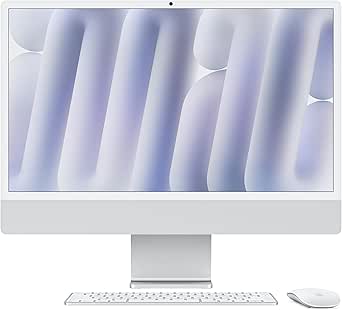 | Best for Power Users Who Want Future-Proof Performance | Processor: M4 chip with 10-core CPU and GPU | Display: 24-inch Retina 4.5K | Memory: 24GB Unified Memory | VIEW LATEST PRICE | See Our Full Breakdown |
| Apple iMac 27-inch Desktop with Retina 5K Display, Intel Core i7 4.0GHz, 32GB Memory, 512GB SSD (Renewed) |  | Best for Professionals Needing a Large, Sharp Display and Raw Power | Display: 27-inch Retina 5K | Processor: Intel Core i7 4.0GHz quad-core | Memory: 32GB DDR3 | VIEW LATEST PRICE | See Our Full Breakdown |
| desktop Mac | Processor | Storage | Memory | Display |
|---|---|---|---|---|
| Apple iMac 21.5-inch 2.7GHz Co | 2.7GHz Core i5 | 256GB SSD | 8GB RAM | 21.5-inch |
| Apple iMac MK472LL/A 27-Inch R | 3.2 GHz Intel Core i5 Quad-Core | 1TB Fusion Drive | 8GB DDR3 RAM | 27-inch Retina 5K |
| Apple Mac Studio with M4 Max 1 | M4 Max 16-Core CPU | 2TB SSD | 64GB Unified Memory | — |
| Apple 21.5-inch iMac Desktop C | 2.3 GHz Intel Core i5 | 1TB HDD | 8GB DDR4 | 21.5-inch LED-backlit IPS |
| Apple 2026 Mac mini Desktop Co | M6 chip | Up to 2x faster storage (capacity unspecified) | Up to 32GB unified | — |
| Apple 2021 iMac All-in-One Des | 8-core CPU (Apple M1) | 256GB SSD (upgradable to 2TB) | — | 24-inch Retina, 4.5K, 500 nits, 1 billion colors |
| Apple 2024 iMac Air with M4 Ch | Apple M4, 8-core, 3.2 GHz | 256GB SSD | 16GB SDRAM | 24-inch Retina, 4480×2520, supports 1 billion colors |
| Apple iMac with Retina 5K Disp | 3.3GHz 6-core 10th-generation Intel Core i5 | 512GB SSD | 8GB DDR4 | — |
| Apple 2021 iMac with M1 Chip | Apple M1 with 8-core CPU and 7-core GPU | 256GB SSD | — | 24-inch 4.5K Retina |
| Apple 2026 Mac Studio Desktop | M5 Max chip | Up to 2TB SSD bandwidth | Up to 128GB | — |
| Apple 2023 iMac All-in-One Des | 8-core CPU with M3 chip | 256GB SSD | 8GB Unified Memory | 24-inch 4.5K Retina |
| Apple 2024 iMac All-in-One Des | M4 chip with 10-core CPU and GPU | 512GB SSD | 24GB Unified Memory | 24-inch Retina 4.5K |
| Apple iMac 27-inch Desktop wit | Intel Core i7 4.0GHz quad-core | 512GB SSD | 32GB DDR3 | 27-inch Retina 5K |
More Details on Our Top Picks
Apple iMac 21.5-inch 2.7GHz Core i5 (ME086LL/A) All-in-One Desktop, 8GB RAM, 256GB SSD, macOS Sierra (Renewed)
This renewed 21.5-inch iMac is a practical choice for those seeking a reliable, affordable desktop, especially compared with the higher-spec 27-inch models. It offers decent performance for everyday tasks like browsing, emails, and light productivity, but runs on macOS Sierra, which limits compatibility with newer software. The 256GB SSD provides faster load times than traditional HDDs, yet it’s still a step below the newer SSDs in speed and capacity. It’s ideal for users on a tight budget who prioritize basic functionality over cutting-edge features, but those needing the latest OS or higher performance should consider more recent options. The main tradeoff is its older software environment and modest specs, which can limit future-proofing and multitasking capabilities.
Pros:- Renewed product that performs like new at a lower price
- Decent specs for everyday computing tasks
- Includes a 90-day warranty for peace of mind
Cons:- Runs on macOS Sierra, outdated for many applications
- Older hardware and packaging may lack the latest features
Best for: Budget-conscious students or casual users who need a dependable desktop for light tasks
Not ideal for: Power users or creative professionals requiring modern software and higher processing power
- Display:21.5-inch
- Processor:2.7GHz Core i5
- Memory:8GB RAM
- Storage:256GB SSD
- Operating System:macOS Sierra
- Warranty:90 days
Our verdict“This iMac is best suited for budget-minded users with basic computing needs who can accept older software and hardware limitations.”
Apple iMac MK472LL/A 27-Inch Retina 5K Desktop (Renewed)
Compared with the 21.5-inch models, this 27-inch Retina 5K iMac stands out for its stunning display, making it ideal for photo editing, video work, and detailed visual tasks. Its 3.2 GHz quad-core Intel Core i5 processor offers more horsepower than the older 21.5-inch iMacs, though it’s still based on DDR3 RAM, which is slower than newer memory types. The inclusion of a 1TB Fusion Drive strikes a balance between speed and capacity, but it falls short of the performance offered by SSD-only setups like the Mac Studio. While it comes with a keyboard and mouse, the older graphics card (AMD Radeon R9 M390) limits performance in intensive GPU tasks. This model suits creative professionals who prioritize a high-resolution display but can accept older internals and limited upgrade options.
Pros:- Exceptional 5K Retina display for detailed visuals
- Decent quad-core processor for creative workflows
- Includes essential peripherals for immediate use
Cons:- Older DDR3 RAM limits upgrade potential
- Renewed product may arrive in generic packaging
- Graphics performance is modest for high-end tasks
Best for: Designers or video editors requiring a large, high-res display for detailed work
Not ideal for: Gamers or users who need the latest GPU performance and software features
- Display:27-inch Retina 5K
- Processor:3.2 GHz Intel Core i5 Quad-Core
- Memory:8GB DDR3 RAM
- Storage:1TB Fusion Drive
- Graphics:AMD Radeon R9 M390
- Ports:2 Thunderbolt, 4 USB 3
Our verdict“This iMac is best for creative users who need a stunning display and solid performance without the latest internals, accepting some age-related limitations.”
Apple Mac Studio with M4 Max 16-Core CPU, 40-Core GPU, 64GB Unified Memory, 2TB SSD
The Mac Studio with M4 Max represents Apple’s latest powerhouse, designed for demanding creative and scientific tasks. Its 16-core CPU and 40-core GPU deliver performance that surpasses most traditional desktops, making it ideal for 3D rendering, AI, and complex simulations. The 64GB unified memory ensures smooth multitasking, while the 2TB SSD offers fast storage for large files. Compared to the iMacs, the Mac Studio’s compact design maximizes desk space and reduces noise, but its high price makes it inaccessible for casual users. The absence of upgrade options due to its integrated design means you should choose your specs wisely upfront. This model makes the most sense for professionals who need raw power in a small footprint and are willing to invest accordingly.
Pros:- Blazing-fast M4 Max CPU and GPU performance
- Large 64GB unified memory for heavy multitasking
- Compact, quiet design fits well on any desk
Cons:- High cost may be prohibitive for many users
- Limited upgrade options due to integrated components
- Specific storage capacity not detailed, potential flexibility issues
Best for: Creative professionals and researchers needing maximum processing and GPU power
Not ideal for: Budget-conscious users or those seeking upgradeability and expandability
- Processor:M4 Max 16-Core CPU
- GPU:40-Core GPU
- Memory:64GB Unified Memory
- Storage:2TB SSD
- Dimensions:7.7 inches square
- Connectivity:Thunderbolt 5
Our verdict“This Mac Studio is ideal for professionals demanding top-tier processing power in a compact, noise-free form, with a significant investment requirement.”
Apple 21.5-inch iMac Desktop Computer (Renewed)
This 21.5-inch iMac offers a straightforward Apple experience with a 2.3 GHz Intel Core i5 processor and a 1TB HDD, making it suitable for basic computing. Compared to SSD-based models, the HDD results in slower boot and load times, which can hinder productivity. Its 1080p full HD display delivers clear visuals, but the older macOS 10.12 limits compatibility with newer apps and features. It’s a dependable choice for users who prioritize reliability and a large screen over speed and the latest software. However, the HDD storage is a significant bottleneck for modern workflows, and the system’s age may mean eventual obsolescence for some users. This pick makes sense for those on a tight budget who need a simple, all-in-one desktop for light use.
Pros:- Reliable build quality from Apple
- Large, clear display for everyday tasks
- Includes basic peripherals for immediate setup
Cons:- Older macOS version limits software compatibility
- HDD storage is slower than SSDs
- Limited upgradeability and future-proofing
Best for: Home users or small offices needing a simple, reliable desktop for email, browsing, and documents
Not ideal for: Power users or those needing faster storage and modern OS features
- Display:21.5-inch LED-backlit IPS
- Processor:2.3 GHz Intel Core i5
- Memory:8GB DDR4
- Storage:1TB HDD
- Graphics:Intel Iris Plus Graphics 640
- Operating System:macOS 10.12
Our verdict“This renewed 21.5-inch iMac is best for basic users who value dependability over speed and cutting-edge features.”
Apple 2026 Mac mini Desktop Computer with M6 Chip
The Mac mini with M6 chip packs impressive power into a tiny form factor, making it perfect for those who need a space-efficient yet capable desktop. Its M6 chip offers significant AI and processing enhancements over previous Intel or M1 models, rivaling larger desktops in performance. Unlike the Mac Studio, which is more expensive and targeted at professionals, this mini provides a flexible platform for creative work, coding, or media editing, especially with support for up to three external displays. The absence of specific storage details and price makes it tricky to evaluate fully, but its connectivity—Thunderbolt 4, HDMI, Wi-Fi 7—ensures versatility. This pick is best for users who want power and size without sacrificing connectivity or future expandability, assuming they have compatible peripherals.
Pros:- Extremely compact and space-saving design
- Powerful M6 chip with advanced AI capabilities
- Supports up to three external displays with versatile ports
Cons:- Specific storage capacity not provided, limiting planning
- No built-in peripherals; requires external keyboard/mouse
- Price and availability may vary
Best for: Creative professionals or developers needing a compact yet powerful desktop with multiple display support
Not ideal for: Users seeking internal upgradeability or a traditional tower desktop
- Processor:M6 chip
- Memory:Up to 32GB unified
- Storage:Up to 2x faster storage (capacity unspecified)
- Ports:Three Thunderbolt 4, HDMI, USB-C, Ethernet
- Wireless:Wi-Fi 7, Bluetooth 6
- Display Support:Up to three external displays
Our verdict“This Mac mini is ideal for those needing a small, powerful desktop with extensive connectivity, suitable for creative and technical workflows.”
Apple 2021 iMac All-in-One Desktop Computer with M1 Chip, 24-inch Retina Display, 8GB RAM, 256GB SSD, Blue
This 2021 iMac with M1 chip stands out for its balanced performance, stunning display, and sleek design, making it the ideal choice for most users. Compared with the 2020 27-inch Retina 5K iMac, it offers faster performance and better energy efficiency thanks to the M1 chip, though it sacrifices some expandability and port options. Its vivid 24-inch Retina display delivers incredible color accuracy and brightness, perfect for creative work or media consumption. The all-in-one design simplifies setup, but the base model’s 256GB storage can be limiting if you handle large files regularly. The inclusion of matching accessories and seamless Apple ecosystem integration add to its appeal. However, limited ports and higher price point mean it’s not the best fit for users needing extensive connectivity or on a tight budget.
Pros:- Fast M1 chip delivers smooth performance for multitasking and creative apps
- Vivid 24-inch Retina display with color accuracy and high brightness
- Sleek, colorful design with matching accessories
Cons:- Limited to 256GB storage at base, which can be restrictive
- Only a few ports—limited expandability
- Higher price compared to some Windows desktops with similar specs
Best for: Creative professionals or students who want a powerful, stylish desktop that fits into their Apple ecosystem.
Not ideal for: Power users needing extensive ports or storage, or those on a tight budget who might prefer a cheaper, upgradeable PC.
- Processor:8-core CPU (Apple M1)
- Graphics:8-core GPU
- Display:24-inch Retina, 4.5K, 500 nits, 1 billion colors
- RAM:8GB
- Storage:256GB SSD (upgradable to 2TB)
- Ports:2 Thunderbolt / USB 4, up to 2 USB 3, headphone jack
- Connectivity:Wi-Fi 6, Bluetooth 5.0
- Camera:1080p FaceTime HD
- Audio:Six-speaker system with Spatial Audio
Our verdict“This iMac is ideal for users seeking a stylish, high-performance all-in-one that excels in everyday and creative tasks, with some tradeoffs in expandability.”
Apple 2024 iMac Air with M4 Chip, 24-inch, 16GB RAM, 256GB SSD, Silver (Renewed)
This 2024 iMac Air with M4 chip makes a compelling case for users who prioritize multitasking, speed, and a sleek look. Its 8-core M4 processor and 16GB RAM outperform the M1-based models like the 2021 iMac, making it better suited for intensive multitasking or demanding workflows. The high-resolution 24-inch Retina display supports over a billion colors, ensuring vivid visuals for media or design work. While it shares the same 256GB SSD as the M1 models, the increased RAM provides a smoother experience with multiple apps open. The slightly heavier weight and renewal status could be concerns for portability or longevity, respectively. Compared with the 2020 27-inch Retina 5K iMac, this model’s design is more modern but offers less internal expandability and storage. It’s perfect for those who need performance in a compact, colorful package.
Pros:- Powerful M4 chip with 8 cores for fast multitasking and workflows
- Vivid Retina display with high resolution and color depth
- Ample 16GB RAM supports smooth, demanding multitasking
Cons:- Limited to 256GB SSD which might be small for large files
- Heavy at over 22 pounds, less portable for frequent moving
- Renewed product may have less longevity than new
Best for: Productivity-focused users who want a fast, portable, yet stylish desktop for multitasking and media creation.
Not ideal for: Power users needing extensive storage or upgrade options, or those seeking a budget-friendly desktop.
- Processor:Apple M4, 8-core, 3.2 GHz
- Display:24-inch Retina, 4480×2520, supports 1 billion colors
- Memory:16GB SDRAM
- Storage:256GB SSD
- Ports:Two Thunderbolt / USB 4, up to two USB 3
- Connectivity:Wi-Fi 6, Bluetooth 6
- Weight:22.1 pounds
- Dimensions:21.53 x 5.78 x 18.14 inches
- Color:Silver
Our verdict“This refreshed iMac Air is well-suited for users who need a compact, high-performance desktop that excels at multitasking and media work, with some storage limitations.”
Apple iMac with Retina 5K Display (27-inch, 8GB RAM, 512GB SSD)
The 2020 27-inch Retina 5K iMac is designed for those who need a large, vibrant screen and strong performance. Its 5120×2880 resolution and P3 color support make it ideal for detailed creative work, especially compared with the smaller 24-inch models. Powered by a 6-core 10th-generation Intel Core i5, it offers a level of raw processing power for multimedia editing and multitasking. However, it falls behind the newer M1 and M4 models in energy efficiency and system integration. The 8GB RAM, while sufficient for many tasks, might require upgrading for intensive workflows. The absence of dedicated graphics options limits performance for 3D or high-end gaming. This iMac balances a large display with high-res visuals but is less future-proof than newer Apple silicon models.
Pros:- Stunning 5K Retina display with vibrant, accurate colors
- Powerful 10th-gen Intel Core i5 for multimedia tasks
- All-in-one design saves space and clutter
Cons:- Limited to 8GB RAM, which may require upgrade for demanding tasks
- No dedicated graphics card options
- Older processor architecture compared to Apple silicon models
Best for: Creative professionals who need a large, high-resolution display and are okay with a slightly older processor and no upgradeability.
Not ideal for: Power users needing the latest in performance or those seeking future-proof hardware; budget-conscious buyers might prefer newer models.
- Display Size:27 inches
- Display Resolution:5120 x 2880
- Processor:3.3GHz 6-core 10th-generation Intel Core i5
- Graphics:AMD Radeon Pro 5300
- Storage:512GB SSD
- Memory:8GB DDR4
- Connectivity:Thunderbolt 3, Bluetooth, Ethernet, USB
- Weight:19.7 pounds
- Color:Silver
Our verdict“This 27-inch Retina 5K iMac is ideal for users who prioritize a large, high-resolution display and strong multimedia performance, with some limitations in future upgradeability.”
Apple 2021 iMac with M1 Chip, 24-inch, 8GB RAM, 256GB SSD, Blue (Renewed)
This 2021 M1 iMac combines impressive performance with an attractive, vibrant design at a more accessible price. Its M1 chip with an 8-core CPU and 7-core GPU ensures quick responsiveness for everyday tasks, light creative work, and media consumption. The 24-inch 4.5K Retina display provides excellent color and brightness, making it suitable for casual creative projects. Its compact form and high-quality speakers and camera enhance multimedia experiences. However, the limited 256GB SSD storage and only two Thunderbolt / USB 4 ports make it less suitable for users with larger storage needs or those who require multiple peripherals. Compared to more powerful or expandable options like the Mac Studio, this model is best for straightforward use without heavy multitasking or upgrade demands.
Pros:- Strong M1 performance for everyday use and light creative tasks
- Bright, high-resolution 4.5K Retina display
- Vibrant, colorful design with good multimedia features
Cons:- Limited to 256GB SSD, which can be restrictive
- Only two Thunderbolt / USB 4 ports, limiting peripherals
- Renewed status may impact long-term reliability
Best for: Entry-level users, students, or families seeking a stylish, reliable desktop for daily tasks and media use.
Not ideal for: Power users needing extensive storage or advanced connectivity; professionals with demanding creative workflows.
- Display:24-inch 4.5K Retina
- Color:Blue
- Processor:Apple M1 with 8-core CPU and 7-core GPU
- RAM:8GB
- Storage:256GB SSD
- Ports:Two Thunderbolt / USB 4
- Camera:1080p FaceTime HD
- Audio:Six-speaker system
Our verdict“This iMac is a solid choice for casual users or students who want a sleek, capable desktop for daily tasks and media, with some storage and port limitations.”
Apple 2026 Mac Studio Desktop Computer with M5 Max Chip
The Mac Studio with M5 Max is designed for demanding professional tasks, including high-end creative workflows, AI processing, and multi-display setups. Its M5 Max chip offers unmatched processing power, making it far more capable than any 24-inch iMac. Its support for up to 128GB RAM and ultrafast storage ensures it can handle large project files effortlessly. The compact, cube-shaped design supports multiple Thunderbolt 5 ports, HDMI, SDXC, and fast wireless connectivity, making it highly versatile. While its high price and limited upgradeability might deter casual users, this model excels in environments where raw power and expandability matter most. Compared with the iMac lineup, the Mac Studio is a clear choice for professionals who need maximum performance in a small footprint.
Pros:- Exceptional processing power with M5 Max chip
- Supports up to 128GB RAM and high-speed storage
- Multiple ports including Thunderbolt 5, HDMI, SDXC
Cons:- High price point limits accessibility for casual users
- Limited upgradeability due to integrated design
- No built-in display, requiring external monitors
Best for: Creative professionals, video editors, and AI developers needing maximum power and connectivity in a small desktop.
Not ideal for: Budget-conscious users or those seeking a simple, all-in-one design; its high cost and limited upgrade options are significant considerations.
- Processor:M5 Max chip
- Memory:Up to 128GB
- Storage:Up to 2TB SSD bandwidth
- Ports:Four Thunderbolt 5, HDMI, SDXC, USB-A, USB-C, headphone
- Wireless:Wi-Fi 7, Bluetooth 6
- Dimensions:7.7 inches square
- Weight:5.94 pounds
Our verdict“This Mac Studio is ideal for demanding creatives and professionals who need top-tier performance and connectivity in a compact form, accepting the premium cost.”
Apple 2023 iMac All-in-One Desktop Computer with M3 Chip, 24-inch Retina Display, 8GB RAM, 256GB SSD, Silver
This 2023 iMac stands out for offering a capable combination of performance and style at a more accessible price point compared to the newer M4 models. Its M3 chip provides solid speed for everyday tasks and moderate multitasking, but the 8GB RAM can become a bottleneck for heavier workflows, especially when compared with the 24GB of the M4-powered iMac. The 24-inch Retina display delivers vibrant visuals ideal for media consumption, though it lacks the brightness and advanced color support of higher-end models. Its all-in-one design and seamless Apple ecosystem integration make it a natural choice for casual users and students who prioritize simplicity and aesthetics. The limited storage of 256GB SSD may require external drives for larger files, and the price reflects its entry-level positioning. Overall, this pick makes the most sense for budget-conscious buyers needing reliable Apple performance without the bells and whistles of the latest chips.
Pros:- Affordable entry point into the Apple ecosystem
- Vivid 24-inch Retina display for media and browsing
- Seamless integration with other Apple devices
- Includes Touch ID-enabled Magic Keyboard and Magic Mouse
Cons:- Limited to 8GB RAM, which can hinder multitasking
- Only 256GB SSD storage, may require external drives
- Premium price for entry-level specs
Best for: Students and casual users who want a visually stunning Mac that handles everyday tasks well without spending extra on high-end specs.
Not ideal for: Power users or creative professionals who require extensive multitasking, large storage, or high RAM capacity for demanding applications.
- Processor:8-core CPU with M3 chip
- Graphics:10-core GPU
- Display:24-inch 4.5K Retina
- Memory:8GB Unified Memory
- Storage:256GB SSD
- Connectivity:Wi-Fi 6E, Bluetooth 5.3
Our verdict“This iMac is best suited for users seeking a stylish, reliable Mac for everyday use at a friendly price point.”
Apple 2024 iMac All-in-One Desktop Computer with M4 Chip, 24-inch Retina Display, 24GB Memory, 512GB SSD – Silver
This 2024 iMac offers a significant upgrade over the 2023 model, featuring the new M4 chip with a 10-core CPU and GPU, which makes it ideal for demanding multitasking, creative work, and even gaming. The 24-inch Retina display has higher brightness and color fidelity, surpassing the 2023 version’s visual quality. With 24GB of unified memory, this iMac handles intensive workflows more comfortably than the more modest 8GB models, and the 512GB SSD provides ample space for large projects. Its multiple Thunderbolt 4 ports and Wi-Fi 6E ensure excellent connectivity options. Compared with the 27-inch Retina 5K iMac, this model’s smaller size and newer architecture make it more versatile for desk setups, although it comes at a higher price. This pick makes the most sense for professionals and power users who need speed, large memory, and future-proofing in a colorful, compact design.
Pros:- Powerful M4 chip with excellent performance for demanding tasks
- Vibrant, bright Retina display with high color accuracy
- Large 24GB unified memory improves multitasking
- Multiple Thunderbolt 4 ports and Wi-Fi 6E enable flexible connectivity
Cons:- Higher price point compared to the 2023 M3 model
- Limited to Apple ecosystem; less flexible for non-Apple accessories
- No upgradeability for RAM or storage after purchase
Best for: Creative professionals, power users, and multitaskers seeking fast performance and ample memory in a sleek, modern design.
Not ideal for: Budget-conscious buyers or those who prefer a larger, higher-resolution display for detailed creative work or video editing.
- Processor:M4 chip with 10-core CPU and GPU
- Display:24-inch Retina 4.5K
- Memory:24GB Unified Memory
- Storage:512GB SSD
- Display Brightness:500 nits
- Ports:Up to four Thunderbolt 4
Our verdict“This iMac is ideal for those needing exceptional speed, large memory, and future-proof features in a compact, colorful package.”
Apple iMac 27-inch Desktop with Retina 5K Display, Intel Core i7 4.0GHz, 32GB Memory, 512GB SSD (Renewed)
This 27-inch Retina 5K iMac, refurbished, offers a traditional desktop experience with a focus on visual clarity and processing power. Its Intel Core i7 at 4.0GHz provides strong performance, especially for applications optimized for Intel chips, making it a good choice for creative workflows. The 32GB of RAM ensures smooth multitasking, while the 512GB SSD delivers fast storage for large files. The high-resolution 5K display is unmatched in sharpness, perfect for detailed editing and design work. However, as a refurbished unit, it may have some wear, and its Intel architecture is less future-proof compared to Apple’s M-series chips. The absence of dedicated GPU options limits performance in graphics-intensive tasks. This model makes sense for professionals who prioritize display quality and raw CPU power over the latest architecture or upgradeability.
Pros:- High-resolution 5K Retina display for precise visuals
- Powerful Intel Core i7 processor for demanding tasks
- Large 32GB RAM supports multitasking
- Fast 512GB SSD for storage
Cons:- Refurbished condition may involve wear and limited warranty
- Higher price relative to newer models with Apple Silicon
- Limited graphics options — no dedicated GPU
Best for: Creative professionals and designers who need a large, sharp display and robust performance for intensive tasks.
Not ideal for: Budget buyers or those seeking a new, state-of-the-art processor, since this is a refurbished device with older architecture.
- Display:27-inch Retina 5K
- Processor:Intel Core i7 4.0GHz quad-core
- Memory:32GB DDR3
- Storage:512GB SSD
- Graphics:AMD Radeon R9 M290X with 2GB GDDR5
- Weight:21 pounds
Our verdict“This 27-inch iMac excels for professionals needing a large, detailed display and powerful processing, especially in creative fields.”

How We Picked
Our evaluation process focused on performance, build quality, usability, and value. We considered the latest hardware configurations, emphasizing processors, memory, and storage options that support current and future software demands. Ease of setup, display quality, and expandability also played critical roles. Additionally, we balanced price against features to highlight models that offer the best bang for the buck, while also noting premium options for power users. The ranking reflects a combination of raw performance, versatility, and overall user experience, with distinctions made for different types of buyers and needs.
Factors to Consider When Choosing Best Desktop Macs
When selecting the best desktop Mac, it’s essential to weigh several factors to match your specific requirements. Beyond raw power, consider how you plan to use the computer, the importance of display quality, and your budget. Understanding these factors can help prevent overspending on features you’ll never use or missing out on capabilities that could future-proof your investment.Performance Needs
Assess your typical workload—professional editing, software development, or casual browsing. For demanding tasks, models with M4 Max or M5 Max chips provide significant headroom, but for lighter use, even an M1 or M3 chip might suffice. Investing in higher CPU and GPU power pays off for intensive work, while less powerful configurations can save money for general use.
Display Size and Quality
The choice between 24-inch and 27-inch displays influences workspace comfort and multitasking ability. Retina displays offer sharp visuals, but higher resolution models cost more. Consider whether a larger screen or better color accuracy is critical for your work or entertainment needs, as this can impact your overall satisfaction and productivity.
Expandability and Upgradability
Most modern Macs limit internal upgrades, so consider future-proofing your purchase. For example, Mac Studio models with higher RAM and SSD options at purchase will serve longer without upgrades. If you anticipate needing more storage or memory later, choose a configuration that allows some expansion or plan to invest in external drives and peripherals.
Budget and Value
Balancing price against features is key. Refurbished and renewed options can lower the entry barrier, but verify warranty and condition. Premium models like the Mac Studio or high-end iMacs justify their cost through superior performance and display quality, especially for professional users. Avoid overspending if your workflow doesn’t demand the latest hardware.
Operating System and Ecosystem
All these options run macOS, but consider how well they integrate with your existing Apple devices. Features like Universal Control or AirPlay enhance productivity when working across multiple Apple products. Additionally, ensure software compatibility if you rely on specialized applications—this can influence your choice of hardware and configuration.
Frequently Asked Questions
Should I buy a Mac Studio or an iMac?
The decision depends on your needs for performance and form factor. The Mac Studio offers more raw power, especially with the M4 Max or M5 Max chips, making it suitable for intensive tasks like video editing, 3D rendering, or software development. The iMac, particularly the 24-inch models, provides a more integrated and space-saving solution with a beautiful display, ideal for general use or creative work that doesn’t require the highest performance tier. Consider how much power you need versus the desk space available.
Are refurbished Macs a good choice?
Refurbished and renewed Macs are often a smart way to save money, especially if you select certified models with warranties. They typically undergo rigorous testing and come with some guarantee of quality. However, they may lack the latest hardware updates or features found in brand-new models. For budget-conscious buyers who don’t need the absolute newest specs, refurbished options can offer excellent value, provided you buy from reputable sources.
How important is display size for my workflow?
Display size significantly impacts productivity and comfort. Larger screens, like 27-inch models, provide more workspace for multitasking, which benefits professionals handling complex projects. Smaller displays, such as 24-inch models, are more compact and easier to fit into tight spaces, making them suitable for casual users or those with limited desk area. The quality of the display also matters, especially for color accuracy in creative fields.
Should I prioritize the latest M chips or stick with older models?
Latest M chips, such as the M4 Max and M5 Max, offer substantial improvements in speed, efficiency, and GPU performance, making them worthwhile for demanding users. Older models, like those with M1 or M3 chips, still perform well for most everyday tasks and can be more budget-friendly. If your work involves intensive computing or future software updates, investing in the newest hardware provides better longevity and performance headroom.
What’s the best choice for someone new to Macs?
For newcomers, an iMac or Mac mini offers an approachable entry point with straightforward setups and less complexity. The 24-inch iMac provides a balance of performance, design, and ease of use, making it ideal for general users or students. Mac mini models are also affordable and flexible, allowing users to choose their own peripherals. These options simplify the transition into the Apple ecosystem without overwhelming new users with high-end hardware choices.
Conclusion
The best overall pick for most users remains the Mac Studio with M4 Max because of its exceptional performance and future-proofing. For those prioritizing affordability, refurbished or entry-level Macs, such as the 24-inch iMac, make excellent choices. Power users or creative professionals should consider the high-end Mac Studio or 27-inch iMac with Retina 5K display. Beginners or casual users will find the 24-inch iMac to be the most accessible and stylish option. Ultimately, your choice should align with your workload, space, and budget, ensuring you get a Mac that fits your specific needs.