The best home tech deals depend on what you want to improve: my best overall pick is the Amazon Echo Show 11 for a useful mix of screen space, Alexa features, and room-friendly audio. For a simpler start, the Amazon Echo Dot (5th Gen) adds voice control without a display, while the TP-Link Tapo Matter Smart Plug Mini is a practical way to automate a lamp or appliance. The main tradeoffs are ecosystem compatibility, how much space a device takes up, and whether its features solve a real daily need. Smart plugs are easy to add, while thermostats and large displays call for more planning. Read on for the full breakdown of all 14 picks and help matching one to your home.

Get home appliances delivered free with Prime
- Fast, free delivery on millions of items
- Prime Video, Amazon Music and more included
- Member-only deals all year
Complete the kit


Key Takeaways
- The Echo Show 11 is my best overall pick because it balances a substantial touchscreen with Alexa functions and spatial audio, without taking up as much wall space as the Echo Show 15.
- Smart plugs offer the easiest entry point: the Govee, Linkind, TP-Link Tapo, and GHome options can automate existing devices, but Matter support makes the Linkind and Tapo models more flexible across compatible platforms.
- Echo devices serve different rooms and routines. The Echo Dot suits voice-first use, the Echo Spot is tailored to bedside alarms, and the Echo Show 5 offers a compact screen; the Echo Dot Max prioritizes fuller sound.
- Thermostat choice depends on your heating and cooling setup as well as the smart-home platform you prefer, so check system compatibility before choosing between Amazon Smart Thermostat and Google Nest Thermostat.
- The most feature-rich option is not automatically the best fit. The Echo Show 15 and mini projector call for more room and setup planning, while smart bulbs and plugs are simpler ways to address specific everyday tasks.
| Amazon Echo Show 11 Smart Display with Full HD Touchscreen and Spatial Audio, Graphite |  | Best Premium Home Hub | Display: 10.95-inch Full HD touchscreen (1920 × 1200) | Audio: Spatial audio with 1 woofer and 2 full-range drivers | Camera: 13 MP with auto-framing | VIEW LATEST PRICE | See Our Full Breakdown |
| Amazon Echo Dot (5th Gen) Smart Speaker, Deep Sea Blue |  | Best Compact Starter Speaker | Dimensions: 3.9 x 3.9 x 3.5 inches | Weight: 10.7 oz (304 g) | Speaker: 1.6-inch full-range driver, mono output | VIEW LATEST PRICE | See Our Full Breakdown |
| Govee Smart Plug, WiFi Outlet Compatible with Alexa & Google Assistant, 4 Pack |  | Best Value Plug Pack | Pack Count: 4 plugs | Connectivity: 2.4G WiFi, Bluetooth | Compatibility: Alexa, Google Assistant | VIEW LATEST PRICE | See Our Full Breakdown |
| Amazon Echo Spot (newest model), Smart Alarm Clock with Alexa, Glacier White |  | Best Nightstand Companion | Dimensions: 4.5″W x 4.1″D x 4.4″H | Display: 2.83-inch touchscreen (240x320px) | Speaker: 1.73-inch full-range speaker | VIEW LATEST PRICE | See Our Full Breakdown |
| Linkind Matter Smart Plug, 4-Pack | 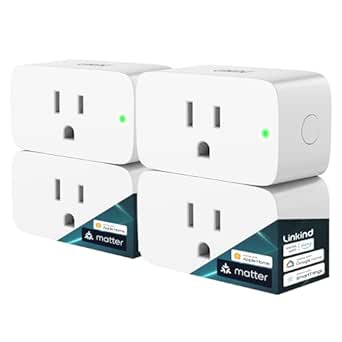 | Best Matter-Compatible Plug | Pack Count: 4 plugs | Protocol: Matter, Wi-Fi | Amperage: 15 A | VIEW LATEST PRICE | See Our Full Breakdown |
| TP-Link Tapo Matter Supported Smart Plug Mini (3-Pack) |  | Best for Multi-Platform Flexibility | Connectivity Protocol: Matter, Wi-Fi, Bluetooth | Wattage Capacity: 1800 watts | Controller Type: Alexa, Google Home, Apple Home, SmartThings | VIEW LATEST PRICE | See Our Full Breakdown |
| Amazon Echo Show 5 Smart Display, Cloud Blue |  | Best Entry-Level Smart Display | Display Size: 5.5 inches | Camera Resolution: 2 MP | Voice Assistant: Alexa | VIEW LATEST PRICE | See Our Full Breakdown |
| GHome Smart Plug (4-Pack) | 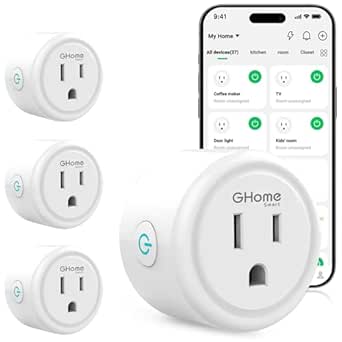 | Best Budget Bulk Option | Wattage: 1200 watts | Connectivity Protocol: Wi-Fi (2.4 GHz) | Control Method: App, Voice, Schedule | VIEW LATEST PRICE | See Our Full Breakdown |
| Amazon Echo Dot Max (newest model) |  | Best Audio Performance & Hub Utility | Audio Drivers: 1x 0.8” tweeter, 1x 2.5” woofer | Smart Home Hub: Zigbee, Matter, Thread | Connectivity: Wi-Fi 6E, Bluetooth 5.3 | VIEW LATEST PRICE | See Our Full Breakdown |
| Mini Projector with WiFi 6 and Bluetooth 5.4 |  | Best Portable Home Theater Starter | Native Resolution: 1280 x 720 | Brightness: 200 ANSI Lumens | Connectivity: Wi-Fi 6, Bluetooth 5.4, HDMI | VIEW LATEST PRICE | See Our Full Breakdown |
| Amazon Smart Thermostat |  | Best for Alexa-Connected Heating and Cooling | Model: S6ED3R | Dimensions: 3.56 x 3.56 x 0.84 in | Weight: 3.86 oz | VIEW LATEST PRICE | See Our Full Breakdown |
| Amazon Echo Show 15 (newest model), Full HD 15.6″ Smart Display with Alexa and Fire TV |  | Best for Family Organization and Shared Spaces | Display: 15.6 in, 1920 x 1080 resolution | Dimensions: 16.1 x 10.1 x 1.4 in | Weight: 4.96 lb | VIEW LATEST PRICE | See Our Full Breakdown |
| Linkind Smart Light Bulbs with Alexa & Google Home Compatibility | 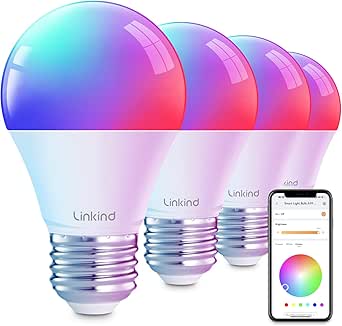 | Best for Affordable Smart Lighting Scenes | Bulb type and shape: LED, A19 | Base: E26 | Power: 9 W | VIEW LATEST PRICE | See Our Full Breakdown |
| Google Nest Thermostat – Smart Thermostat for Home – Programmable Wi-Fi – Charcoal | 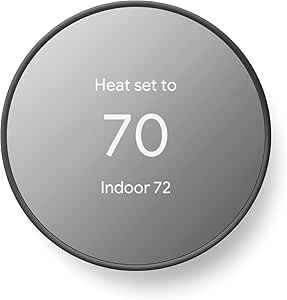 | Best for Google Home Households | Color: Charcoal | Display: 2 in LCD | Connectivity: Wi-Fi and Bluetooth | VIEW LATEST PRICE | See Our Full Breakdown |
| home tech deal | Connectivity | Dimensions | Weight |
|---|---|---|---|
| Amazon Echo Show 11 Smart Disp | Wi-Fi 6E, Bluetooth 5.4, Zigbee, Matter, Thread | 10 x 5 x 7.2 inches | 45.92 oz (1302 g) |
| Amazon Echo Dot | Dual-band Wi-Fi (2.4/5 GHz), Bluetooth | 3.9 x 3.9 x 3.5 inches | 10.7 oz (304 g) |
| Govee Smart Plug | 2.4G WiFi, Bluetooth | 0.19"D x 0.19"W x 0.2"H | — |
| Amazon Echo Spot | Dual-band Wi-Fi, Bluetooth | 4.5"W x 4.1"D x 4.4"H | 14.3 oz |
| Linkind Matter Smart Plug | 2.4 GHz Wi-Fi | — | — |
| TP-Link Tapo Matter Supported | — | — | — |
| Amazon Echo Show 5 Smart Displ | — | — | — |
| GHome Smart Plug | — | 2.1 x 2.1 x 1.1 inches | — |
| Amazon Echo Dot Max | Wi-Fi 6E, Bluetooth 5.3 | 4.27” x 4.27” x 3.9” | 17.82 Oz |
| Mini Projector with WiFi 6 and | Wi-Fi 6, Bluetooth 5.4, HDMI | — | 0.85 lb |
| Amazon Smart Thermostat | — | 3.56 x 3.56 x 0.84 in | 3.86 oz |
| Amazon Echo Show 15 | — | 16.1 x 10.1 x 1.4 in | 4.96 lb |
| Linkind Smart Light Bulbs with | — | — | — |
| Google Nest Thermostat | Wi-Fi and Bluetooth | — | — |
More Details on Our Top Picks
Amazon Echo Show 11 Smart Display with Full HD Touchscreen and Spatial Audio, Graphite
This display stands out for its 10.95-inch Full HD touchscreen and spatial audio, offering a richer visual and auditory experience than the smaller Echo Show 5 or the camera-less Echo Spot. The inclusion of a 13 MP camera with auto-framing makes it superior for video calls compared to the basic Echo Dot, which lacks a screen entirely. While the built-in Zigbee, Matter, and Thread hub simplifies device management, the large footprint might overwhelm a small nightstand where the compact Echo Spot would fit better. It is the most capable smart home command center in this lineup, but its size and premium positioning mean it is overkill for users who only need basic voice assistance.Pros:- Large 10.95-inch Full HD touchscreen provides clear visuals for recipes and video.
- Spatial audio with a dedicated woofer delivers room-filling sound without external speakers.
- Integrated Zigbee, Matter, and Thread hub eliminates the need for separate smart home bridges.
- Auto-framing 13 MP camera keeps you centered during video calls without manual adjustment.
Cons:- Bulky 10 x 5 x 7.2-inch footprint restricts placement options in tight spaces.
- Premium positioning makes it a significant investment compared to basic smart speakers.
- Some Bluetooth features are limited, lacking full hands-free voice control on certain Mac OS devices.
Best for: Users who want a central smart home command center with high-quality video calling and superior audio.
Not ideal for: Those with limited desk or counter space, as the 10-inch width and depth demand significant room.
- Display:10.95-inch Full HD touchscreen (1920 × 1200)
- Audio:Spatial audio with 1 woofer and 2 full-range drivers
- Camera:13 MP with auto-framing
- Connectivity:Wi-Fi 6E, Bluetooth 5.4, Zigbee, Matter, Thread
- Dimensions:10 x 5 x 7.2 inches
- Weight:45.92 oz (1302 g)
- Processor:AZ3 Pro with AI Accelerator
- Sensors:Ambient light, temperature, presence detection
Our verdict“This is the definitive choice for users seeking a premium, all-in-one smart home hub with top-tier video and audio capabilities.”
Amazon Echo Dot (5th Gen) Smart Speaker, Deep Sea Blue
The Echo Dot (5th Gen) is the ideal entry point for home automation, offering a spherical design that fits anywhere the larger Echo Show 11 cannot. Compared to the Echo Spot, the Dot provides better omnidirectional audio for music but lacks a visual display for alarms or timers. Its built-in motion and temperature sensors add utility for automated routines, such as turning on lights when you enter a room, a feature absent in basic smart plugs like the Govee 4-Pack. However, it relies on a connected ecosystem; without compatible eero routers, the Wi-Fi extension feature remains unused, making it less versatile for network improvement than dedicated extenders.Pros:- Compact spherical design fits easily on shelves, desks, or nightstands.
- Built-in motion and temperature sensors enable proactive smart home routines.
- Dual-band Wi-Fi and Bluetooth ensure stable connectivity for streaming.
- Can extend eero Wi-Fi coverage when paired with compatible mesh systems.
Cons:- Lacks a display, limiting its use for visual information or video calls.
- Wi-Fi extension features require specific eero hardware to be useful.
- Mono audio lacks the depth and bass found in premium models like the Echo Show 11.
Best for: First-time smart home users needing a compact voice assistant and basic sensor-based automation.
Not ideal for: Users who want visual feedback for timers or recipes, as the Dot has no screen.
- Dimensions:3.9 x 3.9 x 3.5 inches
- Weight:10.7 oz (304 g)
- Speaker:1.6-inch full-range driver, mono output
- Connectivity:Dual-band Wi-Fi (2.4/5 GHz), Bluetooth
- Sensors:Motion, indoor temperature
- Smart Home:Matter, Wi-Fi, Bluetooth Low Energy Mesh
- eero Coverage:Up to 1,000 sq. ft. (with compatible eero)
- Color:Deep Sea Blue
Our verdict“This is the perfect low-barrier entry into Alexa, offering essential voice control and sensors without the bulk or cost of larger displays.”
Govee Smart Plug, WiFi Outlet Compatible with Alexa & Google Assistant, 4 Pack
The Govee Smart Plug 4-Pack offers an affordable way to automate multiple appliances, supporting both Alexa and Google Assistant for broader ecosystem flexibility than Amazon-only devices like the Echo Dot. While the Linkind Matter Smart Plug supports local control during internet outages, the Govee plugs rely on cloud connectivity but compensate with ETL and FCC certifications for peace of mind. Their compact design avoids blocking adjacent outlets, a common issue with bulkier smart plugs. However, they are limited to 2.4G WiFi, requiring careful network configuration if your router prioritizes 5GHz, and their 15A capacity is standard rather than exceptional.Pros:- Supports both Alexa and Google Assistant for flexible ecosystem integration.
- ETL and FCC certified, ensuring safety and regulatory compliance.
- Compact footprint prevents blocking neighboring outlets on power strips.
- Includes scheduling and group control for efficient multi-device management.
Cons:- Supports only 2.4G WiFi, causing potential connection issues on 5GHz-only networks.
- Limited to 15A/1200W capacity, unsuitable for high-draw heavy appliances.
- Lacks local control fallback if the internet connection drops.
Best for: Budget-conscious users wanting to automate multiple devices across different voice assistant ecosystems.
Not ideal for: Users with 5GHz-only networks or those needing local control during internet outages.
- Pack Count:4 plugs
- Connectivity:2.4G WiFi, Bluetooth
- Compatibility:Alexa, Google Assistant
- Amperage:11 A (Rated), 15 A (Max)
- Voltage:120 volts
- Certifications:ETL, FCC
- Dimensions:0.19″D x 0.19″W x 0.2″H
- Features:Scheduling, group control, voice command
Our verdict“This pack delivers reliable, certified smart control for multiple devices at a competitive price, ideal for mixed-assistant households.”
Amazon Echo Spot (newest model), Smart Alarm Clock with Alexa, Glacier White
The Echo Spot occupies a unique niche as a smart alarm clock with a 2.83-inch touchscreen, offering visual feedback that the audio-only Echo Dot cannot provide. Unlike the larger Echo Show 11, the Spot lacks a camera, making it a more private option for bedrooms where video calls are unnecessary. Its vibrant sound quality is surprisingly robust for its size, though it cannot match the spatial audio depth of premium displays. The built-in eero extender is a strong selling point for small apartments, but it requires a compatible eero router to function, limiting its utility for users with other mesh systems.Pros:- Compact size fits neatly on nightstands and desks without dominating space.
- Touchscreen allows for visual alarm management and timer visibility.
- Built-in eero Wi-Fi extender improves network coverage in small homes.
- No camera offers enhanced privacy for bedroom or bathroom placement.
Cons:- Wi-Fi extension features are inactive without a compatible eero router.
- Small 2.83-inch screen is too limited for video content or detailed recipes.
- Lacks the bass and volume of larger speakers like the Echo Show 11.
Best for: Bedroom users who want a visual alarm clock and voice assistant without a camera.
Not ideal for: Users who need video calling capabilities or a large screen for media consumption.
- Dimensions:4.5″W x 4.1″D x 4.4″H
- Display:2.83-inch touchscreen (240x320px)
- Speaker:1.73-inch full-range speaker
- Camera:None
- Connectivity:Dual-band Wi-Fi, Bluetooth
- eero Coverage:Up to 1,000 sq. ft. (with compatible eero)
- Privacy:Mic off button, in-app controls
- Weight:14.3 oz
Our verdict“This is the ideal choice for bedroom privacy and utility, combining a visual alarm clock with voice control in a compact form.”
Linkind Matter Smart Plug, 4-Pack
The Linkind Matter Smart Plug shines in multi-platform environments, supporting Apple Home, Alexa, Google Home, and SmartThings via the Matter protocol. This broad compatibility surpasses the Govee Smart Plug, which is limited to Alexa and Google, making the Linkind ideal for households with mixed devices. A key advantage is its ability to maintain local control over LAN if the internet goes down, a reliability feature the Govee lacks. However, it requires a Matter-certified hub for some platforms, adding potential complexity. Like many competitors, it is restricted to 2.4 GHz Wi-Fi, necessitating network adjustments for optimal setup.Pros:- Native Matter support enables seamless integration across Apple, Google, and Alexa.
- Local control continues over LAN during internet outages for uninterrupted automation.
- 15A/1800W capacity handles high-draw appliances like heaters or air conditioners.
- Overload and short-circuit protection enhances safety for connected devices.
Cons:- Requires a Matter-certified hub or controller for full functionality on some platforms.
- Supports only 2.4 GHz Wi-Fi, which may require router configuration changes.
- Setup complexity is higher than simple Wi-Fi-only plugs due to Matter protocols.
Best for: Users with mixed smart home ecosystems (Apple, Google, Alexa) who prioritize local control reliability.
Not ideal for: Users without a Matter controller or those who want simple plug-and-play setup without hubs.
- Pack Count:4 plugs
- Protocol:Matter, Wi-Fi
- Amperage:15 A
- Power Capacity:1800 W
- Connectivity:2.4 GHz Wi-Fi
- Compatibility:Apple Home, Alexa, Google Home, SmartThings, AiDot
- Features:Local control, schedules, timers, voice control
- Certifications:FCC, ETL
Our verdict“This is the most future-proof smart plug option for diverse smart home ecosystems, offering robust local control and wide compatibility.”
TP-Link Tapo Matter Supported Smart Plug Mini (3-Pack)
This 3-pack stands out for its Matter compatibility, allowing seamless integration with Apple Home, Alexa, Google Home, and SmartThings without forcing a specific ecosystem choice. Unlike the GHome Smart Plug, which is locked into Alexa and Google, the Tapo P125M offers true vendor independence, making it ideal for households with mixed device preferences. The compact form factor ensures it does not block adjacent outlets, a common issue with bulkier competitors. However, the reliance on 2.4 GHz Wi-Fi can be a hurdle in modern homes prioritizing 5 GHz networks, requiring careful router configuration. While it lacks energy monitoring found in some premium plugs, its robust platform support and reliable Bluetooth onboarding make it a superior choice for users who value ecosystem freedom over niche analytics.Pros:- Universal Matter support for Apple, Alexa, Google, and SmartThings
- Compact size prevents blocking neighboring outlets
- Fast Bluetooth onboarding reduces setup friction
Cons:- Does not support 5 GHz Wi-Fi networks
- Lacks energy monitoring capabilities
- Requires specific router configuration for 2.4 GHz band
Best for: Users with mixed smart home ecosystems who need plugs that work equally well with Apple, Amazon, and Google.
Not ideal for: Users on strict 5 GHz-only networks or those requiring detailed energy consumption tracking.
- Connectivity Protocol:Matter, Wi-Fi, Bluetooth
- Wattage Capacity:1800 watts
- Controller Type:Alexa, Google Home, Apple Home, SmartThings
- Operating Voltage:120 volts
- Color:White
- Mounting Type:Surface Mount
Our verdict“Choose this pack if you want future-proof, cross-platform compatibility without committing to a single smart home vendor.”
Amazon Echo Show 5 Smart Display, Cloud Blue
The Echo Show 5 provides an accessible introduction to visual Alexa interactions, featuring a 5.5-inch touchscreen that is perfectly sized for nightstands or kitchen counters. Compared to the larger Amazon Echo Show 15, this model is far less intrusive and cheaper to deploy in multiple rooms, though it sacrifices screen real estate for media consumption. The inclusion of a physical camera shutter and microphone button addresses privacy concerns better than many competitors that rely solely on software toggles. While the 2 MP camera is adequate for video calls, it struggles in low-light conditions. This device is best viewed as a voice-first assistant with a helpful glanceable screen, rather than a dedicated media hub, making it a practical upgrade from the audio-only Echo Dot.Pros:- Compact footprint fits easily on nightstands and counters
- Physical privacy shutter and mic button for security
- Seamless integration with other Echo devices for calling
Cons:- Small 5.5-inch screen limits video and photo viewing
- 2 MP camera quality is poor in low light
- Audio quality is basic compared to higher-end displays
Best for: First-time smart display buyers who want visual Alexa feedback without dominating their shelf space.
Not ideal for: Movie enthusiasts or users wanting a central household command center with a large interface.
- Display Size:5.5 inches
- Camera Resolution:2 MP
- Voice Assistant:Alexa
- Privacy Controls:Camera shutter, mic off button
- Materials:Recycled fabric yarn, aluminum
- Color:Cloud Blue
Our verdict“This is the logical first step into visual smart home control, offering essential features in a discreet package.”
GHome Smart Plug (4-Pack)
For those needing to automate multiple lights or fans simultaneously, this 4-pack offers exceptional value per unit. The group control feature allows users to manage several plugs with a single voice command or app tap, a convenience that simplifies daily routines significantly. However, unlike the TP-Link Tapo, these plugs are restricted to Alexa and Google Home, lacking broader Matter support. The connection process requires the specific GHome app before linking to voice assistants, adding a slight layer of friction during initial setup. While the 1200W rating is sufficient for lamps and chargers, it is lower than the 1800W found in the Tapo, making these less suitable for high-draw appliances like space heaters. This is a pragmatic choice for simple lighting automation on a tight budget.Pros:- Cost-effective 4-pack for multi-device automation
- Group control simplifies managing multiple outlets
- Compact size fits in tight power strip spaces
Cons:- Lower 1200W capacity limits high-draw appliance use
- Requires proprietary app setup before voice assistant linking
- No support for Apple Home or broader Matter ecosystem
Best for: Budget-conscious users automating multiple low-power devices like lamps and fans via Alexa or Google.
Not ideal for: Owners of high-wattage appliances or those seeking Apple HomeKit compatibility.
- Wattage:1200 watts
- Connectivity Protocol:Wi-Fi (2.4 GHz)
- Control Method:App, Voice, Schedule
- Unit Count:4
- Operating Voltage:120 volts
- Dimensions:2.1 x 2.1 x 1.1 inches
Our verdict“Pick this bundle if you need to automate several low-power devices quickly without breaking the bank.”
Amazon Echo Dot Max (newest model)
The Echo Dot Max represents a significant audio leap from previous generations, delivering room-filling sound with nearly three times the bass of the standard Echo Dot. Its built-in smart home hub supports Zigbee, Matter, and Thread, eliminating the need for a separate bridge for many smart devices. This makes it more versatile than the Amazon Echo Show 5, which relies on external hubs for certain protocols. The integration of eero Built-in mesh Wi-Fi is a standout feature, though it only activates fully if you own an eero router. While the audio quality rivals dedicated speakers, the design is bulkier than the classic Dot. This device is best suited for users who want a central audio and connectivity node, rather than just a voice assistant.Pros:- Superior bass and audio clarity compared to standard Echo Dots
- Integrated hub supports Zigbee, Matter, and Thread
- eero Built-in mesh capability strengthens Wi-Fi coverage
Cons:- Larger footprint than previous Echo Dot models
- Mesh Wi-Fi features require an eero router
- Higher price point than entry-level smart speakers
Best for: Audiophiles on a budget and smart home enthusiasts needing a multi-protocol hub in one device.
Not ideal for: Users with very small spaces or those who do not use eero routers for the mesh feature.
- Audio Drivers:1x 0.8” tweeter, 1x 2.5” woofer
- Smart Home Hub:Zigbee, Matter, Thread
- Connectivity:Wi-Fi 6E, Bluetooth 5.3
- Dimensions:4.27” x 4.27” x 3.9”
- Weight:17.82 Oz
- Processor:AZ3 with AI Accelerator
Our verdict“This is the premium audio choice for Alexa users who also want to centralize their smart home connectivity.”
Mini Projector with WiFi 6 and Bluetooth 5.4
This projector targets the niche of portable, casual viewing, offering a lightweight design ideal for bedrooms and dorms. With 200 ANSI lumens, it performs adequately in darkened rooms but struggles significantly against ambient light, unlike brighter home theater projectors. The inclusion of WiFi 6 and Bluetooth 5.4 ensures stable streaming from phones or tablets, while built-in apps reduce reliance on external sticks. Compared to the Amazon Echo Show 15, this offers a much larger image size (up to 86 inches) but lacks the crisp native resolution, as it upconverts from 720p. Autofocus and keystone correction simplify setup, but the short throw distance limits how close it can be to the wall for large images. It is a fun, affordable entry point for movie nights, not a primary TV replacement.Pros:- Extremely lightweight and portable for travel or moving
- WiFi 6 and Bluetooth 5.4 offer modern connectivity
- Auto-focus and keystone correction speed up setup
Cons:- 200 ANSI lumens is too dim for lit rooms
- Native 720p resolution lacks sharpness for 4K content
- Short throw distance requires space for large images
Best for: Students or renters who want a large-screen experience in dark bedrooms without installing permanent equipment.
Not ideal for: Users needing to watch in bright living rooms or those demanding true 1080p native clarity.
- Native Resolution:1280 x 720
- Brightness:200 ANSI Lumens
- Connectivity:Wi-Fi 6, Bluetooth 5.4, HDMI
- Maximum Image Size:86 inches
- Weight:0.85 lb
- Focus Type:Automatic
Our verdict“Buy this for dark-room movie nights on a budget, but skip it if you need brightness or native HD clarity.”
Amazon Smart Thermostat
For an Alexa-focused home, this thermostat puts everyday climate controls in the same app as compatible Echo and Ring devices. Schedules, remote adjustments, and energy monitoring make it more useful than a basic programmable model, while guided app installation can help DIY buyers through setup. Compared with the Google Nest Thermostat, this pick makes more sense for households already organized around Alexa; Nest is the more natural match for Google Home users. The Amazon model’s tradeoffs are practical: it needs a C-wire or separately sold power adapter, and it won’t work with 110–240V electric baseboard systems. Its voice controls also depend on a separate compatible Alexa device, so the thermostat alone isn’t a hands-free assistant.
Pros:- Remote temperature control through the Alexa app
- Schedules and energy monitoring help manage daily heating and cooling
- Guided app installation supports DIY setup
- Includes humidity sensing, vacation mode, and emergency heat
Cons:- Needs a C-wire or separately sold power adapter
- Does not support 110–240V HVAC systems such as electric baseboard heat
- Voice control requires a separate compatible Alexa device
Best for: Alexa and Ring households with a compatible 24V HVAC system that want app-based scheduling and energy monitoring.
Not ideal for: Homes with electric baseboard heating, no C-wire and no plan to buy an adapter, or buyers seeking voice control without another Alexa device.
- Model:S6ED3R
- Dimensions:3.56 x 3.56 x 0.84 in
- Weight:3.86 oz
- HVAC compatibility:Most 24V systems, including forced-air, heat pump, and radiant boiler
- Power requirement:C-wire or separately sold power adapter
- Wi-Fi:2.4 GHz, 802.11 b/g/n; does not support 5 GHz
- Features:Humidity sensing, schedules, emergency heat, vacation mode, energy dashboard, and automatic air filter ordering
- Certifications:ENERGY STAR and ECOLOGO Gold
Our verdict“Choose this thermostat if your home runs on Alexa and its wiring and HVAC system meet the compatibility requirements.”
Amazon Echo Show 15 (newest model), Full HD 15.6″ Smart Display with Alexa and Fire TV
The Echo Show 15 is the roundup’s clearest choice for a shared kitchen or family room: its 15.6-inch Full HD screen gives widgets, calendars, and smart-home controls room to be seen across the household. Built-in Fire TV adds a viewing option that smaller displays such as the Amazon Echo Show 5 can’t match as comfortably, while the centered camera and shutter support video calls with a privacy control close at hand. Its Zigbee, Matter, and Thread hub also gives it a broader smart-home role than a display used mainly for calls or quick Alexa requests. The tradeoff is footprint: at nearly five pounds and over 16 inches wide, it needs a suitable surface or mounting plan. Buyers who only want a compact assistant may get more display than they need, and some services may require subscriptions.
Pros:- Large Full HD screen accommodates shared widgets and video
- Built-in Fire TV supports streaming on the same device
- 13 MP camera with shutter supports video calls with a privacy control
- Zigbee, Matter, and Thread support a wide range of smart-home devices
Cons:- Large, relatively heavy body needs ample mounting or counter space
- Some content and services may require additional subscriptions
- Wi-Fi 6E benefits depend on having a compatible home network
Best for: Households that want a prominent kitchen or shared-room screen for family widgets, streaming, video calls, and smart-home control.
Not ideal for: Buyers short on wall or counter space, or anyone seeking a small, simple display for timers and occasional voice requests.
- Display:15.6 in, 1920 x 1080 resolution
- Dimensions:16.1 x 10.1 x 1.4 in
- Weight:4.96 lb
- Camera:13 MP with shutter
- Audio:Two 2 in woofers and two 0.6 in tweeters
- Wi-Fi:Wi-Fi 6E, tri-band, dual-antenna
- Smart-home hub:Zigbee, Matter, and Thread
- Included accessories:Alexa Voice Remote, power adapter, and 5 ft cord
Our verdict“Pick the Echo Show 15 if a household-sized screen and built-in smart-home hub matter more than compactness.”
Linkind Smart Light Bulbs with Alexa & Google Home Compatibility
These Linkind bulbs add color and app or voice control to standard E26 fixtures without requiring a dedicated lighting hub, making them a straightforward way to experiment with smart-home routines. 800 lumens, dimming, and multicolor scenes let one bulb serve as everyday room lighting and switch to a different mood when wanted; music sync adds an entertainment feature missing from simpler smart plugs in this roundup. Unlike the Amazon Echo Show 15, the bulbs aren’t a central control screen, but they can respond through Alexa or Google Home and fit existing compatible sockets. The main setup constraint is network and fixture compatibility: they require 2.4 GHz Wi-Fi, are indoor-only, and may flicker on traditional dimmer switches. They’re best for standard switched fixtures, not installations built around wall dimmers.
Pros:- Multicolor lighting, dimming, and preset scenes support flexible room ambiance
- Works with Alexa and Google Home voice control
- Dual Wi-Fi and Bluetooth connectivity
- Rated lifespan of 25,000 hours
Cons:- May flicker when used with traditional dimmer switches
- Requires 2.4 GHz Wi-Fi rather than 5 GHz
- Designed for indoor use only
Best for: Renters or homeowners with standard indoor E26 fixtures who want app-controlled color lighting and Alexa or Google Home voice control.
Not ideal for: People using traditional wall dimmer switches, 5 GHz-only Wi-Fi, or outdoor fixtures.
- Bulb type and shape:LED, A19
- Base:E26
- Power:9 W
- Brightness:800 lumens
- Color:Multicolor
- Color temperature:6500 K
- Connectivity and control:Wi-Fi and Bluetooth; app and voice control
- Lifespan:25,000 hours
Our verdict“Choose these bulbs for app- and voice-controlled color in standard indoor fixtures, provided you don’t rely on a wall dimmer.”
Google Nest Thermostat – Smart Thermostat for Home – Programmable Wi-Fi – Charcoal
The Google Nest Thermostat is a sensible fit for buyers who want app access and automatic away adjustments without making Alexa the center of their climate setup. Its programmable schedule and away features can reduce unnecessary heating or cooling when nobody is home, while the Google Home app makes remote changes convenient. Compared with the Amazon Smart Thermostat, this is the more fitting pick for a household already using Google Assistant or Google Home; Amazon’s model is better aligned with Alexa and includes an energy dashboard. Nest’s listed compatibility spans major voice platforms, but actual HVAC fit and wiring needs depend on the home, so checking compatibility before purchase matters. Its 2-inch LCD keeps the unit compact, though buyers wanting a lock feature won’t find one here, and full app functionality depends on a stable Wi-Fi connection.
Pros:- Automatic adjustments when the home is unoccupied can limit unnecessary heating or cooling
- Remote control through the Google Home app
- Programmable operation supports scheduled comfort
- Supports voice control across listed major smart-home platforms
Cons:- Some HVAC systems may require additional wiring or accessories
- Full connected functionality depends on a stable Wi-Fi connection
- Does not include a lock feature
Best for: Google Home households with compatible 24V heating and cooling who want remote control and automatic away adjustments.
Not ideal for: Buyers who need a thermostat lock, have an incompatible HVAC system, or cannot provide stable Wi-Fi for app-connected features.
- Color:Charcoal
- Display:2 in LCD
- Connectivity:Wi-Fi and Bluetooth
- Voltage:24 V
- Power:Battery powered; two batteries required and included
- Control:Remote and voice control
- Mounting:Wall mount
- Features:Programmable, with automatic adjustments when away
Our verdict“Choose the Nest if you use Google Home and want remote scheduling and away adjustments, after confirming your HVAC and wiring compatibility.”
How We Picked
I compared these 14 products by the home problem each one solves, how approachable it is to set up and use, and how well its features match its likely role. For speakers and displays, I weighed form factor, screen utility, and sound-focused features; for plugs and bulbs, I focused on everyday automation, voice-assistant compatibility, and whether Matter support offers broader platform flexibility. For thermostats, system compatibility and the value of programmable control matter more than a feature list alone.
The ranking favors useful versatility and a clear fit for common homes over sheer feature count. That puts the Echo Show 11 first as a balanced hub, while compact speakers and plug packs rank as targeted, lower-commitment upgrades. Larger displays and the projector can do more, but their space and setup demands narrow their audience. Since the products span different jobs rather than one direct category, I judged each against its role and called out tradeoffs that can change the right choice.
Factors to Consider When Choosing Best Home Tech Deals
These picks cover several kinds of home upgrades, so I would start with the task you want to make easier rather than choosing by the longest feature list. A speaker, a smart plug, and a thermostat can all add convenience, but they bring different setup demands and compatibility checks.
Start With the Job, Not the Gadget
Write down the one routine you want to improve, such as controlling a bedside lamp, checking a shared calendar, or changing the temperature when you are away. That goal points toward the right device class before you compare models. A smart plug is a simple choice for a compatible lamp or appliance that already works with an on-off switch, but it cannot add smart dimming to a basic plug-in light. A smart bulb can provide lighting control, though it may lose its smart functions when someone turns off the wall switch. A display or speaker makes more sense when voice commands, media, or at-a-glance information will see regular use. Avoid buying overlapping devices until you know which routines matter most.
Check Ecosystem and Matter Support
Compatibility can decide whether a device feels convenient or becomes another app to manage. Check which voice assistant you already use and whether the product supports it directly; a label that names Alexa or Google does not mean every feature works identically in both. Matter support can help compatible devices work across supported smart-home platforms, but it does not make every feature universal or remove the need for a compatible controller and network. Before buying a multipack, confirm that its setup process and required app suit your household. This is especially useful when choosing among smart plugs, where similar-looking products differ in platform flexibility. If your home uses more than one ecosystem, favor clear compatibility over a feature you may rarely use.
Match the Device to the Room
Room size, placement, and viewing distance can matter as much as specifications. A bedside alarm clock has a different job from a kitchen display, and a compact screen may be easier to place but less useful for shared viewing. Large displays need a suitable counter or wall location, while a projector needs room to position the unit and a surface for the image. Speakers also need a location where voice pickup and sound make sense for the room. Measure the intended spot and check for nearby power before ordering. Choosing a smaller device for a tight space can be a better home upgrade than adding capabilities that the room cannot support.
Verify Electrical and Thermostat Compatibility
Smart plugs and thermostats involve different compatibility checks, and skipping them can turn a straightforward purchase into a poor fit. For plugs, check the device’s power requirements and intended use against the plug’s stated limits; avoid assuming that every appliance is suitable just because it has a standard plug. For a thermostat, confirm that your heating and cooling system is supported and identify the wiring requirements before removing the existing unit. A programmable thermostat can be useful only if its controls match the way your household runs the system. If wiring or HVAC terms are unfamiliar, consult the manufacturer’s compatibility guidance or a qualified installer. These checks matter more than choosing a device based on brand loyalty alone.
Compare Setup Effort With Everyday Payoff
A lower-effort device can be the better choice when it addresses a small, repeated annoyance. Smart plugs and bulbs usually target one task at a time, while a thermostat or large display can affect a broader routine but may require more planning. Think about who will configure the device, whether other household members need access, and how often anyone will use its extra features. A multipack is useful when you already have several intended locations; otherwise, unused units do not add much value. Pay more attention to a feature when it removes a genuine friction point, such as needing controls in a shared room. Skip add-ons that sound appealing but would leave the product harder to manage.
Plan for Privacy, Power, and Ongoing Use
Connected devices need a reliable home network and a place to stay powered, while displays and voice assistants may also involve microphones, cameras, or personalized information. Review the device’s privacy controls and decide where those features are welcome before choosing a location. Consider whether a display will remain useful after its novelty wears off, or whether a plug automates an appliance people still need to control manually. Keeping a small list of devices, apps, and household routines can prevent a scattered setup. For shared homes, choose products that everyone can operate without relying on one person’s phone. The best purchase is the one that keeps fitting daily life after setup is finished.
Frequently Asked Questions
Which smart plug is the better fit if I use more than one smart-home platform?
I would start by checking which platforms and controllers you already use, then look at the Linkind and TP-Link Tapo plugs because both list Matter support. Matter can make compatible devices easier to connect across supported systems, but it does not guarantee every advanced feature works on every platform. The Govee and GHome options list Alexa and Google compatibility, which may be enough if your household uses one of those assistants. Confirm the exact app and setup requirements before buying a multipack. If you only need basic on-off control in one ecosystem, broad cross-platform support may not be worth prioritizing.
Should I choose an Echo display or a Google Nest Thermostat for a more useful smart home?
These products solve different problems, so the better choice depends on the routine you want to improve. An Echo display adds a screen and Alexa access for information, media, and household controls; a thermostat focuses on managing heating and cooling. If temperature scheduling is the priority, check thermostat compatibility with your HVAC system before buying either thermostat in this roundup. If you want a central place for voice interaction and visual information, compare the Echo Show sizes and placement needs instead. A display does not replace a compatible thermostat, and a thermostat will not provide the general-purpose screen of an Echo Show.
Is a smart bulb or a smart plug better for automating a lamp?
Choose a smart plug when you want to switch a compatible lamp on and off while keeping its existing bulb. Choose a smart bulb when you want control that comes from the bulb itself, such as lighting features beyond basic power switching. A plug generally cannot make a standard bulb dim or change color, and a smart bulb may become unreachable if someone turns off the lamp’s physical switch. Check how the lamp is used by everyone in the home before deciding. If the lamp has an unusual control or the bulb is not easily accessible, those details can make one option more convenient than the other.
What should I check before buying a smart thermostat?
Start by confirming that the thermostat supports your heating and cooling equipment and that your home’s wiring meets its requirements. Compatibility can vary by system, so do not choose between the Amazon Smart Thermostat and Google Nest Thermostat based on assistant preference alone. Check how you want to schedule temperatures and whether the controls fit your household’s routine. If you are unsure about the existing wiring, take a clear look at the current thermostat connections and consult the manufacturer’s compatibility information before installation. For unfamiliar wiring or system types, getting help from a qualified installer can prevent a costly mismatch.
When does a larger display or projector make more sense than a compact Echo?
A larger display or projector makes more sense when several people will view it or when you have a specific shared use, such as a prominent household screen or a larger projected image. The Echo Show 15 needs more wall or counter space than the Echo Show 5 or Echo Spot, while the mini projector adds placement and projection-surface needs. A compact Echo is easier to fit into a bedside or small-room setup and may suit voice-first use better. Think about how often you will use the larger viewing area, not just whether it sounds appealing. If the room or routine cannot support it, a smaller device is likely to be the more practical choice.
Conclusion
Best overall: I recommend the Echo Show 11 for shoppers who want one versatile Alexa device with a useful touchscreen and room-oriented audio. Best value: For a low-commitment home upgrade, the TP-Link Tapo Matter Smart Plug Mini 3-pack is my pick for buyers who want to automate a few compatible devices, while the Echo Dot (5th Gen) suits those who want voice control without a screen. Best premium: The Echo Show 15 is better for a household that will use its larger display and Fire TV features and has a suitable place for it. Best for beginners: The Echo Dot is the straightforward voice-first choice; the Govee plug pack is another approachable start for basic outlet control. Best for specific needs: Choose the Echo Spot for a bedside alarm setup, Linkind or Tapo plugs when Matter support matters, smart bulbs for lighting control, and a compatible Amazon or Google thermostat for temperature scheduling. I would match the device to a daily task and confirm compatibility before choosing.