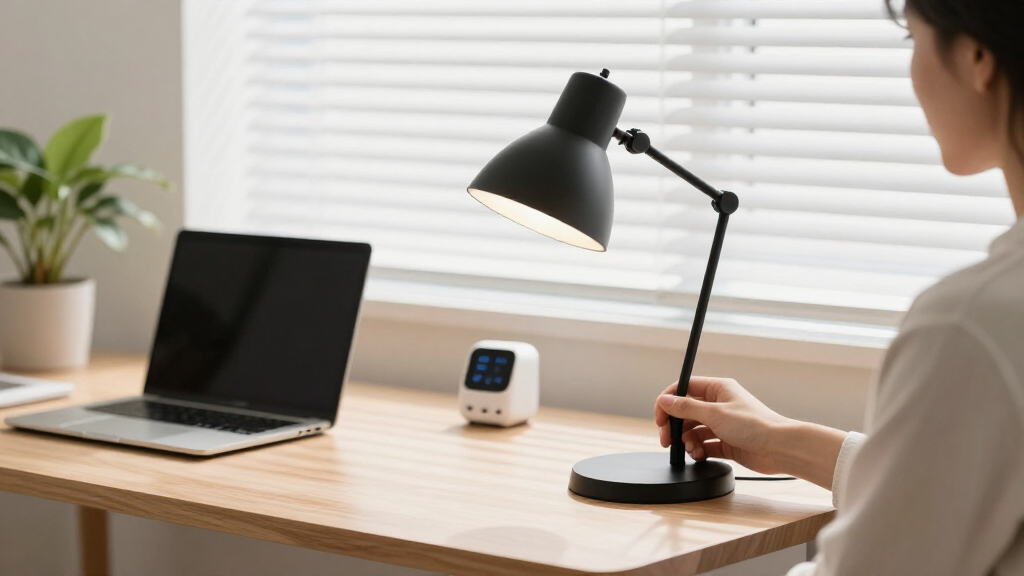

The best smart home study desk lamps combine adaptable lighting with practical desk-side controls, charging, or power access. I rank the LED Desk Lamp with Power Strip, 3 AC Outlets, and 4 USB Ports as the best overall because it pairs broad color adjustment with timer, memory, and hub functions. The five-mode dimmable LED lamp with USB charging is my value pick, while the 24W auto-dimming clamp lamp suits buyers willing to pay more for responsive lighting and wide coverage. The main tradeoffs are base versus clamp mounting, focused versus multi-monitor illumination, and convenient charging versus genuine app or voice integration. Continue reading for my full ranking framework, buying advice, and recommendations by buyer type.
Key Takeaways
- The power-strip lamp ranks first because its 3 AC outlets, 4 USB ports, wide 2800K–6500K range, timer, and memory make it the most complete desk hub in this lineup.
- The five-brightness USB lamp offers the strongest value balance, providing more lighting control than the simpler three-brightness model without adding a bulky outlet bank.
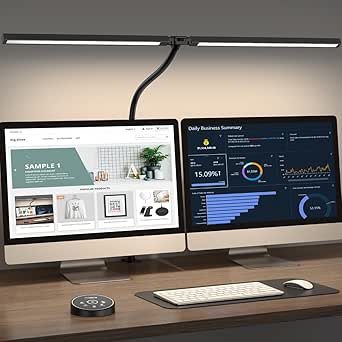
- Clamp lamps dominate wide-workspace lighting: the 17-inch, dual-head, 24W architect, and dual-screen models preserve desk space and spread light farther than compact base lamps.
- Height and reach serve different needs: the 40-inch lamp is aimed at broad overhead coverage, while the 28.2-inch gooseneck model favors closer task positioning.
- Most products are smart desk hubs rather than connected-home devices; their listed intelligence centers on touch controls, memory, timers, auto dimming, USB ports, outlets, or wireless charging rather than advertised apps or voice assistants.






More Details on Our Top Picks
LED Desk Lamp with USB Ports, Touch Control, and Night Light
I rank the LED Desk Lamp with USB Ports and Night Light as the entry-level choice because it covers everyday study needs without crowding a small desk. Its five light modes and three brightness levels provide useful presets for reading, typing, and late-night work, while USB-A and Type-C ports reduce charger clutter. Compared with the LED Desk Lamp with USB Charging Port, ASIN B0F22BR222, it offers fewer brightness steps and lacks a stated lumen output or LED lifespan. It is also less capable than the wireless-charging model for phone users. Still, the foldable body and separate night light make it friendlier for dorms and shared bedrooms. I would skip it if smart-home control means app or voice integration, since neither capability is listed.
Pros:- Five lighting modes support different reading and study tasks
- USB-A and Type-C ports can reduce separate charger use
- Foldable design preserves space on compact desks
- Built-in night light suits shared bedrooms and dorm rooms
Cons:- Only three brightness levels, compared with five on several alternatives
- No stated lumen output or LED lifespan
- No listed app, scheduling, or voice-assistant support
Best for: Students and dorm residents who want preset study lighting, two charging connections, and a lamp that folds away easily
Not ideal for: Smart-home users seeking app, automation, or voice control, since none of those functions is listed
- Light modes:5
- Brightness levels:3
- USB ports:USB-A and Type-C
- Arm adjustment:230°
- Base adjustment:90°
- Night light:Yes
Our verdict“I recommend this model for students who value simple touch presets and desk-friendly charging more than advanced controls.”
LED Desk Lamp with USB Charging Port and Five Color Modes
I place the LED Desk Lamp with USB Charging Port first for buyers who want the most balanced mix of lighting control, compactness, and documented durability. Its 500-lumen output, five color modes, and five brightness levels give it finer adjustment than the entry-level B08923SXXP model, which stops at three brightness settings. The 20,000-hour rated lifespan also supplies useful ownership context missing from that cheaper pick. It does not cover as much desk width as the Motumen dual-head lamp, and its single USB port is less convenient than the wireless charger and phone stand on B09PDBNXGD. A wall connection is required, while app and voice features are not listed. Even with those limits, I see its flicker-free light and foldable geometry as the strongest fit for a typical smart-home study station.
Pros:- Five brightness levels and five color modes allow precise task matching
- 500-lumen output is documented rather than left unspecified
- Flicker-free LEDs are better suited to long reading sessions
- Foldable head and base make storage and positioning easier
Cons:- Must remain connected to a power outlet
- Single USB charging port offers less connectivity than hub-style alternatives
- No listed app, voice, or automation support
Best for: Students and remote workers who want granular light presets, a compact folding body, and dependable everyday task lighting
Not ideal for: Buyers needing broad dual-monitor coverage or app-based smart-home automation
- Brightness:500 lumens
- Color modes:5
- Brightness levels:5
- Power input:5V/2A
- LED lifespan:20,000 hours
- Head rotation:180°
- Base fold:90°
Our verdict“I recommend this as the most balanced lamp for buyers who prioritize adjustable study light over specialized charging or extra-wide coverage.”
17-Inch LED Clamp Desk Lamp with Stepless Dimming
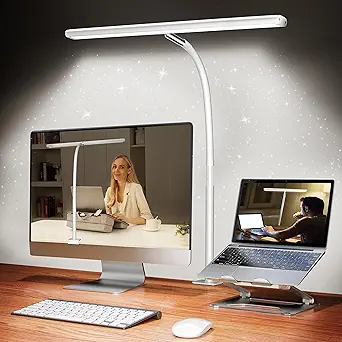
I chose the 17-Inch LED Clamp Desk Lamp for study setups where usable desktop area matters more than charging extras. The clamp removes the footprint of a conventional base, while the 17-inch bar and 360° gooseneck can spread light across books, keyboards, or craft materials. Compared with the compact B0F22BR222 lamp, it offers broader placement freedom, stepless adjustment, and a much longer stated 60,000-hour lifespan. It is less suitable than the Motumen dual-head model for lighting two separated work zones, and it lacks that lamp’s remote and timer. The clamp only accepts surfaces up to 2.36 inches thick, so heavy desks with deep aprons may be incompatible. I rank it behind the overall pick because USB-adapter power and no listed connected controls limit its smart-home credentials.
Pros:- 17-inch light bar spreads illumination across a larger work area
- Stepless dimming avoids being locked into preset brightness steps
- 360° gooseneck supports precise positioning
- 60,000-hour stated lifespan exceeds the other rated lamps in this batch
Cons:- Clamp cannot accommodate desktops thicker than 2.36 inches
- USB adapter dependence limits portable placement
- Long bar may feel oversized on very small workstations
Best for: Students with narrow desks who need broad, precisely positioned light without sacrificing desktop space to a lamp base
Not ideal for: Owners of desks thicker than 2.36 inches or anyone wanting wireless charging, remote control, or voice automation
- Color-temperature range:2700K–6500K
- LED count:100 LEDs
- Light-bar length:17 inches
- Arm adjustment:360° gooseneck
- Maximum desk thickness:2.36 inches
- Rated lifespan:60,000 hours
- Power supply:5V/3A USB adapter
Our verdict“I recommend this clamp model for space-conscious buyers who need flexible, wide task lighting and can verify desk compatibility first.”
LED Desk Lamp with Wireless Charging and Pen Holder
I give the LED Desk Lamp with Wireless Charging and Pen Holder a specialized role for buyers building a phone-centered study station. Its 10W wireless pad, phone stand, and pen cup consolidate several desktop accessories, an advantage neither the 17-inch clamp lamp nor B0F22BR222 can match. Lighting is capable too: 800 lumens, a CRI of 95, and stepless 5%–100% dimming support detailed reading and color-sensitive projects. Yet it offers only three color modes, while the overall pick provides five, and thick phone cases can interfere with charging. Compatibility is another concern because Qi EPP charging is not supported for some devices. I rank it below the simpler lighting-first models because charging convenience drives the value; buyers with an incompatible phone would pay for a feature they cannot fully use.
Pros:- Built-in 10W wireless charger reduces cable clutter
- 800-lumen output is the brightest stated output in this batch
- CRI 95 light supports accurate color perception
- Pen holder and phone stand consolidate desktop accessories
Cons:- Thick phone cases may interrupt wireless charging
- Qi EPP charging is unsupported for some devices
- Only three color modes, fewer than the five offered by the overall pick
Best for: Students who keep a Qi-compatible phone beside their books and want charging, stationery storage, and lighting in one base
Not ideal for: Buyers with thick phone cases, incompatible Qi EPP devices, or no need for wireless charging
- Wireless charging power:10W
- Light output:800 lumens
- Color modes:3
- Color rendering index:CRI 95
- Rated lifespan:50,000 hours
- Dimming range:5%–100%, stepless
- Panel material:Acrylic
- Arm adjustment:360°
Our verdict“I recommend this lamp when compatible wireless phone charging and desktop organization matter as much as the light itself.”
Motumen Eye-Care Dual-Head Clamp Desk Lamp
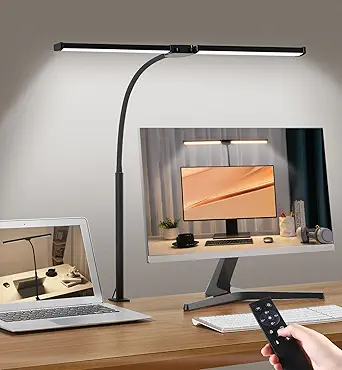
I selected the Motumen Eye-Care Dual-Head Clamp Desk Lamp for large study surfaces and multi-monitor workstations. Its two adjustable heads and 168 LED beads across 25 lighting combinations can illuminate separate zones more effectively than the single 17-inch bar on B0C4JTPPYY. A remote with a 32.8-foot range and a timer also makes this the closest option here to room-level control, even though no app or voice integration is listed. That convenience comes with more controls to learn, and the clamp may rule out desks with unusual edges or unsupported thicknesses. It also lacks the charging functions of B09PDBNXGD, so its value rests almost entirely on coverage. I place it below the overall pick for ordinary desks, but its dual-head reach and remote operation make it the better tool for expansive study layouts.
Pros:- Dual adjustable heads cover separated work zones
- Twenty-five lighting combinations support varied study tasks
- 32.8-foot remote range allows control away from the desk
- Timer function is useful for scheduled study sessions
Cons:- Remote and numerous settings may feel complicated for buyers wanting quick controls
- Clamp compatibility is uncertain for unusually thick or shaped desks
- No built-in USB or wireless device charging
Best for: Students, designers, and remote workers with wide desks, dual monitors, or separate reading and keyboard zones
Not ideal for: People with small desks, incompatible desk edges, or a preference for simple controls and built-in device charging
- Lighting combinations:25
- Color-temperature range:3000K–6500K
- Brightness levels:5
- Remote range:32.8 feet
- LED bead count:168
- Power source:USB or AC adapter
Our verdict“I recommend the Motumen for buyers who need maximum desk coverage and remote control more than charging features or compact simplicity.”
LED Desk Lamp with Power Strip, 3 AC Outlets, 4 USB Ports
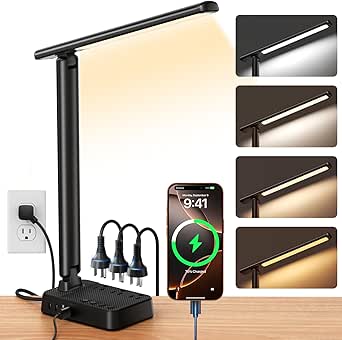
I rank this as the best charging hub because three AC outlets and four USB ports can replace a separate desktop power strip. Its 1%–100% dimming range also gives study sessions finer control than the five fixed brightness levels on the One Beat Small LED Desk Lamp. A 2800K–6500K range supports everything from relaxed evening reading to alert daytime work, while the folding arm keeps the charging station manageable on a dorm desk. The tradeoff is that its 1200W/10A ceiling is lower than the One Beat model’s 1875W/15A rating. The many controls may also feel excessive for someone wanting a basic reading light. Although it centralizes connected devices neatly, the supplied data lists no app, scheduling, or voice-assistant support.
Pros:- Three AC outlets and four USB ports consolidate desktop charging
- Stepless 1%–100% dimming provides precise brightness control
- Wide 2800K–6500K color range suits daytime work and evening reading
- Foldable arm and rotating head reduce its footprint between sessions
Cons:- 1200W/10A capacity is lower than the One Beat model’s 1875W/15A rating
- Numerous lighting and power functions may complicate initial setup
- No app or voice-control capability is listed
Best for: Dorm residents and home-office users who need one compact station for lighting, laptops, phones, and USB accessories
Not ideal for: Buyers powering higher-draw equipment or seeking app and voice-assistant control
- Color temperature:2800K–6500K
- Dimming:Stepless, 1%–100%
- AC outlets:3
- USB ports:2 USB-C and 2 USB-A
- Power rating:1200W/10A maximum
- LED beads:64
- Arm adjustment:90°
- Light-head adjustment:180°
- Cord:5 ft with flat plug
Our verdict“This is my pick for a device-heavy study desk where charging capacity and fine lighting control matter more than smart-platform integration.”
Tall LED Desk Lamp for Home Office, 50 Light Modes, 40 Inches
The 40-inch adjustable height separates this lamp from every compact charging model here. I would place it above the Honeywell LED Desk Lamp for video calls, artwork, and content creation because its CRI above 97.8 should render faces and colors more faithfully, while the tall structure can cast light from a broader angle. Ten brightness levels across five color temperatures create 50 lighting combinations, giving mixed study and creative work plenty of flexibility. That versatility comes with a substantial footprint: the metal base occupies desk space, and the full height may overwhelm a shelf or dorm workstation. It also lacks the Honeywell model’s USB charging ports. The 45-minute shutoff timer is useful for focused sessions, but no app or voice integration is listed for wider smart-home routines.
Pros:- Height adjusts from 14 to 40 inches for desk work or elevated video lighting
- CRI above 97.8 supports accurate color and natural-looking skin tones
- Fifty brightness and color combinations accommodate varied tasks
- Metal base provides stability at taller settings
Cons:- Forty-inch maximum height and metal base can dominate a small desk
- Ten brightness settings and five color choices may feel overcomplicated
- No USB charging, app control, or voice integration is listed
Best for: Students, designers, streamers, and remote workers who need elevated, color-accurate light for both desk tasks and video calls
Not ideal for: People with shallow dorm desks or anyone who wants charging ports and a low-profile lamp
- Light modes:50
- Color temperature:2700K–6500K
- Brightness levels:10
- Height range:14–40 inches
- CRI:>97.8
- Power:15W
- Timer:45-minute auto-off
- Base material:Metal
Our verdict“Choose this model when tall, highly adjustable, color-accurate lighting outweighs compactness and built-in charging.”
Honeywell LED Desk Lamp with Dimmable Light and USB Ports
I see the Honeywell LED Desk Lamp as the balanced choice for readers who want useful customization without turning the lamp into a full power station. Its four preset color modes are easier to manage than the Tall LED Desk Lamp’s 50 combinations, while stepless touch dimming still allows precise brightness changes. A CRI of 94 makes printed pages and colors look natural, and USB-A plus USB-C ports handle everyday phone or tablet charging. Compared with the Infiway lamp, it omits the clock, alarm, outlets, and night light; that means less clutter but fewer bedside functions. The foldable head works well on small desks, yet plug-in-only operation limits placement and travel use. Its 30-minute timer can cue a short study block, though buyers wanting app-based routines or voice commands will need another option.
Pros:- Stepless touch dimming offers finer control than fixed brightness steps
- CRI 94 full-spectrum light supports comfortable reading and color clarity
- USB-A and USB-C ports charge common study devices
- Foldable adjustable design fits small desks and bedside tables
Cons:- Plug-in-only operation prevents cordless placement
- No AC outlets, clock, alarm, or night light like the Infiway model
- No app or voice-assistant compatibility is listed
Best for: Students and readers who want refined dimming, dependable color quality, and basic device charging without a crowded control panel
Not ideal for: Mobile users needing battery operation or smart-home enthusiasts seeking app, voice, or automated routine support
- CRI:94
- Color modes:4
- Color temperatures:2700K, 4000K, 5000K, and 5700K
- Dimming:Stepless touch control
- USB ports:USB-A and USB-C
- Power source:Plug-in; not rechargeable
- LED lifespan:30,000 hours
- Timer:30 minutes
Our verdict“This Honeywell model makes the most sense for focused readers who prefer simple lighting controls over power-strip features and home automation.”
Infiway Dimmable LED Desk Lamp with USB Ports and Power Outlets
The Infiway Dimmable LED Desk Lamp earns its place by combining study lighting with a clock, alarm, snooze function, and night light. I would choose it over the Honeywell LED Desk Lamp for a bedroom workspace where one device needs to manage morning alarms, evening reading, and overnight charging. Its two AC outlets and USB-A/USB-C pairing add more power flexibility, while CRI 94 and five color modes provide capable task lighting. It is less precise than the Power Strip lamp’s stepless 1%–100% dimming, relying instead on five brightness steps. The LCD and multifunction controls also create a steeper learning curve than Honeywell’s simpler interface. A folding, rotating structure helps reclaim space, but the listed features do not include app synchronization or voice control for automated smart-home scenes.
Pros:- Clock, alarm, snooze, and night-light functions suit bedroom study spaces
- Two AC outlets plus USB-A and USB-C ports support several devices
- Five color modes cover warm evening light through cool task light
- Rotating and folding sections provide flexible positioning
Cons:- Five-step brightness control is less precise than stepless alternatives
- LCD, alarm, lighting, and charging functions create a learning curve
- No app synchronization or voice control is listed
Best for: Bedroom-based students who want a lamp, alarm clock, night light, and charging station combined on one desk
Not ideal for: Minimalists who prefer simple controls or buyers who need fine stepless dimming and smart-platform automation
- Color modes:5
- Color temperature:3000K–6500K
- Brightness levels:5 steps, 20%–100%
- CRI:≥94
- USB ports:1 USB-A and 1 Type-C
- AC outlets:2
- Arm movement:180° rotation and 135° fold
- Base rotation:90°
- Display features:LCD clock, alarm, snooze, and night light
Our verdict“Pick the Infiway when a bedroom study station needs timekeeping, lighting, and charging in one unit.”
One Beat Small LED Desk Lamp Power Strip
I rank the One Beat Small LED Desk Lamp as the strongest compact option for buyers who want serious power capacity without surrendering much desk space. Its three outlets and four USB ports match the charging count of the LED Desk Lamp with Power Strip, but the 1875W/15A rating supports more total load than that model’s 1200W/10A limit. Five brightness levels and four color temperatures cover common reading and study needs, though they lack the rival’s fine stepless adjustment. The 180-degree head directs light without a tall stand, making this better suited to a crowded workstation than the 40-inch Tall LED Desk Lamp. Long sessions may warm the housing, and the touch switch can require calibration. It also offers no listed timer or memory function, leaving the other power-strip lamp better equipped for repeatable routines.
Pros:- Three outlets and four USB ports provide broad charging coverage
- 1875W/15A rating exceeds the other power-strip lamp’s listed capacity
- Compact body and 180-degree head work well on crowded desks
- Four color temperatures and five brightness levels cover common study tasks
Cons:- Fixed brightness steps provide less precise control than stepless dimming
- Lamp housing may become warm during extended operation
- Touch controls may need calibration, and no timer or memory function is listed
Best for: Students with crowded desks who need a compact lamp to power several USB devices and higher-load plug-in equipment
Not ideal for: Buyers wanting stepless dimming, timer-based study sessions, memory settings, or app-controlled routines
- AC outlets:3
- USB-C ports:2
- USB-A ports:2
- Brightness levels:5
- Color temperatures:4
- Lamp-head adjustment:180°
- Extension cord:5 ft
- Power rating:1875W/15A
Our verdict“The One Beat is my compact pick for a power-hungry study setup that can accept simpler lighting controls.”
LED Desk Lamp for Office and Home, Height Adjustable with USB, Stepless Dimming
I rank the LED Desk Lamp for Office and Home as the Best Small-Space Timer Pick because its foldable dual-head design provides useful coverage without permanently occupying much desk space. Unlike the 17-inch LED Desk Lamp with Clamp, this model can change height from 15.55 to 22.83 inches, making it more adaptable when switching between reading and laptop work. Its 45-minute auto-off timer is the main automation feature, while ten brightness levels and five color temperatures make evening study less harsh. The tradeoff is limited connected-home capability: no app, voice assistant, or hub support is listed. It also needs a 5V/3A-or-better adapter when lighting and USB charging are used together, which weakens its plug-and-play appeal.
Pros:- Height adjustment supports different sitting positions and tasks
- Dual flexible heads spread light across a broader work area
- Five color temperatures and ten brightness levels suit daytime and evening study
- Foldable body and 45-minute timer fit small, shared spaces
Cons:- No listed app, voice-assistant, or smart-hub compatibility
- Lighting and charging together require a 5V/3A-or-better adapter
- The supplied data does not clarify whether a suitable adapter is included
Best for: I recommend it for students in dorm rooms or compact home offices who want adjustable lighting and a timed shutoff.
Not ideal for: I would skip it for buyers seeking app control, voice commands, or dependable charging from a low-power USB adapter.
- Height Range:15.55 to 22.83 inches
- Head Design:Dual-head with flexible arms
- Brightness Levels:10
- Color Temperatures:5 settings, 3000K to 6500K
- Auto-Off Timer:45 minutes
- Power:USB; 5V/3A-or-better adapter recommended
- Storage Design:Foldable
Our verdict“I would choose this for a tight study area where flexible placement and automatic shutoff matter more than connected-home control.”
LED Desk Lamp with Clamp, 17-inch Dimmable Light, White, 2700K-6500K, 100 LEDs, 360° Gooseneck, Compatible with Monitors up to 30 inches
The 17-inch LED Desk Lamp with Clamp earns my Best Monitor-Clamp Value position by combining a 100-LED bar, broad 2700K-to-6500K adjustment, and a clamp that leaves the desktop clear. Compared with the height-adjustable LED Desk Lamp for Office and Home, its 360-degree gooseneck offers more direct positioning around a monitor, though it lacks that model’s shutoff timer. The flicker-free light and stepless controls are well matched to long reading sessions because buyers can soften both intensity and tone instead of accepting preset jumps. Its smart-home credentials are weak, however: there is no listed sensor, memory, remote, app, or voice control. USB power also ties it to a 5V/3A source, and the 2.36-inch clamp limit rules out unusually thick desktops.
Pros:- Clamp mounting preserves space beside a keyboard and monitor
- Stepless brightness and 2700K-to-6500K color adjustment cover varied study hours
- 360-degree gooseneck directs light precisely
- 100 LEDs provide flicker-free illumination with a rated 60,000-hour lifespan
Cons:- No listed timer, sensor, memory, remote, app, or voice control
- Clamp fits surfaces only up to 2.36 inches thick
- Requires a 5V/3A USB power source and is poorly suited to portable use
Best for: I recommend it for students using monitors up to 30 inches who need inexpensive, adjustable lighting without sacrificing desktop area.
Not ideal for: I would skip it for thick desks, portable study setups, or buyers who want automated brightness and connected controls.
- Light-Bar Size:17 inches
- Monitor Compatibility:Up to 30 inches
- Color Temperature:2700K to 6500K
- LED Count:100
- Gooseneck Rotation:360 degrees
- Maximum Clamp Thickness:2.36 inches
- Rated Lifespan:60,000 hours
- Power:5V/3A USB adapter
Our verdict“I see this as the practical choice for a modest monitor desk, provided automation and thick-surface mounting are not priorities.”
LED Desk Lamp with Clamp, 24W Auto Dimming Architect Desk Light for Home Office
I place the 24W Auto Dimming Architect Desk Light highest for automation, earning it the Best Automatic Brightness Pick. Its built-in sensor can adjust output as room light changes, a more hands-off approach than the remote-operated Eye-Caring Architect Lamp. Three light bars, seven joints, and asymmetric illumination also make it better suited to drawing, detailed coursework, and wide desks than the smaller 17-inch clamp lamp. A CRI above 90 helps colors remain credible during art or design work, while memory restores a preferred setting. This capability brings added complexity: separate main and auxiliary-light controls may slow routine adjustments, and seven joints can feel excessive on a basic study desk. It is also smart through sensing rather than connectivity; no app, hub, or voice compatibility is listed.
Pros:- Built-in light sensor adjusts brightness as ambient conditions change
- Three light bars and seven joints support broad, precisely aimed coverage
- Asymmetric, flicker-free lighting helps limit monitor glare
- CRI above 90 and memory support detail work with repeatable settings
Cons:- Separate main and auxiliary-light controls can complicate operation
- Seven-joint adjustment may be excessive for simple reading
- Clamp mounting and absent listed app or voice support limit placement and connectivity
Best for: I recommend it for design students, artists, and home-office users who want wide, color-accurate light that reacts automatically to the room.
Not ideal for: I would skip it for buyers who prefer one-button simplicity, need a freestanding base, or expect voice-assistant control.
- Power:24W
- Color Temperature:3000K to 6500K
- Brightness Control:5 levels plus stepless dimming
- Color Rendering Index:Greater than 90
- Adjustable Joints:7 rotatable joints
- Light Bars:3
- Sensor:Built-in ambient-light sensor
- Control:Touch panel with memory function
Our verdict“I would pick this for demanding study or creative work where automatic brightness and precise coverage justify a steeper learning curve.”
LED Desk Lamp for Office and Home – Eye-Caring Architect Lamp with Clamp, Dual Screen Compatibility, 24W, 5 Color Temperatures, Adjustable Brightness
The Eye-Caring Architect Lamp with Clamp is my Best Remote-Controlled Pick for a dual-screen study station. Its wireless remote lets a buyer change light from a seated position, while the 360-degree stand, swinging arms, and rotating head can spread 24W output around two displays. Compared with the 24W Auto Dimming Architect Desk Light, this model favors direct manual control over sensor-led adjustment; that suits buyers who want predictable settings but adds another device to maintain. Its night and reading modes also give it more ready-made choices than the 28.2-inch gooseneck model. The drawbacks are a narrower 3000K-to-5500K range, possible remote replacement, and adjustment hardware that may feel excessive for homework on a small desk. No app or voice compatibility is listed.
Pros:- Wireless remote supports adjustments without reaching around dual monitors
- Wide range of stand, arm, and head movement helps cover large workstations
- Night, reading, and additional modes support different study activities
- Clamp design preserves usable desk surface
Cons:- Remote adds a component that may eventually need replacement
- 3000K-to-5500K range is narrower than several competing lamps
- No listed automatic sensor, app, or voice-assistant support
Best for: I recommend it for dual-monitor users who want broad clamp-mounted lighting and remote access to brightness and mode controls.
Not ideal for: I would skip it for minimalist desks, buyers wanting automatic ambient sensing, or anyone seeking app and voice-assistant routines.
- Power:24W
- Color Temperatures:5 settings, 3000K to 5500K
- Brightness Range:20% to 100%
- Lighting Modes:Night light, reading, and multiple additional modes
- Stand Rotation:360 degrees
- Arm Movement:180-degree swing
- Head Rotation:270 degrees
- Control:Wireless remote
Our verdict“I favor this for a dual-screen desk where remote convenience matters more than automatic or app-based control.”
LED Desk Lamp with Adjustable Gooseneck, Dimmable, 28.2 inches, for Home Office and Study
I give the 28.2-inch Adjustable Gooseneck Desk Lamp the Best Clamp-Free Wide-Coverage Pick role. Its weighted, non-slip base works on desks that cannot accept the clamps used by the 24W Auto Dimming Architect Desk Light or Eye-Caring Architect Lamp. Three bars distribute light across books, notes, and a keyboard, while the 360-degree neck allows finer aiming than a fixed freestanding lamp. The 1%-to-100% dimming range and 2700K-to-6500K color span are also the broadest controls in this group, and CRI 90+ supports color-sensitive coursework. Memory saves a preferred setup, but that is where its smart behavior ends: no sensor, timer, remote, app, or voice integration is listed. The wide base can consume valuable space, making the clamp models better for narrow desks.
Pros:- Three light bars illuminate a broad workspace
- Weighted non-slip base works where clamp mounting is impossible
- Full-range dimming and warm-to-cool adjustment support varied study tasks
- CRI 90+ and memory suit repeatable creative or academic work
Cons:- Wide weighted base occupies more desk area than clamp-mounted alternatives
- No listed sensor, timer, remote, app, or voice control
- Large 28.2-inch form may overwhelm compact workstations
Best for: I recommend it for renters, students, and creative workers with large desks that cannot accommodate a clamp-mounted lamp.
Not ideal for: I would skip it for narrow desks or buyers who want automatic brightness, remote operation, or smart-home routines.
- Length:28.2 inches
- Light Bars:3
- Color Temperature:2700K to 6500K
- Dimming Range:1% to 100%
- Color Rendering Index:90+
- Gooseneck Flexibility:360 degrees
- Base:Wide, weighted, and non-slip
- Stored Setting:Memory function
Our verdict“I would choose this for broad, clamp-free illumination, but not when desk space or connected automation drives the decision.”
How We Picked
I ranked these lamps around the needs of a connected study setup: usable light control, workspace coverage, and desk-side utility. Models moved higher when they combined a broad color-temperature range, smooth dimming, flexible positioning, and useful charging or power features. I also weighed mounting style, occupied desk area, control simplicity, timer or memory functions, and whether the design could illuminate books, keyboards, and multiple screens without forcing awkward placement.
I gave the highest positions to products that solve several study-desk problems without creating a major new compromise. Stepless adjustment beat a few fixed presets, while stable clamp designs received extra credit for clearing work surfaces and reaching across larger setups. Automatic dimming, dual-head coverage, and taller frames supported premium placements, but only when they produced a clear buyer benefit. I marked down lamps with vague connected features, limited brightness choice, or specialized designs that make sense for fewer desks, making versatility and value visible in the final order.
Factors to Consider When Choosing Smart Home Study Desk Lamps
I would start by defining what “smart” needs to mean at the desk. In this roundup, smart utility usually means integrated controls and power, not a guaranteed connection to a home automation platform. The right choice depends on whether lighting quality, open desk space, charging convenience, or multi-screen coverage matters most.
Separate Connected-Home Control From Desk-Side Convenience
I would not assume that a lamp with USB ports, touch controls, or memory can join Alexa, Google Home, Apple Home, or Matter. Those features make a desk more convenient, but they do not confirm app or voice support. Buyers who need automation should check for the named platform, wireless standard, and supported commands on the current product page. A smart plug can add scheduled on-and-off control, although it may not restore a lamp’s prior brightness or color after power is cut. Built-in memory makes that workaround more dependable because the lamp can return to a chosen setting. For this lineup, I treat timers, memory, auto dimming, and integrated charging as the main smart benefits unless explicit ecosystem support is documented.
Match the Light Shape to the Work Surface
I would choose the beam layout before comparing charging extras. A narrow head works well for a notebook or keyboard, while dual heads and long light bars spread illumination across monitors, reference books, and drawing areas. Tall lamps can cast light from above and reduce bright reflections near the eye, but their reach and stability matter on shallow desks. A flexible gooseneck gives precise placement, though frequent repositioning can expose weaknesses in a light clamp or soft neck. For two monitors, the lamp should sit high or wide enough to avoid creating a bright patch on one screen and a dark zone on the other. Buyers with large work areas should prioritize even coverage over headline brightness.
Choose Dimming and Color Controls for the Study Routine
I favor stepless controls when several people share a desk or when the room changes from daylight to evening use. Fixed levels are easier for beginners, but three brightness steps can leave large gaps between too dim and too harsh. Warm light can make evening reading feel calmer, while cooler settings provide a clearer visual contrast for paperwork and detailed tasks. Color temperature alone does not reveal light quality, so buyers should also check brightness output, color rendering, and flicker claims when those details are published. Auto dimming is useful in rooms with changing daylight, though some people prefer manual control because sensors may react to shadows or screen light. My preferred arrangement combines a broad temperature range, smooth dimming, and memory so the lamp adapts without requiring repeated setup.
Treat Charging and Outlets as a Power Plan
I would count the devices that need power before paying for extra ports. Multiple USB sockets can tidy a study area, but port count does not reveal charging speed or whether output drops when several devices are connected. Buyers should check the total shared wattage, USB-A versus USB-C availability, and suitability for laptops rather than assuming every port provides fast charging. Integrated AC outlets are useful for monitors and small accessories, yet they add cable bulk and place more electrical load at the desk. Wireless charging removes one cable but requires compatible hardware, accurate phone placement, and enough surface area around the charging pad. A lamp with a power strip makes sense when consolidation matters more than minimal size; a simple USB model is cleaner for lighter setups.
Pick a Mounting Style That Fits the Actual Desk
I prefer clamp lamps for small desks because they preserve the writing surface and can reach over screens. The tradeoff is compatibility: edge thickness, underside clearance, and wall spacing determine whether a clamp can attach securely. A rear panel, drawer, beveled edge, or desk flush against a wall may rule out this format. Base lamps are easier to move and suit rented or shared spaces, but the base competes with books, keyboards, and charging accessories. Folding models travel or store more easily, while tall frames need enough room to avoid cabinets and shelves. Before buying, I would measure the mounting area, maximum desired height, and distance to the task zone rather than relying on lamp dimensions alone.
Know When Premium Features Earn Their Price
I would pay more for features that change daily use rather than for a longer specification list. Auto dimming can justify a premium in rooms where daylight shifts often, and a dual-head or architect design can be worthwhile for wide desks used for long sessions. Better joints and clamps also matter when the lamp will be repositioned several times each day. By contrast, a student who uses one notebook and charges one phone may gain little from multiple outlets, 50 lighting combinations, or dual-screen coverage. Premium lighting still needs intuitive controls; buried settings can make extra modes feel like friction. The higher-priced choice earns its place when coverage, adjustment, or automation solves a recurring problem.
Frequently Asked Questions
Do These Smart Home Study Desk Lamps Work With Alexa, Google Home, or Matter?
I would not infer voice or app compatibility from the word “smart” in this category. The supplied product descriptions emphasize touch controls, charging, timers, memory, and auto dimming, but none explicitly name Alexa, Google Home, Apple Home, or Matter. Buyers who require connected-home routines should verify the exact model listing and supported platform before purchase. A compatible smart plug may add basic scheduling, but brightness and color control may remain manual.
Is a Clamp Lamp Better Than a Base Lamp for a Student Desk?
A clamp lamp is usually better when open writing space is the priority or when the light must extend over a monitor. A base lamp is easier to relocate and avoids compatibility problems with thick, enclosed, or beveled desk edges. I would choose a clamp only after measuring both the edge thickness and the free space beneath it. For temporary rooms or desks that are rearranged often, a folding base model is the safer beginner choice.
Are Built-In USB Ports and AC Outlets Safe for Charging Every Device?
I would check the lamp’s rated output and certification rather than judge it by the number of sockets. Shared USB power may charge more slowly when several devices are connected, and a USB port may not provide enough wattage for a laptop. AC outlets also have a maximum combined load that buyers should compare with the equipment they plan to connect. For phones and small accessories, an integrated hub can reduce clutter; for high-power devices, a dedicated rated charger or surge protector may be the better choice.
Is Auto Dimming Worth Paying More For?
Auto dimming makes the most sense in a room where daylight changes across long study sessions. It reduces repeated adjustments and can keep the desk from feeling overly bright after sunset, giving the 24W auto-dimming clamp model a clear premium role here. The drawback is that sensors may respond to shadows, monitor brightness, or nearby movement in ways the user does not prefer. I would choose a model that also permits easy manual adjustment so automation never becomes restrictive.
Which Lamp Style Works Best With Two Monitors?
I would favor a wide architect lamp, dual-head model, or tall overhead design for two screens. These formats can spread light across the keyboard and both sides of the desk while keeping the source above the direct viewing line. The 24W dual-screen clamp lamp is the most purpose-specific option, while the 40-inch model provides an alternative for buyers who want greater height. Whatever the design, place it to prevent screen glare and hard shadows rather than aiming the LEDs toward the displays.
Conclusion
For the broadest mix of lighting and desk utility, my best overall choice is the LED Desk Lamp with Power Strip, 3 AC Outlets, 4 USB Ports, stepless dimming, timer, and memory. My best value pick is the dimmable black LED lamp with USB charging and five brightness and color modes, while beginners should start with the foldable touch-control model offering five modes and three brightness levels. Buyers seeking a premium setup should choose the 24W auto-dimming architect clamp lamp, or the 24W dual-screen version when monitor coverage is the defining need. The 17-inch clamp models suit compact desks, the wireless-charging model fits phone-centered setups, and the 40-inch lamp is the better match for broad overhead illumination. For maximum reach with close task control, I would choose the 28.2-inch adjustable gooseneck lamp. The final choice should follow the recurring problem at the desk: limited space, uneven light, cable clutter, or a need for faster adjustment.