This checklist is for anyone planning a smarter, more comfortable home with lighting and window or fan controls. It covers everyday choices room by room, from individual bulbs to larger fixtures and wake-up routines.

Get home appliances delivered free with Prime
- Fast, free delivery on millions of items
- Prime Video, Amazon Music and more included
- Member-only deals all year
The sections follow different buying slots: smart bulbs, switches, plugs, blinds, ceiling fans, and sunrise alarm clocks. Each one explains what to consider, common fit or compatibility checks, and the named pick where one was provided.
Use it to check your setup first, then compare the checklist points with the product details and your household’s needs. Confirm dimensions, wiring, control methods, and installation requirements before choosing.
Smart Bulbs
Smart bulbs are a useful place to start when you want to change how a room is lit without planning around a new fixture. First identify the bulb base and shape your existing lamp or fixture accepts, then check the bulb’s dimensions against the available space. A bulb that does not physically fit will not solve the lighting need, regardless of its app or control options.
A common buying mistake is choosing by the word “smart” alone. Write down how you expect to control the light, whether that is at the wall, through an app, or with a voice assistant, and check that the bulb supports the setup you actually use. Also consider whether you need dimming or color adjustment, and confirm that the fixture and any existing dimmer are suitable for the bulb. Avoid assuming that every bulb works with every hub, app, or switch.
For rooms with several bulbs, compare the requirements for each fixture before standardizing on one type. Check the product details for supported control methods, bulb dimensions, and installation directions. A little fixture and control checking helps keep the lighting plan practical.
What to look for:
- Bulb base and shape that match the fixture
- Dimensions that fit inside shades or housings
- Control method that suits your household
- Dimming or color options you will use
- Compatibility details for any hub, app, or wall control
Smart Light Switches
A smart switch can be a good fit when you want to control a light from its wall location, but the first step is checking the electrical setup. Inspect the existing switch, note whether the circuit controls one light or multiple fixtures, and review the product’s wiring and installation requirements. The pick listed here is the ELEGRP DPR30 Smart Wi-Fi Dimmer Switch, 10-Pack; confirm its specifications against your home before planning a multi-switch installation.
A frequent mistake is treating every switch box as interchangeable. Box depth, wiring, circuit arrangement, and the presence of other controls can affect fit and compatibility. Check whether the switch requires a neutral wire, whether it is intended for the load type in the room, and whether the dimming behavior suits the bulbs. Also confirm how the switch connects to your network and whether its control options match your household. Do not assume a dimmer will work with every bulb labeled smart or dimmable.
Before buying a pack, count the switches you intend to replace and verify each location separately. Make a room-by-room compatibility list, including the lights on each circuit and any existing multi-way control. Follow the product instructions, and arrange qualified installation if the wiring is unfamiliar.
What to look for:
- Wiring requirements, including neutral-wire needs
- Compatibility with the circuit and connected load
- Fit for the existing wall box and switch arrangement
- Dimming compatibility with the bulbs in use
- Network and control requirements for the home
ELEGRP DPR30 Smart Wi-Fi Dimmer Switch, 10-Pack

Control and dim compatible lights using the ELEGRP Home app, Amazon Alexa, or Google Assistant, with scheduling and scene features. Each switch supports single-pole or 3-way setups, requires a neutral wire and a 2.4 GHz Wi-Fi network, and does not need a hub.
Pros:
- Supports app, voice, scheduling, and scene controls
- Works in single-pole and 3-way setups
- Slim profile leaves more room in the electrical box
- No hub required
Cons:
- Requires a neutral wire
- Supports only 2.4 GHz Wi-Fi
- In a 3-way circuit, the other switch must be a standard switch
Best for: Homes replacing several compatible wall dimmers
Not ideal for: Locations with unverified wiring or incompatible bulbs
Bottom line: Verify every switch location and connected light before planning around the 10-pack.
Smart Plugs
A smart plug adds control at an outlet, so begin by checking the device you want to connect and the space around the receptacle. The listed pick is the Kasa Smart Plug Mini EP10P4, 4-Pack. Before choosing it, confirm the plug’s dimensions, the outlet orientation, and whether using it could block an adjacent receptacle. Check the connected device’s electrical requirements against the plug’s specifications.
A common mistake is assuming a plug makes every appliance suitable for automated control. Some devices need a physical switch to remain on, have their own control routines, or should not be switched off abruptly. Review the appliance instructions and the plug’s supported load and use cases. Also verify the control method and network requirements, and consider who needs access to the controls. A plug in a shared room should be easy for household members to operate when needed.
For a multi-pack, make a short list of intended outlets and devices before setup. Check that each location has dependable access to the chosen network and that the plug remains reachable without creating a cord or clearance problem. Treat device suitability and outlet fit as separate checks, and confirm both for every planned use.
What to look for:
- Plug dimensions and clearance at the intended outlet
- Electrical load limits suited to the connected device
- Appliance behavior after power is interrupted
- Network and control requirements
- Room access and placement for everyday use
Kasa Smart Plug Mini EP10P4, 4-Pack
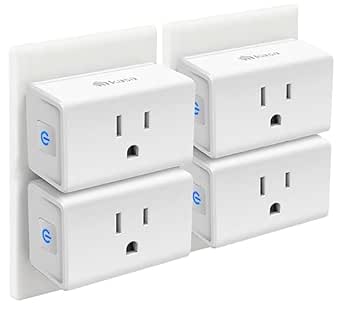
Four compact Wi-Fi smart plugs let you control lights and small appliances by voice or through the Kasa app. They connect to 2.4 GHz Wi-Fi without a hub and support schedules, timers, and Away Mode.
Pros:
- Compact design leaves the second outlet accessible
- Supports voice control and app-based control from anywhere
- Schedules, timers, and Away Mode are included
- UL certified
Cons:
- Requires a 2.4 GHz Wi-Fi connection
- Kasa app is required for setup and control
Best for: Households adding outlet control to suitable devices
Not ideal for: Appliances that should not lose power or need manual operation
Bottom line: Check each device’s power needs and behavior before assigning a plug.
Motorized Blinds
Motorized blinds affect both the window fit and the way a room is controlled, so accurate measuring matters. The listed option is Motorized Vertical Blind – Smart Alexa & Google Home Compatible, Rever. Before selecting it, confirm the product’s supported window dimensions, mounting method, and required clearance. Measure the opening in the way specified by the manufacturer, and note handles, trim, radiators, or other obstructions that could interfere with movement.
A common mistake is assuming that a compatible voice assistant guarantees a complete smart-home fit. Check the exact control requirements, including any hub, app, network, or setup steps, and confirm that the assistant version and account arrangement you use are supported. Verify whether the blind’s direction, operation, and installation approach suit the window. For vertical blinds, review how the track and panels will fit the opening and whether furniture or nearby doors could obstruct them.
Before ordering, compare your measurements with the product’s stated sizing rules and confirm who will install it. If the window is unusually shaped or the mounting surface is uncertain, resolve that question first. A careful measurement and compatibility check can prevent a poor fit and make daily operation easier.
What to look for:
- Window dimensions and the manufacturer’s measuring method
- Mounting type and clearance around the opening
- Supported Alexa and Google Home setup details
- Any required app, hub, or network connection
- Panel movement and nearby obstructions
Motorized Vertical Blind – Smart Alexa & Google Home Compatible, Reversible Blac

The BLIWANS motorized vertical blind features blackout fabric slats that rotate up to 180° for precise light and privacy control. It connects via Wi‑Fi to Alexa, Google Home, and the TuyaSmart app, offering remote, app, and manual operation.
Pros:
- Wi‑Fi integration enables voice control with Alexa and Google Home.
- Blackout fabric blocks UV rays, glare, and provides privacy.
- Customizable up to large dimensions for big sliding doors and patio windows.
- Remote, app and pre‑programmed position controls; manual operation works during power outages.
Cons:
- Requires a nearby electrical outlet for the plug‑in motor.
- Installation needs at least 1.5" clearance and may require an extension track for widths over 110".
Best for: People seeking motorized control for a compatible window
Not ideal for: Windows with uncertain dimensions or obstructed mounting areas
Bottom line: Confirm measurements, mounting clearance, and smart-home requirements before selecting this blind.
Ceiling Fans
A ceiling fan needs to suit the room, mounting location, and household controls. The listed pick is WAC Smart Fans Swirl 54in Matte White 3-Blade Indoor/Outdoor Ceiling F. Check the complete product listing for the exact model name and specifications, then compare its stated installation requirements with the ceiling and room. Confirm the fan’s dimensions and clearance against the available space, including nearby walls, lights, furniture, and the intended blade path.
A frequent buying mistake is focusing on appearance or smart control while overlooking installation fit. Verify whether the fan is rated for the intended indoor or outdoor location, and review mounting and ceiling support requirements. Confirm how the fan connects to power and what controls are included or required. If you want app or voice operation, check the supported platform and setup details rather than assuming a “smart” label covers your preferred system.
For a room with an existing fixture, check the electrical box and mounting arrangement before planning a replacement. Compare the fan’s stated dimensions and operating clearances with the space, and review installation directions in advance. Location rating and mounting fit are essential checks for choosing a fan that suits the room.
What to look for:
- Exact model specifications and complete product details
- Room dimensions and blade clearance
- Indoor or outdoor location rating for the installation site
- Ceiling support and mounting requirements
- Power, included controls, and smart-platform compatibility
WAC Smart Fans Swirl 54in Matte White 3-Blade Indoor/Outdoor Ceiling Fan with Ad

The WAC Swirl ceiling fan features a silent DC motor that is up to 70% more efficient than traditional fans and includes six speed settings. It offers smart control via the WAC app, voice assistants (Alexa, Google Assistant) and a Bluetooth remote, plus an adjustable CCT LED light ranging from 2700K to 5000K.
Pros:
- Silent DC motor provides up to 70% greater efficiency and low noise operation.
- Full smart integration with app, Alexa, Google Assistant, and Bluetooth remote control.
- Adjustable CCT LED lighting (2700K‑5000K) for customizable ambiance.
- UL & cUL wet‑location listed for indoor or outdoor installation.
Cons:
- Bluetooth remote requires batteries and may need occasional replacement.
- Installation may require additional downrod lengths or slope ceiling kit for angled ceilings.
Best for: Rooms that meet the fan’s size and installation requirements
Not ideal for: Locations with uncertain ceiling support or inadequate clearance
Bottom line: Verify the model, location rating, and mounting conditions before planning installation.
Sunrise Alarm Clocks
A sunrise alarm clock is a bedside lighting choice, so consider the wake-up routine and the space where it will sit. The listed pick is Philips SmartSleep Wake-Up Light with Sunrise and Sunset Simulation (H; check the complete listing for the full product name and specifications. Confirm the clock’s footprint, power requirements, and placement guidance, then make sure the display and light can be positioned comfortably from the bed.
A common mistake is choosing by the sunrise description alone without checking the routine features that matter to you. Review the product details for alarm setup, light adjustment, sound options, controls, and any app or power requirements. Consider whether more than one person will use the clock and whether each person’s schedule can be accommodated. Check the instructions for how the light behaves around the alarm time, and verify that the controls are easy to reach in the dark.
Before adding it to a bedside setup, measure the available surface and check for nearby outlets and obstructions. Confirm which functions are included in the model listing rather than assuming they are standard across wake-up lights. A routine and bedside-fit check helps you choose around the way you actually wake up.
What to look for:
- Complete product name and model specifications
- Clock footprint and bedside placement guidance
- Alarm setup and schedule options
- Light and sound adjustments described in the listing
- Power, controls, and any app requirements
Philips SmartSleep Wake-Up Light with Sunrise and Sunset Simulation (HF3650/60)

This wake-up light simulates sunrise and sunset with customizable light and sound profiles to support a gradual wake-up and bedtime routine. It also includes RelaxBreathe guided breathing, an FM radio, a phone charging dock, a bedside lamp, and backup power.
Pros:
- Customizable sunrise and sunset light and sound profiles
- RelaxBreathe provides light-guided breathing for bedtime
- Includes FM radio, phone charging dock, and backup power
- Auto-dimming display and smart snooze
Cons:
- Requires a bedside setup with access to power
- The description does not specify charging compatibility or supported phone models
Best for: People who want a light-based addition to a bedside alarm routine
Not ideal for: Bedside spaces without room for the clock or power access
Bottom line: Check the complete listing and confirm the clock fits your space and routine.
Start with the fit and compatibility checks that could rule out a choice: bulb bases, switch wiring, outlet and device needs, window measurements, fan clearance, and bedside space. Then prioritize the rooms and routines that matter most to your household, and expand the setup in manageable steps.
You do not need to change every room at once. A clear list of what each space needs makes it easier to compare options and avoid mismatches. Use the checklist, confirm the product details, and choose the upgrades that make everyday comfort easier for you.
Black Friday Picks

Philips Hue Play Gradient Light Tube, Large, Black
As an affiliate, we earn on qualifying purchases.