Keeping your Keurig K-Mini in top shape ensures you get the best coffee experience every time. Whether you’re facing brewing issues, mineral buildup, or routine cleaning, this comprehensive guide offers practical, safe, and effective solutions. We’ll walk you through troubleshooting common problems, performing regular maintenance, and caring for your coffee maker to prolong its lifespan.

Get home appliances delivered free with Prime
- Fast, free delivery on millions of items
- Prime Video, Amazon Music and more included
- Member-only deals all year
Follow these step-by-step instructions to troubleshoot issues, clean your machine, and optimize its performance, making sure your mornings start right with fresh, delicious coffee.
Key Takeaways
| Regular Cleaning is Key | Routine descaling and cleaning prevent mineral buildup and flavor transfer. |
| Troubleshoot Common Issues | Identify and resolve brewing, water flow, or power problems with simple steps. |
| Use Proper Maintenance Kits | Keurig-approved descaling and rinse kits keep your machine performing at its best. |
| Care for Water Reservoir & Components | Keep water reservoirs clean and free of deposits for optimal brewing. |
| Avoid Common Mistakes | Don’t ignore signs of malfunction; regular maintenance saves time and money. |
Initial Troubleshooting Steps
- Check Power Connection: Ensure your Keurig K-Mini is plugged in and the power switch is on. Confirm the outlet is working by plugging in another device.
- Inspect the Water Reservoir: Remove and refill the reservoir with fresh water, making sure it’s seated properly.
- Clear Blockages: If the machine isn’t brewing, check the brew head for clogs or leftover coffee grounds. Clean with a soft cloth if necessary.
- Test the Brew Button: Press the brew button and listen for activity. If no response, reset the machine by unplugging for 30 seconds, then plugging back in.
Performing Routine Cleaning & Descaling
Mineral deposits from water can impair your Keurig’s performance and affect coffee flavor. Regular descaling and cleaning are essential.
- Descaling: Use a Keurig-approved descaling solution or a mixture of equal parts water and white vinegar. Fill the water reservoir and run a brew cycle without a K-Cup. Repeat until the reservoir is empty, then rinse thoroughly with fresh water.
- Cleaning the Brew Head: Remove the drip tray and wipe the brew head with a damp cloth. Use a soft brush or toothpick to clear any residue or blockages.
- Cleaning the Water Reservoir: Wash the reservoir with mild soap and water. Rinse well and dry before refilling.
- Rinse Pods & Maintenance Kits: Use Keurig rinse pods to flush out oils and flavor residues, especially after brewing flavored beverages.
Maintaining the Water Reservoir & Components
Proper care of your water reservoir and internal components ensures consistent brewing quality.
- Regular Cleaning: Wash the reservoir weekly with soap and water. Avoid harsh chemicals that could damage parts.
- Check for Mineral Buildup: If you notice white deposits, descaling more frequently is advised.
- Keep the Nozzle & Brew Area Clean: Wipe with a damp cloth to prevent clogging or flavor transfer.
- Replace Water Filter Cartridges: If your model uses water filters, change them every 2-3 months for optimal performance.
Troubleshooting Specific Issues
If your Keurig K-Mini isn’t functioning properly, try these targeted solutions:
- Machine Not Turning On: Confirm the power cord is securely connected. Test the outlet with another device. Reset by unplugging, waiting 30 seconds, then plugging back in.
- Water Not Flowing: Check for clogs or mineral deposits in the brew head. Descale if necessary. Ensure the water reservoir is filled and seated correctly.
- Brewer Leaking or Dripping: Remove and clean the drip tray and check for cracks. Replace if damaged.
- Weak Coffee Brew: Clean the brew head and descale. Also, verify you’re using the correct brew size setting.
Additional Tips & Safety Warnings
Always use authentic Keurig cleaning and descaling products to avoid damaging your machine. Avoid using abrasive cleaners or harsh chemicals.
Unplug your Keurig before cleaning internal parts or performing maintenance. Be cautious when handling hot water and steam during descaling.
Regularly inspect for cracks or leaks, and replace damaged parts promptly to prevent further issues.
If problems persist after troubleshooting, contact Keurig customer service for professional assistance.
The Products in This Guide
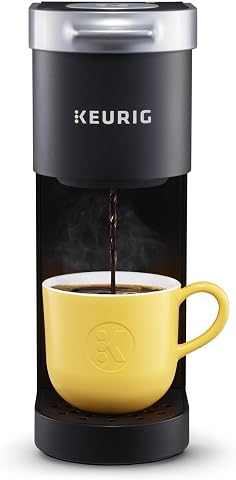
Keurig K-Mini Single Serve K-Cup Pod Coffee Maker
- ✔ Weight: 4.5 pounds
- ✔ Color: Black
- ✔ Warranty: 1-year limited
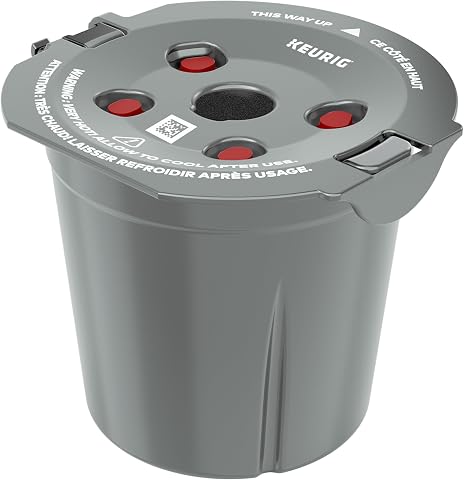
My K-Cup® Reusable Coffee Filter
- ✔ Weight: 2.4 ounces
- ✔ Color: Black
- ✔ Material: Plastic
Keurig K-Mini Single Serve K-Cup Pod Coffee Maker
The Keurig K-Mini is a sleek, space-saving single-serve coffee maker ideal for small kitchens, dorms, or offices. It brews 6-12oz with quick, fresh results and features easy cleanup and energy-saving auto-off.
Pros:
- Compact and fits anywhere
- Brews multiple cup sizes
- Removable drip tray for travel mugs
- Energy-efficient with auto off
Cons:
- Limited water reservoir capacity
- No built-in Milk Frother
- Requires frequent descaling in hard water areas
Best for: Small space living, quick coffee needs, travel-friendly brewing
Not ideal for: Heavy users needing larger capacity or specialty brewing features
Bottom line: A compact, efficient coffee maker perfect for small spaces and quick brewing.
My K-Cup® Reusable Coffee Filter
The My K-Cup® Reusable Coffee Filter allows you to brew your favorite ground coffee with your Keurig K-Mini, reducing waste and expanding flavor options. It’s easy to use and compatible with your brewer.
Pros:
- Eco-friendly and cost-effective
- Compatible with Keurig models including K-Brew+Chill
- Brew with your preferred grounds
- Easy to clean
Cons:
- Requires filling and measuring ground coffee
- Slightly more prep than K-Cup pods
- Must be cleaned regularly
Best for: Eco-conscious brewers, customizing coffee blends, saving money
Not ideal for: Users preferring quick, pod-based brewing without extra steps
Bottom line: A practical reusable filter that offers flexibility and savings for Keurig owners.
Frequently Asked Questions
How often should I descale my Keurig K-Mini?
It is recommended to descale every 3 months, especially if you have hard water, to prevent mineral buildup and maintain optimal performance.
Why isn’t my Keurig brewing coffee?
Check that the water reservoir is filled and seated properly. Clear any clogs from the brew head or nozzle, and consider descaling if mineral deposits are present.
Can I use ground coffee instead of K-Cups?
Yes, with the Keurig My K-Cup reusable filter, you can brew your favorite ground coffee directly in your K-Mini.
What safety precautions should I follow during cleaning?
Always unplug your Keurig before cleaning. Handle hot water carefully during descaling, and avoid abrasive cleaners to prevent damage.
How do I reset my Keurig if it’s not responding?
Unplug the machine, wait 30 seconds, then plug it back in. Ensure the power switch is on and check your outlet connection.
Keep Your Keurig K-Mini Brewing Perfectly
With regular maintenance, proper cleaning, and troubleshooting, your Keurig K-Mini can deliver delicious coffee for years to come. By following our step-by-step care guide, you ensure consistent performance and extend your machine’s lifespan. Remember, a well-maintained coffee maker is the key to a perfect morning brew every time.
Affiliate disclosure: As an Amazon Associate we earn from qualifying purchases. Prices and availability are accurate as of the time of publishing.