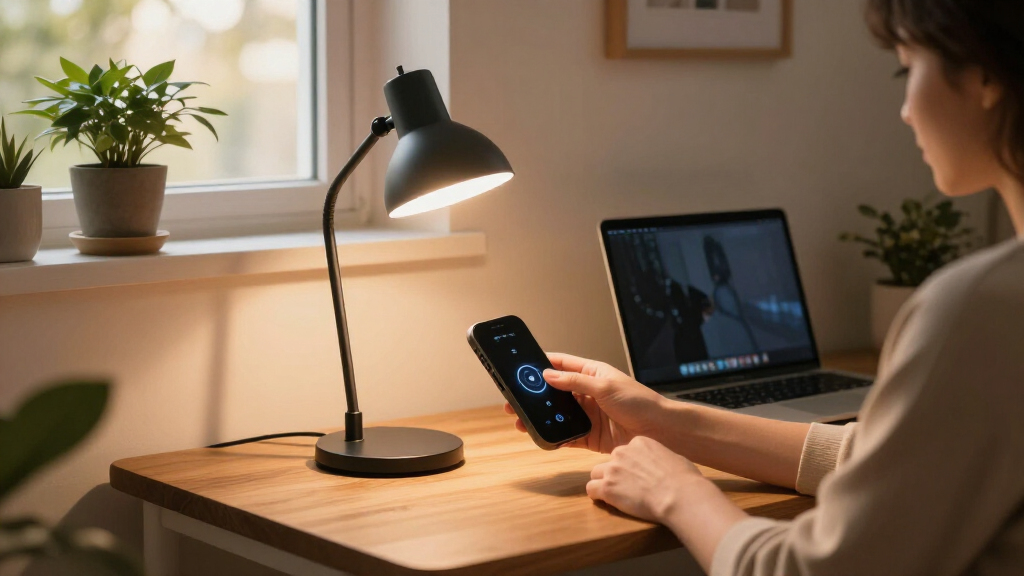

The Govee RGBIC Smart Table Lamp 2 is my best overall smart home desk lamp because its Matter support, broad ecosystem compatibility, and layered RGBIC lighting provide the strongest connected experience in this lineup. I favor the Meross Smart Table Lamp for value-minded Apple users, while the 24W architect lamp is the better choice for wide, focused illumination across two screens. The main choice is between genuine app and voice automation and stronger task-light performance, since several capable desk lamps here lack listed smart-home controls. Buyers must also weigh colorful ambience against accurate work lighting, along with clamp mounting, charging features, and desk footprint. Continue reading for my full breakdown of which model fits each type of workspace.
Complete the kit



Key Takeaways
- Govee leads the ranking because it is the only entry that explicitly combines Matter, SmartThings, Alexa, RGBIC lighting, and 64 scene modes.
- The HomeKit table lamp with USB and AC outlets is the most useful connected power hub, but Govee offers broader modern automation support.
- Clamp and dual-head lamps provide better work coverage than the small RGB models, yet their listings lack the app, voice, and automation features that define a true smart-home pick.
- The two Honeywell lamps emphasize eye-friendly task lighting, folding, and charging, making them practical office choices rather than leading automation choices.
- Touch RGB lamps are easier for casual bedside use, while buyers building routines or mixed-brand systems should favor models with HomeKit, Matter, Alexa, Google Assistant, or SmartThings support.
| Honeywell LED Desk Lamp for Home Office |  | Best for Focused Work | CRI: 94 | Color modes: 4: 2700K, 4000K, 5000K, and 5700K | Dimming: Stepless touch control | VIEW LATEST PRICE | See Our Full Breakdown |
| Smart Table Lamp with App and Voice Control |  | Best for Color Ambience | Control methods: App, voice, and touch | Color options: RGB color changing | Lighting modes: Scene modes and music sync | VIEW LATEST PRICE | See Our Full Breakdown |
| LED Desk Lamp for Office and Home with Dual-Screen Compatibility | 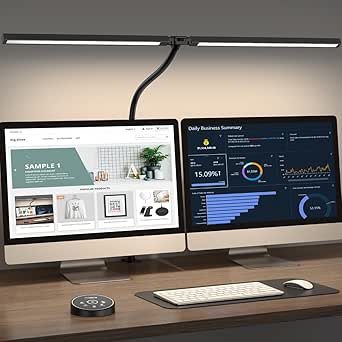 | Best for Dual-Monitor Workstations | Power: 24 watts | Color-temperature range: 3000K–5500K | Brightness range: 20%–100% | VIEW LATEST PRICE | See Our Full Breakdown |
| LED Desk Lamp with Clamp and 17-Inch Light Bar |  | Best Space-Saving Clamp Lamp | Color-temperature range: 2700K–6500K | LED count: 100 LEDs | Lamp length: 17 inches | VIEW LATEST PRICE | See Our Full Breakdown |
| Smart Table Lamp with HomeKit, Alexa, and Google Assistant |  | Best Overall Smart-Home Integration | Smart-home compatibility: Apple HomeKit, Siri, Amazon Alexa, Google Assistant, and Android | Color-temperature range: 2700K–6500K | Color selection: 16 million colors | VIEW LATEST PRICE | See Our Full Breakdown |
| Govee RGBIC Smart Table Lamp 2 |  | Best Overall Smart Integration | Lighting technology: RGBICWW LED | Scene modes: 64 | Controls: App and touch | VIEW LATEST PRICE | See Our Full Breakdown |
| Meross Smart Table Lamp |  | Best for HomeKit Simplicity | Color options: 16 million colors | White color range: 2700K–6500K | Brightness range: 1%–100% | VIEW LATEST PRICE | See Our Full Breakdown |
| Motumen LED Desk Lamp | 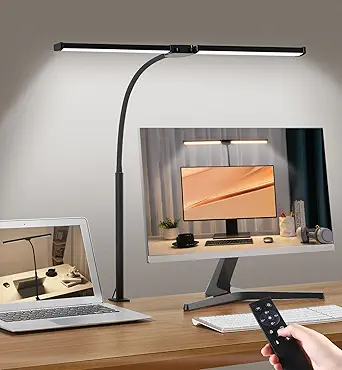 | Best for Wide Workspaces | Lighting modes: 25 | Color temperature range: 3000K–6500K | Brightness range: 20%–100% | VIEW LATEST PRICE | See Our Full Breakdown |
| LED Desk Lamp with USB Charging Port |  | Best Compact Task Lamp | Brightness: 500 lumens | Color modes: 5 | Brightness levels: 5 | VIEW LATEST PRICE | See Our Full Breakdown |
| Touch Bedside Table LED Lamp |  | Best for Simple RGB Ambiance | Light source: LED | Lighting modes: Dimmable warm white and RGB | Control method: Touch | VIEW LATEST PRICE | See Our Full Breakdown |
| Honeywell HWT-H01 LED Desk Lamp |  | Best for Color-Accurate Task Lighting | Color: Black | Lighting type: Full-spectrum LED | Color temperatures: 3000K, 4000K, 5500K | VIEW LATEST PRICE | See Our Full Breakdown |
| LED Desk Lamp with Atmosphere Lighting |  | Best for Gaming Ambience | Light source: LED | Color range: RGB, up to 16 million colors | Connectivity: Wi-Fi | VIEW LATEST PRICE | See Our Full Breakdown |
| LED Desk Lamp with 10W Wireless Charging & Pen Holder |  | Best Space-Saving Desk Organizer | Wireless charging: 10W | Brightness: 800 lumens | Color modes: 3: warm, excellent, daylight | VIEW LATEST PRICE | See Our Full Breakdown |
More Details on Our Top Picks
Honeywell LED Desk Lamp for Home Office
I rank the Honeywell LED Desk Lamp as the best work-focused choice because its CRI 94, flicker-free light favors visual clarity over decorative effects. Unlike the Smart Table Lamp with App and Voice Control, it prioritizes accurate colors and adaptable white light rather than RGB scenes. Four color temperatures and stepless dimming let a buyer shift from warm evening reading to cooler, concentration-friendly illumination, while USB-A and USB-C ports reduce charger clutter. Its folding arm also preserves usable desk space. The compromise is connectivity: there is no app or voice control, and constant plug-in power rules out portable use. I would choose it over the RGB models for paperwork, studying, or color-sensitive hobbies, but buyers building automated smart-home routines should favor a connected lamp.
Pros:- CRI 94 full-spectrum light presents colors naturally
- Four white-light temperatures support work, reading, and evening use
- Stepless dimming provides finer control than fixed brightness levels
- USB-A and USB-C ports reduce desktop charging clutter
Cons:- No app, voice-assistant, or smart-home integration
- Must remain connected to an outlet
- Designed for stationary desk or table use
Best for: Remote workers, students, and crafters who value accurate, adjustable task lighting more than app-controlled effects
Not ideal for: Smart-home automators or mobile users who need voice commands, scheduled scenes, or cordless operation
- CRI:94
- Color modes:4: 2700K, 4000K, 5000K, and 5700K
- Dimming:Stepless touch control
- Charging ports:USB-A and USB-C
- Power:Plug-in; not rechargeable
- LED lifespan:30,000 hours
- Timer:30 minutes
- Adjustments:Rotating head, adjustable arm, and foldable body
Our verdict“I recommend this Honeywell lamp for buyers who want disciplined task lighting and charging convenience without paying for connected features they will not use.”
Smart Table Lamp with App and Voice Control
I place the Smart Table Lamp with App and Voice Control in the ambience slot because its strongest assets are RGB colors, scene modes, and music sync. It offers more playful lighting than the work-oriented Honeywell LED Desk Lamp, and touch controls keep basic adjustments accessible when a phone is elsewhere. Alexa and Google Assistant support also makes hands-free changes possible. Against the Smart Table Lamp with HomeKit, Alexa, and Google Assistant, however, this model has narrower ecosystem support and lacks built-in charging outlets. Its app may require patience during setup, while voice operation depends on a compatible assistant device. I would pick it for bedrooms, gaming desks, or mood lighting, but not for buyers who need documented white-light temperatures, precise task illumination, or native Apple Home integration.
Pros:- App, voice, and touch controls suit different daily routines
- RGB colors and scene modes provide broad decorative flexibility
- Music sync adds responsive lighting for games and entertainment
- Flicker-free soft light is comfortable for low-intensity evening use
Cons:- Voice control requires a compatible Alexa or Google Assistant device
- App setup may be cumbersome for buyers new to smart lighting
- No specified white-light temperature range or power-consumption data
Best for: Alexa or Google Assistant users who want colorful bedroom, gaming-desk, or evening ambience with touch control as a fallback
Not ideal for: Apple Home users and detail-focused workers who need specified white-light temperatures or strong directional task lighting
- Control methods:App, voice, and touch
- Color options:RGB color changing
- Lighting modes:Scene modes and music sync
- LED lifespan:Over 10,000 hours
- Material:ABS and PC
- Compatibility:Amazon Alexa and Google Assistant
Our verdict“I recommend this model for buyers who value colorful, voice-controlled atmosphere more than ecosystem breadth or serious task-lighting performance.”
LED Desk Lamp for Office and Home with Dual-Screen Compatibility
I assign this 24W LED Desk Lamp to larger workstations because its articulated design can direct light across a dual-screen desk more effectively than the smaller Honeywell LED Desk Lamp. Five color settings, 20%–100% brightness, and dedicated reading, drafting, and night modes make it adaptable for long computer sessions or detailed projects. Compared with the 17-inch LED Desk Lamp with Clamp, it offers a remote and more jointed positioning, including a 360-degree stand and rotating head. Those controls add versatility, but they also introduce a weak point because the remote may malfunction. This is not a connected smart-home model either; adjustments stop at the supplied remote rather than app routines or voice commands. I would reserve it for indoor offices where broad coverage matters more than compactness or automation.
Pros:- 24W output is suited to broad workstation illumination
- Five color settings and adjustable brightness accommodate varied tasks
- Multi-joint design provides extensive control over light direction
- Remote access is convenient across a deep or wide desk
Cons:- Remote operation may become unreliable
- No app, scheduling, or voice-assistant support
- Large articulated design may overwhelm a small workstation
Best for: Programmers, designers, and home-office users who need adjustable light across a wide desk or dual-monitor arrangement
Not ideal for: Voice-assistant users or minimalist desk owners who want a compact lamp with app-based automation
- Power:24 watts
- Color-temperature range:3000K–5500K
- Brightness range:20%–100%
- Light modes:Night light, reading, and drafting
- Control method:Remote control
- Adjustability:360° stand, 180° folding arm, and 270° rotating head
- CRI:Greater than 90
- Voltage:24V DC
- Water resistance:Not water resistant
Our verdict“I recommend this lamp for wide, monitor-heavy desks where coverage and positioning matter more than true smart-home connectivity.”
LED Desk Lamp with Clamp and 17-Inch Light Bar
I give the 17-inch LED Desk Lamp with Clamp the space-saving role because its clamp leaves the main work surface open while the 360-degree gooseneck places light where it is needed. Its 2700K–6500K range is wider than the Honeywell LED Desk Lamp’s four presets, so buyers gain finer control over warm relaxation light and cool task light. Compared with the larger 24W dual-screen LED Desk Lamp, this model is simpler and easier to position, though it lacks a remote and advanced operating modes. The 17-inch bar can still feel oversized on a very narrow desk, and the 2.36-inch clamp limit excludes thick desktops. USB power also keeps it tethered. I would choose it for compact home offices that need precise illumination, provided voice control and app scheduling are not priorities.
Pros:- Clamp mounting preserves usable desk space
- Wide 2700K–6500K range supports both relaxed and focused lighting
- 360-degree gooseneck allows precise placement
- Rated 60,000-hour lifespan exceeds the other listed lamps
Cons:- No app, remote, or voice-assistant controls
- Clamp cannot accommodate surfaces thicker than 2.36 inches
- The 17-inch light bar may be awkward on very narrow desks
Best for: Apartment workers and students who need adjustable task lighting without sacrificing desk surface to a conventional base
Not ideal for: Owners of desktops thicker than 2.36 inches or buyers seeking voice control, app routines, or cordless use
- Color-temperature range:2700K–6500K
- LED count:100 LEDs
- Lamp length:17 inches
- Adjustability:360° gooseneck
- Clamp capacity:Surfaces up to 2.36 inches thick
- LED lifespan:60,000 hours
- Power supply:5V/3A USB adapter
Our verdict“I recommend this lamp for space-conscious buyers who want flexible, long-lived task lighting and can accept basic USB-powered controls.”
Smart Table Lamp with HomeKit, Alexa, and Google Assistant
I rank the Smart Table Lamp with HomeKit, Alexa, and Google Assistant highest for connected homes because it supports the broadest set of platforms here, including Siri and Apple HomeKit. Its 16 million colors, 2700K–6500K white range, and 1%–100% dimming cover both mood lighting and everyday desk use. Compared with the Smart Table Lamp with App and Voice Control, it adds Apple compatibility, USB-C charging, USB charging, and an AC outlet, making it a stronger bedside command center. The linen shade produces softer, less directional light than the Honeywell LED Desk Lamp, so demanding paperwork is not its specialty. Setup requires 2.4GHz Wi-Fi, and the pull chain feels dated beside its digital controls. I would choose it for mixed-platform households that want one lamp to handle routines, color, and charging.
Pros:- Works across HomeKit, Siri, Alexa, and Google Assistant
- Broad white-light range and 16 million colors support work and ambience
- USB, USB-C, and AC connections consolidate bedside charging
- Metal base and linen shade suit living spaces better than utilitarian task lamps
Cons:- Connects only through 2.4GHz Wi-Fi
- Diffuse shade is less effective for precise task illumination
- Pull-chain hardware feels mismatched with the smart controls
Best for: Apple Home, Alexa, or Google Assistant households seeking a bedside or desk lamp that combines automation, color scenes, and device charging
Not ideal for: Buyers with 5GHz-only networks or professionals who need concentrated, high-CRI task lighting
- Smart-home compatibility:Apple HomeKit, Siri, Amazon Alexa, Google Assistant, and Android
- Color-temperature range:2700K–6500K
- Color selection:16 million colors
- Brightness range:1%–100%
- Charging ports:1 USB and 1 USB-C
- AC outlet:2-pin outlet
- Material:Metal base and linen shade
- Manual switch:Pull-out chain
- Wi-Fi support:2.4GHz only
Our verdict“I recommend this as the connected all-rounder for multi-platform homes, especially when charging access and soft room lighting matter more than concentrated desk illumination.”
Govee RGBIC Smart Table Lamp 2
I rank the Govee RGBIC Smart Table Lamp 2 highest in this group because it combines broad platform support with lighting effects that go beyond basic color changes. Matter, SmartThings, Alexa, Google Assistant, and Apple HomeKit support make it easier to place within a mixed-device household, while RGBICWW technology can display multiple colors at once. Compared with the Meross Smart Table Lamp, Govee offers more ambitious scene and music-sync options, making it the stronger accent light for gaming desks and creative rooms. That flexibility brings added setup complexity, and its compact form provides atmosphere rather than broad task illumination. The Motumen LED Desk Lamp covers a work surface far better. I see Govee as the leading smart-home choice, but not as a replacement for a focused office lamp.
Pros:- Matter and major voice-assistant support suit mixed-platform smart homes
- RGBICWW lighting can display richer effects than standard single-color lamps
- 64 scenes and music syncing provide extensive ambiance choices
- Touch, app, timer, and schedule controls support both manual use and automation
Cons:- Compact diffuser is less effective for illuminating documents or a large desk
- Numerous features can make initial setup harder for smart-home beginners
- Corded design offers no placement flexibility away from an outlet
Best for: I recommend it to smart-home users who want colorful desk ambiance, cross-platform automation, and customizable scenes.
Not ideal for: I would skip it for buyers who need wide, bright task lighting or a portable cordless lamp.
- Lighting technology:RGBICWW LED
- Scene modes:64
- Controls:App and touch
- Connectivity:Wi-Fi and Bluetooth
- Smart-home support:Matter, SmartThings, Alexa, Google Assistant, Apple HomeKit
- Wattage:24W
- Dimensions:4.3 x 4.3 x 8.8 inches
- Power source:Corded electric
Our verdict“I would choose this as the most capable smart accent lamp here, provided task lighting is handled separately.”
Meross Smart Table Lamp
The Meross Smart Table Lamp earns its place by focusing on dependable everyday controls instead of elaborate entertainment effects. I would pick it over the Govee RGBIC Smart Table Lamp 2 for a buyer who values Siri and Apple HomeKit access, straightforward schedules, and local operation during a Wi-Fi outage. Its 2700K–6500K white range also makes it more adaptable for winding down or reading than a lamp centered only on saturated colors. Govee remains the better choice for multicolor displays and its 64 preset scenes, while Meross offers a less effects-heavy smart-light experience. The main compromises are its corded design and the absence of battery backup. Setup may still feel involved to buyers unfamiliar with HomeKit pairing, and its small table-lamp format cannot match the Motumen lamp’s wide task-light coverage.
Pros:- Apple HomeKit and Siri support make it a natural fit for Apple households
- Local control remains available during Wi-Fi outages
- Tunable white range supports both relaxed evening light and cooler work light
- Touch, voice, and app controls provide flexible operation
Cons:- Color effects are less elaborate than the Govee lamp’s RGBIC scenes
- Corded power and no stated battery backup limit placement
- HomeKit pairing may challenge buyers new to smart-home setup
Best for: I recommend it to Apple-focused households seeking a compact lamp with Siri control, tunable white light, and schedules.
Not ideal for: I would skip it for gamers wanting layered RGB effects or office users who need broad, directional illumination.
- Color options:16 million colors
- White color range:2700K–6500K
- Brightness range:1%–100%
- Controls:Touch, voice, and app
- Smart-home support:Apple HomeKit, Amazon Alexa, SmartThings
- Automation:Schedules and timers
- Offline capability:Local control during Wi-Fi outages
- Power source:Corded electric
Our verdict“I would choose Meross for practical HomeKit control rather than elaborate RGB entertainment.”
Motumen LED Desk Lamp
I include the Motumen LED Desk Lamp for buyers whose priority is seeing an entire work surface clearly. Its dual heads and adjustable gooseneck spread light across monitors, books, or craft materials, giving it far stronger task-light coverage than the Govee RGBIC Smart Table Lamp 2 or Meross Smart Table Lamp. Twenty-five combinations of color temperature and brightness help match focused daytime work or softer evening reading, while the remote offers convenient control from up to 32.8 feet. The tradeoff is central to this roundup: this is remote-controlled, not a connected smart-home lamp. There is no listed app, voice-assistant support, or scheduling system beyond a one-hour timer. Its clamp also demands a compatible desk edge. I would rank it below the connected models for automation, but above them for serious desk work.
Pros:- Dual adjustable heads illuminate a wider workspace than compact table lamps
- Five color temperatures and five brightness levels support varied tasks
- Gooseneck design allows precise positioning around screens and books
- Remote control and one-hour timer add convenient non-app operation
Cons:- No listed Wi-Fi, app, or voice-assistant integration
- Clamp may not fit thick, enclosed, or delicate desktop edges
- Remote control is less capable than true smart-home automation
Best for: I recommend it to home-office workers, students, and crafters who need broad adjustable light across a large desk.
Not ideal for: I would skip it for buyers who require app routines, voice commands, or a desk without a clamp-compatible edge.
- Lighting modes:25
- Color temperature range:3000K–6500K
- Brightness range:20%–100%
- Lamp design:Dual head
- Adjustment:Flexible gooseneck
- Control:Remote and onboard buttons
- Remote range:32.8 feet
- Timer:1 hour
Our verdict“I would buy this for wide task lighting, but not when smart-home connectivity is a firm requirement.”
LED Desk Lamp with USB Charging Port
The LED Desk Lamp with USB Charging Port is my compact pick for a small study area where useful illumination matters more than home automation. Its 500-lumen output, five color modes, and five brightness levels provide more focused working light than the decorative Govee RGBIC Smart Table Lamp 2. A 180-degree rotating head and folding base also make it easier to direct the beam or reclaim desk space, while the USB port can charge a phone without occupying another wall socket. Unlike Meross, though, this lamp has no listed app, scheduling, or voice control, so it is smart only in its space-efficient feature set. The 5V/2A supply is not intended for high-powered devices, and touch controls offer little tactile feedback. I would place it behind connected lamps for automation but ahead of them for simple, compact productivity.
Pros:- 500-lumen output is better suited to focused work than small ambiance lamps
- Five color modes and five brightness levels allow useful light adjustment
- Foldable base and rotating head save space and direct light precisely
- Built-in USB port reduces cable clutter around a small desk
Cons:- No listed app, voice control, or smart-home platform support
- 5V/2A power limits charging performance for demanding devices
- Touch controls lack the tactile certainty of physical buttons
Best for: I recommend it to students and apartment dwellers who want a foldable task lamp with convenient phone charging.
Not ideal for: I would skip it for smart-home enthusiasts or buyers who need fast charging for power-hungry devices.
- Brightness:500 lumens
- Color modes:5
- Brightness levels:5
- LED lifespan:20,000 hours
- Power input:5V/2A
- Charging port:USB
- Head adjustment:180-degree rotation
- Base adjustment:90-degree folding
Our verdict“I would choose this for compact work lighting and basic charging, not for connected-home routines.”
Touch Bedside Table LED Lamp
I see the Touch Bedside Table LED Lamp as the simplest mood-lighting option in this batch. Touch control, dimmable warm white light, and RGB colors give a bedroom or casual desk easy ambiance without an app. That makes it less intimidating than the Govee RGBIC Smart Table Lamp 2, but it also strips away the features that make Govee the stronger smart-home purchase: no voice-assistant, Wi-Fi, schedule, or app control is described. Its 6-watt output is suited to a night light or background glow rather than detailed work, where the Motumen LED Desk Lamp is much more capable. Although Bluetooth appears in the supplied specifications, I would not treat that alone as proof of meaningful connected control. The low-complexity touch interface is its main appeal, balanced by limited brightness, corded placement, and no water resistance.
Pros:- Touch controls make nighttime brightness changes quick and simple
- Warm white dimming and RGB modes cover both practical glow and decoration
- Compact modern shape works well on small bedside tables and casual desks
- Low-complexity operation suits buyers who do not want an app
Cons:- No described app, scheduling, or voice-assistant controls
- 6W output is too limited for broad task lighting or large rooms
- Corded and non-water-resistant design restricts placement
Best for: I recommend it to bedroom users who want uncomplicated touch dimming and occasional RGB color beside a laptop or bed.
Not ideal for: I would skip it for buyers building voice-controlled routines or anyone needing bright illumination for sustained desk work.
- Light source:LED
- Lighting modes:Dimmable warm white and RGB
- Control method:Touch
- Wattage:6W
- Voltage:240V AC
- Connectivity protocol:Bluetooth
- Power source:Corded electric
- Water resistance:Not water resistant
Our verdict“I would pick this for simple touch-controlled color, while connected-home buyers should spend more on Govee or Meross.”
Honeywell HWT-H01 LED Desk Lamp
I rank the Honeywell HWT-H01 as the strongest pure work light in this group because its CRI 95 full-spectrum output makes documents, artwork, and everyday objects appear more natural. Stepless brightness control also gives it finer adjustment than lamps limited to fixed levels. Compared with the LED Desk Lamp with Atmosphere Lighting, it trades colorful scenes, Wi-Fi, and app control for cleaner task illumination and two practical charging ports. Its fold-flat body occupies less space than the larger LED Desk Lamp with 10W Wireless Charging, though it lacks that model’s flexible arm and desktop storage. The biggest compromise is clear: this is not a connected lamp, so it cannot join routines or respond to voice commands. I recommend it when light quality matters more than smart-home automation.
Pros:- CRI 95 full-spectrum light renders colors accurately
- Stepless 10%-100% dimming supports both focused work and softer evening light
- USB-A and USB-C ports charge two nearby devices
- Foldable body saves desk space when stored
Cons:- No Wi-Fi, app, voice-assistant, or automation support
- Only three white color-temperature settings
- Repeated folding may place long-term wear on the hinge
Best for: Home-office workers, artists, and readers who want color-accurate adjustable lighting beside their connected devices
Not ideal for: Smart-home users who need app control, voice commands, schedules, or automated lighting routines
- Color:Black
- Lighting type:Full-spectrum LED
- Color temperatures:3000K, 4000K, 5500K
- Dimming range:10%-100% stepless
- CRI:95
- Charging ports:USB-A and USB-C, 5V/2.1A
- Adjustment range:0°-180° foldable
- Energy use:75% lower than incandescent lighting
Our verdict“I would choose this for precise, comfortable task lighting, but not as the connected centerpiece of a smart desk.”
LED Desk Lamp with Atmosphere Lighting
The LED Desk Lamp with Atmosphere Lighting earns its place through entertainment-focused smart features rather than conventional task-light performance. I see its 16 million colors, scene modes, and music synchronization as a better match for gaming stations and streaming backgrounds than the white-light-focused Honeywell HWT-H01. App and remote controls let a buyer change the mood without reaching across the desk, while the foldable design supports more creative light arrangements. Yet this is the least practical choice for a restrained office: its 2,000-gram weight limits easy repositioning, app operation depends on Wi-Fi, and the available data does not establish CRI or white-light color temperatures. It also cannot play music itself during atmosphere mode; it only reacts to sound. I rank it as a specialist mood-lighting pick, not the best lamp for color-sensitive reading or paperwork.
Pros:- Offers 16 million colors and multiple scene modes
- Music synchronization adds responsive lighting to games and entertainment
- App and remote control allow operation from across the room
- Foldable structure supports varied shapes and compact storage
Cons:- App control requires a Wi-Fi connection
- Two-kilogram weight makes the lamp less convenient to reposition
- No stated CRI or white-light temperature range for demanding task work
Best for: Gamers, streamers, and RGB smart-room owners who want app-controlled scenes and sound-reactive desk lighting
Not ideal for: Readers, designers, and office workers who need documented color accuracy, portable construction, or dependable offline control
- Light source:LED
- Color range:RGB, up to 16 million colors
- Connectivity:Wi-Fi
- Controls:App and remote
- Power source:Corded electric
- Light sources:4
- Dimensions:1.57 x 3.94 x 8.27 inches
- Weight:2,000 g
- Mounting type:Tabletop
Our verdict“I would pick this for an RGB gaming desk, while buyers focused on accurate work light should choose the Honeywell instead.”
LED Desk Lamp with 10W Wireless Charging & Pen Holder
I give the LED Desk Lamp with 10W Wireless Charging & Pen Holder the organization-focused role because it combines illumination, phone placement, charging, and stationery storage in one footprint. Its 360-degree flexible arm offers more positioning freedom than the folding Honeywell HWT-H01, while 800 lumens and CRI 95 make it more credible for detailed work than the RGB Atmosphere Lighting model. The built-in charger removes a cable from the desktop, but it is less universal than Honeywell’s USB ports: thick cases can interrupt charging, Google Pixel 4a 5G lacks supported Qi EPP charging, and the required 5V/3A adapter is absent. It also offers no app, Wi-Fi, or voice control, which weakens its smart-home credentials. I favor this model for compact multifunctionality, provided the buyer values desk organization over automation.
Pros:- Integrated 10W wireless charger reduces desktop cable clutter
- Pen holder and phone stand consolidate several desk accessories
- CRI 95 output and 800-lumen brightness suit focused work
- 360-degree arm directs light more freely than a simple folding hinge
Cons:- No app, Wi-Fi, voice-assistant, or routine support
- Wireless charging can fail through thick phone cases and lacks Qi EPP support for Google Pixel 4a 5G
- Required 5V/3A power adapter is not included
Best for: Students and small-desk home-office users with compatible Qi phones who want lighting, charging, and stationery storage in one unit
Not ideal for: Voice-automation users or owners of unsupported phones and thick cases, since charging compatibility is limited and no smart controls are included
- Wireless charging:10W
- Brightness:800 lumens
- Color modes:3: warm, excellent, daylight
- Dimming range:5%-100% stepless
- CRI:95
- Rated lifespan:50,000 hours
- Panel material:Acrylic
- Arm adjustment:360° flexible
- Required adapter:5V/3A, not included
Our verdict“I recommend this as a compact desk hub for compatible-phone owners who can live without connected lighting controls.”
How We Picked
I ranked these lamps through the specific lens of a connected workspace. My highest weighting went to smart-platform compatibility, followed by task-light usefulness, control flexibility, and the ability to fit naturally into routines. Matter, HomeKit, SmartThings, Alexa, and Google Assistant support moved products upward because they reduce dependence on manual controls. I then compared brightness adjustment, color modes, light coverage, mounting style, charging, and physical flexibility.
I gave the top positions to lamps that balance automation with everyday desk utility, rather than rewarding the longest feature list. Wider architect and dual-head models scored well for work performance, but their lack of listed connected controls kept them below genuine smart lamps. RGB-only touch models ranked lower when their features centered on mood lighting rather than routines or voice commands. I judged value by useful feature return rather than a temporary sale price, and I treated build confidence conservatively when the supplied product information offered little detail about materials or durability.
Factors to Consider When Choosing Smart Home Desk Lamps
I divide smart home desk lamps into three broad groups: connected task lights, ambient smart lamps, and conventional desk lamps with smart-adjacent conveniences such as charging or touch controls. Knowing which group matches the desk prevents paying for colorful effects when better work illumination is the real need. It also helps buyers avoid mistaking USB ports or wireless charging for actual home-automation support.
Separate Real Smart Controls From Smart-Adjacent Features
I treat a desk lamp as genuinely smart only when it lists app, voice, or automation support. Touch dimming, RGB presets, timers, and USB charging are convenient, but they do not automatically make a lamp part of a connected home. Matter support can make mixed-brand setups easier because it reduces reliance on a single ecosystem. HomeKit remains appealing for an Apple-centered household, while Alexa and Google Assistant support matters more in homes already using those speakers. Before buying, I would check whether every desired function can be controlled remotely, since some lamps expose only power or basic brightness to a platform. I also prefer models with reliable physical controls so the lamp remains usable when Wi-Fi or an app is unavailable.
Match the Light Pattern to the Work
I would choose the lighting geometry before comparing scene counts. Wide dual-head or architect designs spread light across monitors, documents, and larger desks, reducing the bright center spot produced by a small table lamp. Compact RGB lamps work better as background illumination or gentle evening lights than as the sole source for detailed work. Adjustable color temperature helps a desk serve different jobs: cooler light can support alert daytime work, while warmer light feels less harsh at night. RGB adds personality, but it has limited value when the lamp cannot produce a strong, even white light. A common buying mistake is choosing dozens of effects while ignoring arm reach, glare control, and beam width. For long reading or design sessions, I place usable white-light coverage above decorative color.
Choose Between a Base, Clamp, and Foldable Body
The mounting style changes how much of the desk remains usable. A clamp lamp saves surface space and can reach over wide monitor arrangements, but it needs a compatible desk edge and enough clearance below the top. A weighted base moves easily between rooms, though it occupies space that could hold notebooks or peripherals. Foldable lamps suit multipurpose desks and storage, yet extra hinges may create more points that can loosen over time. I would measure the desktop thickness, wall clearance, and desired light position before choosing a clamp or long arm. Buyers working in a small corner should favor vertical reach and a flexible neck, while anyone who rearranges rooms frequently may prefer a portable base.
Check Automation Depth and Everyday Controls
Compatibility logos do not reveal how much control a platform provides. I would verify whether the lamp supports brightness, color temperature, RGB color, scenes, schedules, and voice commands, rather than assuming every feature appears in every app. Scene-heavy lamps make sense for gaming rooms and entertainment setups, while office users may gain more from dependable morning and evening routines. Music synchronization can be fun, but it should not outweigh smooth dimming or a useful memory function. App-dependent models also bring account, update, and privacy questions that a simple touch lamp avoids. The strongest designs combine automation for routines with buttons or touch controls that guests can understand immediately.
Decide Whether Charging and Outlets Justify the Space
USB ports, wireless charging pads, and AC outlets can reduce cable clutter, but I would judge them by the devices already used at the desk. A 10W wireless pad is convenient for overnight charging, though it may be slower and more sensitive to phone placement than a cable. Built-in USB ports are useful when wall outlets are scarce, but connector type and available output matter more than the mere presence of a port. AC outlets add flexibility for laptops or accessories, while also making the lamp base larger and busier. A pen holder is helpful on a study desk but wastes space for buyers who work almost entirely on a keyboard. I would pay more for integrated power features only when they replace a separate charger or power strip.
Frequently Asked Questions
Do I Need Matter Support in a Smart Home Desk Lamp?
I recommend Matter support for buyers mixing platforms or planning to change ecosystems later. It can simplify pairing and local control, although the exact features exposed to each platform may vary. A HomeKit-only or Alexa-compatible lamp can still be the better purchase when the household is firmly committed to one system. In this lineup, Govee has the clearest cross-platform case because its listing explicitly includes Matter and SmartThings alongside Alexa.
Can a Small RGB Smart Lamp Replace a Regular Desk Lamp?
I would not rely on a small RGB table lamp as the only work light unless its white-light output and beam coverage suit the desk. These models excel at ambient color, low-level evening light, and automated scenes, but their compact shape may leave documents or a wide keyboard unevenly lit. A 24W architect lamp or dual-head design is better suited to detailed tasks and multi-monitor layouts. Pairing an RGB lamp with a dedicated task light offers the best split between ambience and work coverage, though it adds cost and clutter.
Should an Apple User Choose HomeKit or Matter?
I would choose HomeKit compatibility when Apple Home is the established control center and easy Siri access matters most. Matter is more appealing when the lamp may later join Google, Alexa, SmartThings, or another compatible platform. The Meross lamp offers a focused Apple-friendly route, while Govee provides broader ecosystem flexibility. The HomeKit lamp with USB and AC outlets is better for buyers who want connected lighting and desk power in one device.
Is a Clamp Lamp Better for a Dual-Monitor Desk?
A clamp model is usually my choice for a crowded dual-monitor setup because it preserves desk surface and positions light above the screens. Dual-head designs can distribute light across a wider area than compact table lamps, reducing dark zones at either side. The tradeoffs are desk-edge compatibility, less portability, and possible monitor glare if the arm cannot reach the right angle. I would measure the clamp opening and arm reach, then favor fine positioning over extra RGB modes for this use.
Are Wireless Charging and USB Ports Worth Paying More For?
I see charging features as worthwhile when they replace hardware already taking up space. The 10W wireless-charging model suits a tidy study desk, while a lamp with USB and AC outlets can serve more types of devices. Buyers who already own a fast charger may get little benefit, especially if the lamp uses an older USB connector or modest output. I would prioritize light quality and smart compatibility first, then treat charging as the deciding feature between closely matched lamps.
Conclusion
For the broadest connected experience, I recommend the Govee RGBIC Smart Table Lamp 2 as the best overall pick; Matter, SmartThings, Alexa, RGBIC effects, and extensive scenes give it the clearest smart-home identity. The Meross Smart Table Lamp is my best-value choice for an Apple-centered setup that does not need Govee’s larger effects package. For a more feature-rich workstation hub, I would choose the HomeKit, Alexa, and Google Assistant lamp with USB and AC outlets as the premium pick. Buyers new to connected lighting should start with the app-and-voice RGB touch lamp, since physical touch control provides a simple fallback while they learn routines and voice commands.
For serious desk work, the 24W dual-screen architect lamp is my specific-needs recommendation because broad coverage matters more than decorative scenes. The 17-inch clamp lamp better fits a compact desk, while the 10W wireless-charging lamp with pen holder suits buyers focused on organization. Honeywell’s USB-equipped model makes more sense for conventional task lighting with device charging than for automation. My final choice would hinge on one question: whether the lamp must join a smart-home system or simply make the desk more functional.