
The best smart home hub for most people is Homey Pro (2026), thanks to its broad device support and flexible automation options. Home Assistant Green is a strong alternative for hands-on buyers who want control over a local system, while the Aeotec Smart Home Hub suits households looking for a more guided SmartThings setup. The main choice is between broad compatibility, simple operation, and the time or technical skill needed to manage a more customizable hub. Some products focus on one ecosystem or device type, which can make them easier to use but less useful as a whole-home controller. Read on for the full comparison and help matching a hub to your devices and routines.

Get home appliances delivered free with Prime
- Fast, free delivery on millions of items
- Prime Video, Amazon Music and more included
- Member-only deals all year
Complete the kit


Key Takeaways
- Homey Pro (2026) leads as the all-around pick because its role is broader than a lighting bridge or voice-assistant control panel; it makes the most sense for mixed-device homes seeking flexibility.
- Home Assistant Green and Hubitat Elevation C-8 Pro trade simplicity for control. They suit buyers who want detailed automation and are willing to spend more time on setup and maintenance.
- Aeotec Smart Home Hub is the clearest fit for a guided, multi-protocol SmartThings setup, while the Echo Hub and Nest Hub place more emphasis on visible, voice-friendly control.
- Specialist hubs can be the smarter purchase. Philips Hue Bridge models and the Lutron Caséta hub are better matched to lighting systems than a general-purpose hub if lighting is the main need.
- Protocol labels do not guarantee every device will work as expected. Check the exact device, ecosystem, and automation needs before choosing between Matter, Zigbee, Z-Wave, Wi-Fi, IR, and proprietary integrations.
| Homey Pro (2026) Smart Home Hub |  | Best Overall for Mixed-Brand Homes | Connectivity: Wi-Fi, Zigbee, Z-Wave Plus, Bluetooth LE, infrared, Matter, Thread | Control: App and voice | Compatible devices: Over 70,000 products from more than 2,000 brands | VIEW LATEST PRICE | See Our Full Breakdown |
| eufy Security Smart Display E10, 8-Inch Smart Home Hub |  | Best for eufy Security Monitoring | Screen size: 8 inches | Simultaneous camera views: Up to 4 | Storage: 64GB eMMC | VIEW LATEST PRICE | See Our Full Breakdown |
| Aqara Smart Hub M100 Matter Controller |  | Best Compact Aqara-to-Matter Bridge | Supported protocols: Zigbee, Thread, Matter | Device capacity: Up to 20 Aqara Zigbee devices and 20 Thread devices | Wi-Fi: 2.4 GHz Wi-Fi 6 (802.11ax) | VIEW LATEST PRICE | See Our Full Breakdown |
| Google Nest Hub 7″ Smart Display with Google Assistant (1st Gen) – Chalk |  | Best for Google Assistant Beginners | Display: 7-inch touchscreen | Assistant: Google Assistant | Model: H1A | VIEW LATEST PRICE | See Our Full Breakdown |
| Lutron Caséta Smart Hub for Alexa, Apple HomeKit, Google Assistant, and More | 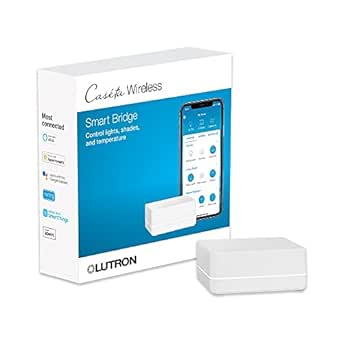 | Best for Caséta Lighting and Shades | Device capacity: Up to 75 Caséta devices | Compatibility: Amazon Alexa, Apple HomeKit, Google Assistant, Ring, Serena shades, Sonos, and others | Connectivity: Clear Connect Technology; connects to router | VIEW LATEST PRICE | See Our Full Breakdown |
| SONOFF Bridge-M Smart Home Hub and Matter Bridge |  | Best for Bridging Existing Devices to Matter | Connectivity: Wi-Fi, Ethernet, Zigbee | Wi-Fi standards: IEEE 802.11a/b/g/n/ac/ax | Zigbee standard: IEEE 802.15.4 | VIEW LATEST PRICE | See Our Full Breakdown |
| Philips Hue Bridge Pro Smart Lighting Hub (1-Pack) |  | Best for Large Philips Hue Lighting Systems | Supported lights: 150+ | Supported accessories: 50+ | Processor: 1.7 GHz | VIEW LATEST PRICE | See Our Full Breakdown |
| Aeotec Smart Home Hub with SmartThings, Z-Wave, Zigbee, and Matter |  | Best for Mainstream Multi-Protocol Control | Model: V3 Smart Home Hub (2020) | Connectivity: Ethernet, Wi-Fi, Z-Wave, Zigbee, Matter | Z-Wave frequency: 908.42 MHz | VIEW LATEST PRICE | See Our Full Breakdown |
| Home Assistant Green Smart Home Hub |  | Best for Home Assistant Beginners | Operating system: Home Assistant OS | Processor: Quad-core | Memory: 4 GB LPDDR4X | VIEW LATEST PRICE | See Our Full Breakdown |
| Hubitat Elevation C-8 Pro Smart Home Hub |  | Best for Advanced Local Automations | Protocols: Matter 1.5, Z-Wave 800 Series with Long Range, Zigbee 3.0, Bluetooth | Voice assistant compatibility: Amazon Alexa, Google Home, Apple HomeKit | Automation processing: Local | VIEW LATEST PRICE | See Our Full Breakdown |
| SwitchBot Hub 2 Smart Home Hub with Thermometer, Hygrometer, Light Sensor, and IR Remote |  | Best for Sensor-Driven Scenes | Connectivity: 2.4 GHz Wi-Fi and Bluetooth | Temperature accuracy: ±0.36°F | Humidity accuracy: ±1.8% RH | VIEW LATEST PRICE | See Our Full Breakdown |
| Aqara Smart Hub M200 Matter Controller with Zigbee, Wi-Fi, IR, and PoE |  | Best for Local Automation | Model: HM-G03E | Zigbee capacity: Up to 40 Aqara Zigbee devices | Thread capacity: Up to 40 Thread devices | VIEW LATEST PRICE | See Our Full Breakdown |
| Philips Hue Bridge Smart Lighting Hub |  | Best for Hue Lighting | Connectivity: Zigbee, LAN, and Matter | Capacity: Up to 50 lights and accessories | Dimensions: 6.26 x 5.79 x 2.91 inches | VIEW LATEST PRICE | See Our Full Breakdown |
| Aqara Smart Home Hub M3 for Advanced Automation, Matter Controller, IR |  | Best for Advanced Aqara Setups | Model: HM-G01E | Supported protocols: Zigbee, Thread, Bluetooth, Wi-Fi, and Matter | Wi-Fi: Dual-band 2.4/5 GHz | VIEW LATEST PRICE | See Our Full Breakdown |
| Amazon Echo Hub 8-Inch Smart Home Control Panel |  | Best Wall-Mounted Control Panel | Display: 8-inch touchscreen, 1280 x 800 resolution | Smart home connectivity: Wi-Fi, Bluetooth Low Energy Mesh, Zigbee, Thread, Matter controller, and Sidewalk | Wi-Fi: Dual-band 802.11a/b/g/n/ac | VIEW LATEST PRICE | See Our Full Breakdown |
| smart home hub | Weight | Connectivity | Dimensions |
|---|---|---|---|
| Homey Pro | — | Wi-Fi, Zigbee, Z-Wave Plus, Bluetooth LE, infrared, Matter, Thread | Listed as 4.9 x 4.9 x (incomplete) |
| eufy Security Smart Display E1 | 2.44 pounds | — | — |
| Aqara Smart Hub M100 Matter Co | — | — | — |
| Google Nest Hub 7" Smart Displ | 1.8 pounds | — | 7 x 2.65 x 4.65 inches |
| Lutron Caséta Smart Hub for Al | — | Clear Connect Technology; connects to router | 1.44 x 2.94 x 4.69 inches |
| SONOFF Bridge-M Smart Home Hub | 2.88 ounces | Wi-Fi, Ethernet, Zigbee | — |
| Philips Hue Bridge Pro Smart L | 11.7 ounces | — | 3.68 x 3.68 x 1.06 inches |
| Aeotec Smart Home Hub with Sma | 1.1 pounds | Ethernet, Wi-Fi, Z-Wave, Zigbee, Matter | — |
| Home Assistant Green Smart Hom | 12 ounces | Gigabit Ethernet, USB | 4.41 × 4.41 × 1.26 inches |
| Hubitat Elevation C-8 Pro Smar | 2.56 ounces | — | 2.95 x 3.23 x 0.67 inches |
| SwitchBot Hub 2 Smart Home Hub | — | 2.4 GHz Wi-Fi and Bluetooth | — |
| Aqara Smart Hub M200 Matter Co | 4.6 ounces | Dual-band 2.4/5 GHz Wi-Fi, Zigbee, Thread, IR, Ethernet with PoE, and USB-C | 3.93 x 3.93 x 1.21 inches |
| Philips Hue Bridge Smart Light | 8.3 ounces | Zigbee, LAN, and Matter | 6.26 x 5.79 x 2.91 inches |
| Aqara Smart Home Hub M3 for Ad | — | — | — |
| Amazon Echo Hub 8-Inch Smart H | — | — | — |
More Details on Our Top Picks
Homey Pro (2026) Smart Home Hub
Homey Pro is the broadest-fit hub in this group for households combining devices from different brands and protocols. Its support for Zigbee, Z-Wave Plus, Matter, Thread, Wi-Fi, Bluetooth LE, and infrared gives it wider reach than the Aqara M100, which is centered on Aqara Zigbee devices and Thread. Local processing and on-hub data storage can keep supported automations running without relying on cloud access, while Homey Flows, energy monitoring, and sensor alerts add room to build beyond basic on/off routines. The tradeoff is that compatibility still depends on official or community-built apps, so a large compatibility claim does not mean every device works identically. Unlike the focused Lutron Caséta hub, Homey Pro is not limited to one product family, but its incomplete dimension listing also leaves its physical footprint unclear.
Pros:- Supports seven technologies, including Matter, Thread, Zigbee, and Z-Wave Plus.
- Runs supported automations locally and stores data on the hub.
- Homey Flows, energy monitoring, and sensor alerts support more involved routines.
- Compatibility spans products from many brands.
Cons:- Some device integrations depend on official or community-built apps.
- The listed dimensions are incomplete, making it hard to judge placement.
Best for: Households with a mix of smart devices from multiple brands and protocols that want local automations and room to customize routines.
Not ideal for: Buyers who want a narrowly focused, simple lighting hub or need guaranteed support for a specific device without checking its app integration first.
- Connectivity:Wi-Fi, Zigbee, Z-Wave Plus, Bluetooth LE, infrared, Matter, Thread
- Control:App and voice
- Compatible devices:Over 70,000 products from more than 2,000 brands
- Automation:Custom Homey Flows
- Processing:Local processing; data stored on the hub
- Additional functions:Energy monitoring and sensor alerts
- Color:Black/Grey
- Dimensions:Listed as 4.9 x 4.9 x (incomplete)
Our verdict“Choose Homey Pro if your home mixes brands and protocols and you want a flexible hub with local automation; skip it if you need plug-and-play certainty for a specific device.”
eufy Security Smart Display E10, 8-Inch Smart Home Hub
The E10 is a security-first display, not a general-purpose hub: its main job is to put camera activity and alerts somewhere visible. It can show four camera feeds at once, surface live video and voice alerts for doorbell rings, door unlocks, or detected activity, and save historical events locally for playback. That makes it a more focused choice than the Google Nest Hub, whose display handles broader Assistant tasks but is not described here as a multi-camera security console. The E10’s 8-inch touchscreen and included wall mount suit a fixed monitoring spot, while its HomeBase 3-powered facial and package recognition can add useful context to daily reports. Those recognition features depend on HomeBase 3, though, and buyers outside the eufy security setup may get less from the device. Its listed dimensions also appear unusually large for an 8-inch screen.
Pros:- Displays up to four security camera feeds simultaneously.
- Shows live video with voice alerts for doorbell, lock, and camera events.
- Stores historical security events locally for playback.
- Includes an 8-inch touchscreen and wall mount.
Cons:- Facial and package recognition rely on HomeBase 3.
- Its listed dimensions are unusually large relative to the screen size.
- Its strongest functions are tied to security monitoring rather than broad smart home control.
Best for: eufy camera and doorbell owners who want a dedicated screen for simultaneous live feeds, alerts, and local event playback.
Not ideal for: Buyers seeking a broad smart home controller or those without HomeBase 3 who want facial and package recognition features.
- Screen size:8 inches
- Simultaneous camera views:Up to 4
- Storage:64GB eMMC
- Security features:HomeBase 3-powered facial and package recognition
- Event playback:Historical events stored locally
- Weight:2.44 pounds
- Included components:5V/2A adapter, charging station, Smart Display E10, Type-C charging cable, wall mount
- Color:Black and white
Our verdict“Pick the E10 if your eufy cameras need a dedicated live-view screen; choose the Google Nest Hub instead for a more general voice-assistant display.”
Aqara Smart Hub M100 Matter Controller
The Aqara M100 makes the most sense as a targeted bridge for people who already own Aqara Zigbee gear and want compatible devices exposed to Matter ecosystems such as Apple Home, Alexa, or Home Assistant. It supports up to 20 Aqara Zigbee and 20 Thread devices, and supported local automations can continue without Wi-Fi or cloud access. That gives it a practical local-control advantage over the Google Nest Hub, but it is much narrower than the multi-protocol Homey Pro: the M100 does not support third-party Zigbee devices. Its USB-A power input is flexible for placement near a router, computer, or power bank, though the adapter is not included. Cloud-dependent actions such as push notifications still need a connection, so local operation does not cover every feature.
Pros:- Bridges compatible Aqara Zigbee devices to supported Matter ecosystems.
- Runs supported automations locally without Wi-Fi or cloud access.
- USB-A power allows use with compatible outlets, PCs, routers, or power banks.
- Supports both Zigbee and Thread devices.
Cons:- Does not support third-party Zigbee devices.
- Power adapter is not included.
- Cloud-dependent functions, including push notifications, require a cloud connection.
Best for: Aqara device owners who want a small Matter bridge, limited local automation, and flexible USB-A placement.
Not ideal for: People building a mixed-brand Zigbee network, or buyers who expect every alert and automation to work without cloud access.
- Supported protocols:Zigbee, Thread, Matter
- Device capacity:Up to 20 Aqara Zigbee devices and 20 Thread devices
- Wi-Fi:2.4 GHz Wi-Fi 6 (802.11ax)
- Security:WPA3
- Power input:5 V, 0.5 A via USB-A
- Power adapter:Not included
- Connectivity range:1,500 sq ft
- Shaft adjustment:210-degree range
Our verdict“Choose the M100 to bridge a modest Aqara setup into Matter, but choose Homey Pro if you need broad third-party device support.”
Google Nest Hub 7″ Smart Display with Google Assistant (1st Gen) – Chalk
The first-generation Nest Hub is an approachable display for basic smart home control, especially for someone who already uses Google Assistant. Its 7-inch touchscreen and hands-free voice control put compatible devices, media, and daily tasks in one compact spot; compared with the E10, it serves a wider household role rather than focusing on camera feeds and security events. That versatility comes with a narrower ecosystem than Homey Pro, which supports a much broader mix of protocols and brands. This model is identified as a Korean-spec unit that can be switched to English after setup, so the initial configuration may take extra steps. It also has no built-in camera, limiting video-call options. Buyers who want a straightforward Assistant screen may value its small footprint, while those building around other platforms should look at a more cross-brand hub.
Pros:- Combines Google Assistant voice control with a touchscreen.
- Compact 7-inch display suits kitchens, desks, and nightstands.
- Can control compatible lights, cameras, thermostats, plugs, and speakers.
- Supports multiple languages, with English available after setup.
Cons:- The Korean-spec default language may require setup changes.
- Its device and service fit is centered on the Google ecosystem.
- No built-in camera for video calls.
Best for: Google Assistant households looking for a compact touchscreen to control compatible devices, play media, and handle everyday voice requests.
Not ideal for: Buyers who need broad multi-platform device support, built-in video calling, or an English-first setup without language changes.
- Display:7-inch touchscreen
- Assistant:Google Assistant
- Model:H1A
- Color:Chalk
- Weight:1.8 pounds
- Dimensions:7 x 2.65 x 4.65 inches
- Included components:Cable
- Camera:No built-in camera
Our verdict“Choose the Nest Hub for a compact Google Assistant control screen, but look to Homey Pro for broader protocol support or the E10 for focused camera monitoring.”
Lutron Caséta Smart Hub for Alexa, Apple HomeKit, Google Assistant, and More
The Lutron Caséta hub is a focused choice for lighting and shade control, rather than a hub for mixing every kind of smart device. It connects compatible Caséta products and Serena shades to app control and supported platforms, with schedules, scenes, remote access, and geofencing helping automate daily routines. Its Clear Connect Technology avoids adding traffic to Wi-Fi-connected devices, a different approach from the broader protocol support of Homey Pro. The hub can manage up to 75 Caséta devices, making it suitable for a sizable setup within that family. The limitation is the product boundary: compatible switches, dimmers, and other accessories are sold separately, and the hub itself needs both a router connection and the Lutron app. Buyers seeking an all-purpose controller should look elsewhere; those standardizing on Caséta get a more directed system.
Pros:- Supports up to 75 Caséta devices.
- Works with Alexa, Apple HomeKit, Google Assistant, Ring, Sonos, and Serena shades.
- Clear Connect Technology avoids competing with Wi-Fi-connected devices.
- Supports schedules, scenes, remote control, and geofencing.
Cons:- Compatible Caséta dimmers, switches, and accessories are sold separately.
- Requires a router connection and the Lutron app.
- Its focus on Caséta products makes it less suited to mixed-brand device control.
Best for: Homeowners building or managing a Lutron Caséta lighting and Serena shade setup who want schedules, scenes, and control through major voice platforms.
Not ideal for: Buyers who want one hub for mixed-brand sensors and devices, or those expecting the hub to include Caséta switches and dimmers.
- Device capacity:Up to 75 Caséta devices
- Compatibility:Amazon Alexa, Apple HomeKit, Google Assistant, Ring, Serena shades, Sonos, and others
- Connectivity:Clear Connect Technology; connects to router
- Operation mode:On-off
- Installation:Plug-in
- Operating voltage:120 volts
- Dimensions:1.44 x 2.94 x 4.69 inches
- Color and material:White plastic
Our verdict“Choose the Caséta hub if lighting and Serena shades are the center of your smart home, but pick Homey Pro for wider device and protocol coverage.”
SONOFF Bridge-M Smart Home Hub and Matter Bridge
The SONOFF Bridge-M is a focused pick for people who already own compatible Zigbee, BTHome, or eWeLink devices and want to expose them to Matter platforms such as Alexa, Google Home, or Apple Home. Its local web console and MQTT support give it more appeal to hands-on users than a basic bridge, while Zigbee automations and a 90 dB alarm can support a small sensor-based security setup. The key distinction from the Aeotec Smart Home Hub is that SONOFF bridges supported devices into Matter; it does not act as a Matter controller or pair Matter devices directly. That makes it useful for extending an existing setup, but not a universal starting point. The alarm also depends on compatible Zigbee sensors, so it is not a complete security system by itself.
Pros:- Bridges compatible Zigbee, BTHome, and eWeLink devices to Matter platforms.
- Local web console allows configuration over the LAN without relying on an app or cloud service.
- MQTT support offers a path to Home Assistant integration.
- Built-in 90 dB alarm and mobile notifications can support sensor-based alerts.
Cons:- Does not function as a Matter controller or add Matter devices directly.
- Alarm-based security use requires compatible Zigbee sensors.
- Its bridging role is less suitable as an all-purpose hub than the Aeotec Smart Home Hub.
Best for: Smart home owners with compatible Zigbee, BTHome, or eWeLink devices who want to surface them in Matter platforms and are comfortable with local configuration or MQTT.
Not ideal for: Buyers building a Matter-first system who need a hub that can pair Matter devices directly, or anyone expecting a standalone security system without compatible sensors.
- Connectivity:Wi-Fi, Ethernet, Zigbee
- Wi-Fi standards:IEEE 802.11a/b/g/n/ac/ax
- Zigbee standard:IEEE 802.15.4
- Matter functionality:Matter Bridge; no Matter Controller functionality
- Alarm:90 dB
- Ports:1
- Voltage:5 volts
- Weight:2.88 ounces
Our verdict“Choose the SONOFF Bridge-M to bring supported legacy devices into Matter, but pick a controller such as the Aeotec Smart Home Hub if you need to add Matter devices directly.”
Philips Hue Bridge Pro Smart Lighting Hub (1-Pack)
The Philips Hue Bridge Pro makes the most sense for a lighting-heavy home built around Hue, especially one that has outgrown a simpler lighting hub. Its stated capacity of 150+ lights and 50+ accessories gives room to expand, while the 1.7 GHz processor and 4 GB of memory are aimed at responsive control and more involved lighting automations. The standout is MotionAware, which can let Hue lights act as motion sensors and reduce the need for separate hardware. That feature requires at least three Hue devices and does not extend to non-Hue products, so it is less flexible than the Aeotec Smart Home Hub or Home Assistant Green for mixed-brand automation. This is a specialist lighting hub, not a whole-home protocol hub; its extra capacity and processing may be unnecessary for a small Hue installation.
Pros:- Supports more than 150 lights and 50+ accessories for larger Hue installations.
- 1.7 GHz processing and 4 GB DDR4 memory are designed for responsive control and complex lighting automations.
- MotionAware can use at least three Hue devices as motion sensors without dedicated sensor hardware.
- Zigbee Trust Center and advanced encryption add security measures for the lighting system.
Cons:- MotionAware requires at least three Hue devices and does not work with non-Hue products.
- Its lighting focus makes it less versatile than the Aeotec Smart Home Hub for mixed-protocol homes.
- The expanded capacity may offer little benefit in a small or simple Hue setup.
Best for: Households with a growing Philips Hue setup that want high device capacity, lighting-focused automations, and MotionAware functionality.
Not ideal for: People with only a few lights, mixed-brand smart home devices, or fewer than three Hue devices who would not benefit from MotionAware.
- Supported lights:150+
- Supported accessories:50+
- Processor:1.7 GHz
- Memory:4 GB DDR4
- Motion sensing:MotionAware; requires at least three Hue devices
- Dimensions:3.68 x 3.68 x 1.06 inches
- Weight:11.7 ounces
- Manufacturer:Philips Hue
Our verdict“Pick the Hue Bridge Pro for a large, Hue-centered lighting system; choose a broader hub such as the Aeotec Smart Home Hub for mixed-brand devices.”
Aeotec Smart Home Hub with SmartThings, Z-Wave, Zigbee, and Matter
The Aeotec Smart Home Hub is the most balanced choice here for buyers who want one hub to connect a range of common device types without building a fully custom system. It supports Matter, Zigbee, and Z-Wave Plus on the V3 model, with both Wi-Fi and Ethernet setup, and many SmartThings automations can run locally. Alexa and Google Assistant voice control make it more approachable for a typical connected home than Home Assistant Green, which asks the owner to manage a more customizable platform. The tradeoff is regional and model-specific: this version is designed for North America, and Z-Wave Plus support applies to V3. It also offers less direct control over advanced automation behavior than Hubitat Elevation C-8 Pro, making it a better fit for convenient everyday routines than highly tailored rule building.
Pros:- Supports Matter, Zigbee, and Z-Wave Plus on the V3 model, alongside Wi-Fi-connected devices.
- Many SmartThings automations can run locally.
- Offers both Ethernet and Wi-Fi connectivity.
- Works with Amazon Alexa and Google Assistant voice control.
Cons:- Designed for use in North America.
- Z-Wave Plus support is limited to the V3 model.
- Offers less advanced rule-building control than Hubitat Elevation C-8 Pro.
Best for: North American households combining Zigbee, Z-Wave, Matter, and Wi-Fi devices that want app-based automation with Alexa or Google Assistant support.
Not ideal for: Buyers outside North America, owners of a non-V3 model who require Z-Wave Plus, or automation enthusiasts seeking the deeper rule customization of Hubitat.
- Model:V3 Smart Home Hub (2020)
- Connectivity:Ethernet, Wi-Fi, Z-Wave, Zigbee, Matter
- Z-Wave frequency:908.42 MHz
- Control methods:App and voice
- Compatible assistants:Amazon Alexa, Google Assistant
- Region:North America
- Weight:1.1 pounds
- Warranty:1 year
Our verdict“Choose the Aeotec hub for straightforward multi-protocol control in a North American home, but look to Hubitat for more hands-on automation rules.”
Home Assistant Green Smart Home Hub
Home Assistant Green is a strong starting point for buyers who want Home Assistant’s flexibility without assembling a small computer or installing its operating system themselves. The OS comes preinstalled, and its quad-core processor, 4 GB of RAM, and 32 GB of storage provide a dedicated base for automations. Its fanless, low-power design can run quietly in the background, while two USB ports let owners add Zigbee, Z-Wave, or Thread through separate adapters. That modular approach is the main tradeoff: unlike the Aeotec Smart Home Hub, Green does not include those radio protocols, and it requires Ethernet to get started. It also favors users willing to learn Home Assistant over those seeking a polished, voice-first control panel. Compared with Hubitat, it offers a distinct path centered on Home Assistant and optional hardware expansion.
Pros:- Home Assistant OS comes preinstalled, avoiding a separate installation process.
- Fanless design runs silently.
- Low power consumption is measured in a couple of watts.
- Two USB ports allow optional Zigbee, Z-Wave, or Thread expansion.
Cons:- Requires an Ethernet connection to get started.
- Z-Wave, Zigbee, and Thread require separate USB devices.
- More suited to users willing to configure Home Assistant than buyers seeking a ready-made voice-control hub.
Best for: Homeowners who want to start with Home Assistant on dedicated hardware and are comfortable using Ethernet and adding protocol adapters as needed.
Not ideal for: Buyers who need built-in Zigbee, Z-Wave, or Thread radios, cannot connect the hub by Ethernet, or want a simple display-based control experience.
- Operating system:Home Assistant OS
- Processor:Quad-core
- Memory:4 GB LPDDR4X
- Storage:32 GB
- Connectivity:Gigabit Ethernet, USB
- USB ports:2
- Dimensions:4.41 × 4.41 × 1.26 inches
- Weight:12 ounces
Our verdict“Choose Home Assistant Green if you want a quiet, dedicated Home Assistant system and are willing to add Ethernet and protocol adapters yourself.”
Hubitat Elevation C-8 Pro Smart Home Hub
The Hubitat Elevation C-8 Pro is the pick for buyers who value local automation control and want to build detailed rules across several smart home protocols. Its automations process locally, so they can keep running without an internet connection, and it supports Matter, Zigbee 3.0, Bluetooth, and Z-Wave 800 Series with Long Range. The two external antennas are a practical contrast with the compact Home Assistant Green: they are intended to extend Zigbee and Z-Wave reach, while Green relies on separate USB devices for those radios. Hubitat also supports Alexa, Google Home, Apple HomeKit, and Ring camera integration without a subscription. The cost of that control is a steeper learning curve; its rule engine and integrations can take time to configure. Buyers who want simpler mainstream setup may find the Aeotec Smart Home Hub more approachable.
Pros:- Local automation processing lets routines run without an internet connection.
- Supports Matter 1.5, Z-Wave 800 Series with Long Range, Zigbee 3.0, and Bluetooth.
- Two external antennas are designed to extend Zigbee and Z-Wave reach.
- Advanced automation tools require no subscription and work with several voice assistants.
Cons:- Advanced rule building can take time to learn.
- Device compatibility and integrations may require setup.
- Less approachable for simple, app-led use than the Aeotec Smart Home Hub.
Best for: Automation enthusiasts who want local rules across Matter, Zigbee, Bluetooth, and Z-Wave, plus antenna-supported wireless reach without a subscription.
Not ideal for: Beginners who prefer guided, simple routines, or buyers unwilling to spend time configuring advanced rules and device integrations.
- Protocols:Matter 1.5, Z-Wave 800 Series with Long Range, Zigbee 3.0, Bluetooth
- Voice assistant compatibility:Amazon Alexa, Google Home, Apple HomeKit
- Automation processing:Local
- Antennas:2 external antennas
- Subscription:Not required
- Dimensions:2.95 x 3.23 x 0.67 inches
- Weight:2.56 ounces
- Model:C8 Pro
Our verdict“Pick Hubitat Elevation C-8 Pro if local, detailed automation matters more than a gentle learning curve.”
SwitchBot Hub 2 Smart Home Hub with Thermometer, Hygrometer, Light Sensor, and IR Remote
The SwitchBot Hub 2 is a strong fit for buyers who want a hub to respond to room conditions, not just relay commands. Its temperature, humidity, and light readings can trigger scenes, while the IR remote adds control for compatible appliances that still use traditional remotes. Two physical buttons offer quick control without opening an app. Compared with the Aqara Smart Hub M200, it has a simpler setup and a useful sensor bundle, but it does not offer the M200’s Thread support, PoE, or stated capacity for dozens of Zigbee and Thread devices. Matter support is limited to select SwitchBot devices, and its Wi-Fi works on 2.4 GHz only. I’d pick it for a modest SwitchBot-centered setup, not as a universal hub for a mixed-protocol home.
Pros:- Combines temperature, humidity, and light sensing with IR control
- Sensor readings can trigger automated scenes
- Two physical buttons provide direct control of appliances or scenes
- Works with compatible voice assistants and platforms
Cons:- Wi-Fi connectivity is limited to the 2.4 GHz band
- Matter support is limited to select SwitchBot devices
- Compatible-device capacity is limited to six
Best for: SwitchBot owners who want room sensors, IR appliance control, and simple condition-based automations in one hub
Not ideal for: Households building a large mixed-brand Zigbee and Thread network or requiring Matter support across a broad range of devices
- Connectivity:2.4 GHz Wi-Fi and Bluetooth
- Temperature accuracy:±0.36°F
- Humidity accuracy:±1.8% RH
- Compatible device capacity:Up to 6 devices
- Maximum range:10 meters
- Buttons:2
- Supported assistants:Amazon Echo, Google Assistant, IFTTT, Siri Shortcuts, and SmartThings
- Matter support:SwitchBot Lock, Curtains, and Blind Tilts
Our verdict“Choose the SwitchBot Hub 2 if sensor-led routines and IR control matter more to you than broad protocol support or network scale.”
Aqara Smart Hub M200 Matter Controller with Zigbee, Wi-Fi, IR, and PoE
The Aqara Hub M200 suits buyers who want a capable controller for an Aqara-centered home, with local Zigbee and Matter automations that can keep running when Wi-Fi or cloud access drops. Its combination of Matter Controller, Thread Border Router, and Matter Bridge makes it more versatile than the Philips Hue Bridge, which focuses on Hue lights and accessories. The M200 also adds a 360° IR blaster with status feedback, plus PoE and USB-C power options for flexible placement. Its limits are just as specific: it does not support third-party Zigbee devices, only one AC device can be exposed to Matter, and some features still need the cloud. The USB power adapter is not included, so I’d choose it for an Aqara setup rather than as a brand-agnostic replacement for every hub.
Pros:- Combines Matter Controller, Thread Border Router, and Matter Bridge functions
- Local Zigbee and Matter automations can run without Wi-Fi or cloud access
- 360° IR blaster provides status feedback and can connect an AC unit to Matter
- Supports both PoE and USB-C power
Cons:- Does not support third-party Zigbee devices
- Only one AC device can be exposed to Matter at a time
- Some automations and push notifications require cloud access; USB power adapter is not included
Best for: Aqara users who want local automations, Thread and Matter support, and flexible PoE or USB-C installation
Not ideal for: Buyers who need third-party Zigbee compatibility, cloud-free access to every feature, or Matter exposure for multiple AC units
- Model:HM-G03E
- Zigbee capacity:Up to 40 Aqara Zigbee devices
- Thread capacity:Up to 40 Thread devices
- Connectivity:Dual-band 2.4/5 GHz Wi-Fi, Zigbee, Thread, IR, Ethernet with PoE, and USB-C
- Security:WPA3
- Dimensions:3.93 x 3.93 x 1.21 inches
- Weight:4.6 ounces
- Power adapter:2A USB power adapter not included
Our verdict“Pick the M200 if you want an Aqara-focused hub with local automation and broad protocol roles, and can accept its ecosystem limits.”
Philips Hue Bridge Smart Lighting Hub
The Philips Hue Bridge is the focused choice for a home built around Hue lights and accessories. It connects them over Zigbee, so lighting control does not depend on Wi-Fi, and it supports automations, voice control, away-from-home access, and Matter integration. Its capacity of up to 50 lights and accessories gives a growing Hue setup room to expand. Compared with the SwitchBot Hub 2, the Hue Bridge is much less of an all-purpose appliance hub: it does not bundle room sensors or an IR remote. That narrow purpose is also its advantage if reliable, organized lighting is the priority. The tradeoff is a required LAN connection to the router, and syncing lights with movies, television, or games requires a separate HDMI Sync Box. I’d skip it if you want one hub to coordinate many unrelated device brands.
Pros:- Supports up to 50 Hue lights and accessories
- Zigbee connection keeps Hue control from relying on Wi-Fi
- Enables automations, voice control, and control away from home
- Supports Matter integration and automatic updates
Cons:- Requires a wired LAN connection to the router
- Focused on Hue lights and accessories rather than broad multi-brand control
- Light syncing with movies, TV, and games requires a separate HDMI Sync Box
Best for: Hue households adding multiple lights and accessories who want Zigbee-based control, routines, and remote access
Not ideal for: Buyers seeking a general smart home hub for mixed brands, built-in sensing, or entertainment syncing without extra hardware
- Connectivity:Zigbee, LAN, and Matter
- Capacity:Up to 50 lights and accessories
- Dimensions:6.26 x 5.79 x 2.91 inches
- Weight:8.3 ounces
- Power:240 volts; 3 watts
- Included components:Hue Bridge, power adapter, and LAN cable
- Warranty:2 years
Our verdict“Choose the Hue Bridge if your main goal is dependable control of a growing Hue lighting system, not a universal smart home hub.”
Aqara Smart Home Hub M3 for Advanced Automation, Matter Controller, IR
The Aqara Smart Hub M3 is aimed at buyers who want automation logic and device control handled locally, with Zigbee, Thread, Bluetooth, Wi-Fi, and Matter in one hub. Its 8 GB encrypted local storage and edge automation approach make it a more advanced Aqara-focused option than the M200, while PoE and USB-C allow more installation flexibility. The 360° IR blaster can learn commands and report status; paired with Aqara sensors, it can also support AC thermostat routines. A microphone- and camera-free design may appeal to people who prefer a hub without those sensors. The main caveat is ecosystem reach: third-party Zigbee devices are not supported, and only one AC unit can be exposed to Matter at a time. Thread capacity also depends on repeaters, so the M3 is not a set-and-forget answer to every protocol need.
Pros:- Supports Zigbee, Thread, Bluetooth, Wi-Fi, and Matter
- Edge hub design supports local automation with less reliance on cloud services
- 360° IR blaster learns commands and reports status
- PoE and USB-C support flexible installation and power options
Cons:- Does not support third-party Zigbee devices
- Only one air conditioner can be exposed to Matter at a time
- Repeaters are required for full Thread capacity
Best for: Advanced Aqara users who want local automation, encrypted onboard storage, and flexible hub placement
Not ideal for: People relying on third-party Zigbee devices or planning a large Thread network without adding repeaters
- Model:HM-G01E
- Supported protocols:Zigbee, Thread, Bluetooth, Wi-Fi, and Matter
- Wi-Fi:Dual-band 2.4/5 GHz
- Power and connectivity:PoE and USB-C
- Local storage:8 GB encrypted storage
- IR blaster:360° IR with learning and feedback
- Security:WPA3 and end-to-end encryption
- Mounting:Wall, flat surface, or ceiling; mount and screws included
Our verdict“Choose the M3 over the M200 if encrypted local storage and advanced Aqara automation matter more than broad third-party Zigbee support.”
Amazon Echo Hub 8-Inch Smart Home Control Panel
The Amazon Echo Hub is the clearest pick here for buyers who want a dedicated, glanceable control point rather than a compact hub tucked beside a router. Its 8-inch touchscreen organizes device controls and routines, while the built-in connectivity covers Wi-Fi, Bluetooth, Zigbee, Thread, Matter controller functions, and Sidewalk. That makes it more hands-on than the Philips Hue Bridge, which is dedicated to Hue lighting, and a better fit for household members who prefer tapping a dashboard to using voice commands. The tradeoff is that it needs internet access and a fixed installation; it is not a portable display. Wall mounting is included, but a stand, in-wall cable pass-throughs, and the PoE adapter are separate. I’d choose it for an Alexa-centered home with a useful wall location, not for offline-first control.
Pros:- 8-inch touchscreen provides a dedicated visual control dashboard
- Built-in hub supports Wi-Fi, Bluetooth, Zigbee, Thread, Matter controller functions, and Sidewalk
- Can be wall-mounted and includes mounting hardware
- Includes a microphone-off button and privacy controls
Cons:- Requires an internet connection and is not designed for portable use
- Stand, in-wall cable pass-throughs, and PoE adapter are sold separately
- Does not support ad-hoc or peer-to-peer Wi-Fi networks
Best for: Alexa households that want a shared wall-mounted dashboard for routines, compatible devices, and camera viewing
Not ideal for: Buyers needing a portable or internet-independent controller, or those who want a tabletop stand included
- Display:8-inch touchscreen, 1280 x 800 resolution
- Smart home connectivity:Wi-Fi, Bluetooth Low Energy Mesh, Zigbee, Thread, Matter controller, and Sidewalk
- Wi-Fi:Dual-band 802.11a/b/g/n/ac
- Audio:Pair of top-ported full-range speakers with stereo playback
- Sensors:Passive infrared proximity sensor and ambient light sensor
- Power:12.5W adapter included; compatible with USB-C PD accessories
- Power over Ethernet:Supported with a compatible USB-C converter and PoE+ or PoE++
- Installation:Wall mount included; stand sold separately
Our verdict“Choose the Echo Hub if you want a fixed, touchscreen Alexa control panel and have internet access and a suitable installation spot.”
How We Picked
I ranked these hubs by how well they solve the central buyer problem: bringing devices together reliably without adding avoidable setup work. I weighed compatibility and protocol support alongside the practical reach of each product, including whether it is a whole-home controller or a focused bridge for lighting, security, or infrared devices. I also considered automation depth, local-control options, day-to-day usability, setup demands, and how much flexibility the system gives buyers as their device mix changes.
The ranking favors useful breadth and a clear role, not the longest feature list. Homey Pro ranks first as the most balanced option for mixed ecosystems; specialist products rank lower as general hubs but can be the better choice for a home built around their supported devices. Advanced platforms such as Home Assistant Green and Hubitat earn high marks for control, with setup complexity counted as a real drawback. Display hubs are judged on how well their interfaces help manage a home, not as substitutes for every automation platform.
Factors to Consider When Choosing Best Smart Home Hubs
Before choosing a hub, I would start with the devices and routines already in your home, then decide how much control you want to manage yourself. A hub that matches your existing ecosystem can be easier to live with than one that advertises broader compatibility but requires extra configuration.
Match Protocols to Your Actual Devices
Start by listing the products you own or plan to buy, including their exact model names and connection types. A hub may support Zigbee, Matter, or Z-Wave without supporting every feature of every device using that standard. Check whether your important routines depend on specific functions such as dimming, sensor triggers, or status reporting. Avoid buying based on protocol logos alone; compatibility lists and manufacturer notes can reveal gaps. If most devices are from one brand, a dedicated bridge may offer a smoother path than a broad hub. For a mixed collection, prioritize verified support for your current devices over hypothetical future flexibility.
Decide How Much Setup and Maintenance You Want
Hub choice also sets expectations for the time you will spend configuring automations and resolving device issues. A guided ecosystem can reduce setup decisions, while a highly configurable platform may let you build more precise rules at the cost of a steeper learning curve. Ask yourself whether you want to edit automations occasionally or routinely tune them as devices change. Advanced hubs can suit technically curious households, but they may frustrate someone who expects an appliance-like experience. Consider who will maintain the system if the original setup person is unavailable. The best fit is the one your household can operate, not simply the one with the most settings.
Choose Local Control With a Clear Purpose
Local processing can help routines continue when internet access is interrupted, but the phrase does not tell the whole story. Some devices still rely on a cloud account for setup, remote access, voice services, or particular integrations. Identify which actions you need to keep working offline, such as motion-triggered lights or a local sensor alert. Then check whether the hub and the specific devices can carry out those actions without cloud services. Paying extra for local control makes more sense when reliability, privacy, or response time is a priority. If your routines depend mainly on online services, a more complex local setup may add work without much benefit.
Separate a Control Screen From the Automation Engine
A display can make lights, cameras, and scenes easier for family members or visitors to control, but a screen is not automatically a capable automation hub. Think about whether you mainly want at-a-glance controls, voice commands, or routines that run in the background. A touch interface is useful in a shared room where people do not want to use a phone, while a dedicated controller may offer more device logic without a display. Some buyers benefit from pairing a control panel with a separate hub rather than expecting one product to handle every task. Check what the screen can manage directly and which functions depend on an app or another system. This distinction helps prevent paying for a display that does not solve your automation needs.
Account for Bridges, Network Placement, and Growth
Some homes need more than one hub because a brand-specific bridge can support features that a general controller does not. That adds devices and network connections, but it can also improve access to a manufacturer’s lighting or control features. Check where the hub must sit for reliable wireless coverage and whether your router has an available connection or suitable placement nearby. Think about future expansion too: a hub that works for a small set of lights may become limiting after adding sensors, locks, or climate controls. Avoid buying several overlapping controllers before deciding which system will own the main automations. A simple plan for bridges and responsibilities can prevent duplicate routines and confusing app handoffs.
Frequently Asked Questions
Can one smart home hub control devices from different brands?
Often, but brand diversity alone does not guarantee that every device feature will work together. Compatibility depends on the hub’s integrations, the device’s connection method, and sometimes the exact model or firmware. Before buying, check support for the devices that matter most and identify any features that may be missing. A hub can still be useful if it controls the core functions you need, even when a few advanced settings remain in the manufacturer’s app. For a home with many brands, prioritize confirmed integrations over broad compatibility claims.
Do I need a separate hub if my smart speaker already controls devices?
Not always: a smart speaker may be enough for voice commands and basic control of compatible devices. A separate hub is more useful when you need support for additional protocols, more detailed automations, or a dedicated control system that does not depend on voice. Some speakers or displays can also serve as controllers for certain device types, but their capabilities vary. Compare the routines you want with what your current device can actually run, including what happens during an internet outage. Add a separate hub only when it fills a clear compatibility or automation gap.
Will Matter support make every future smart home device compatible?
No. Matter can make communication across supported ecosystems simpler, but it does not promise that every device or feature will work with every controller. Device category, software support, and the functions a manufacturer exposes still matter. A product may connect while leaving some brand-specific controls in its own app. Before buying a hub, verify support for the exact types of devices you plan to add and check whether the required features are included. Treat Matter as a useful compatibility tool, not a guarantee of universal control.
Should I choose a hub that works locally if I rely on cloud services?
Local operation can keep some automations running during an internet interruption, but it does not remove every cloud dependency. Remote access, voice assistants, accounts, and certain integrations may still require an online connection. Decide which routines must work when your internet is down, then check whether those exact devices and actions run locally through the hub. If only a few basic tasks need offline operation, a simple local setup may be enough. A more advanced platform makes sense when offline behavior is a central requirement rather than a nice extra.
Is a dedicated lighting bridge better than a general smart home hub?
It can be, when most of your devices belong to one lighting system and you value that system’s specific controls. A dedicated bridge may provide a straightforward route to managing compatible bulbs, switches, or scenes, while a general hub is more useful for coordinating devices across different categories. The tradeoff is another device and app, plus the possibility that lighting routines become split across systems. If you expect to add sensors, locks, or products from several brands, a general hub may have more lasting value. Some homes benefit from both, but decide which system will manage shared routines before setting them up.
Conclusion
For most mixed-device homes, I recommend Homey Pro (2026) as the best overall because this roundup’s strongest all-around pick balances breadth with flexible automation. For a lower-complexity, focused setup, Aqara Smart Hub M100 is my best value direction when its supported devices match your plans; buyers should confirm compatibility before building around it. Home Assistant Green is my best premium-style pick for control-focused buyers, while Hubitat Elevation C-8 Pro is another fit for people prepared to configure their system. Aeotec Smart Home Hub is my pick for beginners seeking a guided multi-protocol setup; those who want a screen and voice-friendly access can look at Echo Hub or Nest Hub instead. For specific needs, choose Lutron Caséta for a Lutron-centered lighting system or a Philips Hue Bridge for Hue lighting. The right choice depends less on the number of protocols listed and more on whether the hub fits your devices, routines, and willingness to manage the system.