TL;DR
Smart home security cameras can show you who is at the door, what your pet is doing, or whether a driveway needs attention, but their usefulness depends on placement, dependable connectivity, usable footage, and clear recording controls. Before buying, compare how each model stores video, works during outages, handles alerts, protects account access, and costs over several years.
A camera labeled “high resolution” can still leave you squinting at a blurry shape near the gate. Placement, lighting, and connection quality often matter as much as the number printed on the box.

Get home appliances delivered free with Prime
- Fast, free delivery on millions of items
- Prime Video, Amazon Music and more included
- Member-only deals all year
Smart home security cameras have moved from simple motion-triggered video recorders to connected devices that can send alerts, classify some activity, store clips, and work with lights or smart displays. In this guide, you’ll learn how to choose a camera for the spot you want to watch, compare power and storage options, and protect the privacy of the people who share your home.
The aim is practical: help you buy footage you can use and a system you can live with. A camera should make a moment easier to check, not turn every passing car or wandering cat into another notification.
Choose indoor, outdoor, doorbell, wired, battery, or floodlight cameras to suit the location and power available.
Check the actual camera view in daylight and after dark; resolution alone does not predict usable detail.
Compare local and cloud storage, outage behavior, retention terms, and several years of subscription and battery costs.
Use detection zones and alert categories to reduce irrelevant notifications, then review how well they work in your home.
Protect camera accounts with unique passwords, multifactor authentication, updates, and careful sharing settings.
Choose a camera that fits the spot you need to watch
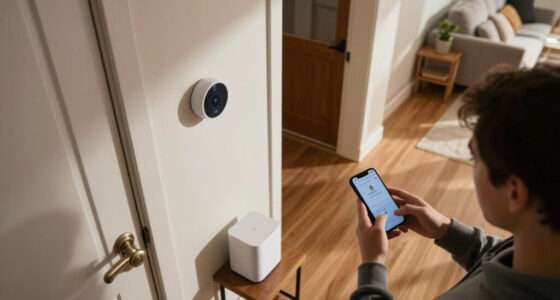
Smart home security cameras are connected cameras that let you view or receive recordings through an app, often with activity alerts and links to other smart devices. The right type depends on the location: a doorbell camera suits the front step, while an outdoor model may cover a driveway or side gate. Start with the area you need to see, then choose the camera’s shape and power source.
For example, a renter who wants to check a package may prefer a doorbell camera that fits existing wiring or a removable battery model, subject to building rules. A homeowner watching a dark driveway might prefer an outdoor camera with a suitable weather rating and dependable night vision. Indoor cameras can help you check on a pet, but they also record shared rooms, so think through when they should be active.
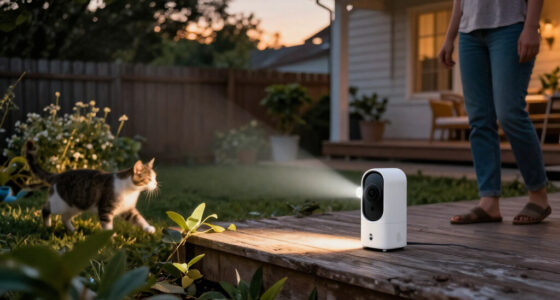
Wired cameras can offer a steady power supply, and some support continuous recording. They take more installation work, though. Battery cameras are easier to mount but need recharging or replacement, and frequent activity can drain them faster. Floodlight cameras add motion-triggered lighting; that bright beam can make a path easier to see, but it may also shine toward a neighbor’s window.
Good placement balances useful coverage with respect for other people’s privacy. Aim at your entrance or driveway instead of a neighbor’s private space, and check local rules for video and audio recording. If installation involves electrical wiring, hire a licensed professional; power should be off before electrical work, and appropriate protective equipment matters.
Products Worth Considering

Bose Lifestyle Ultra Wireless Home Speaker, White Smoke

Sonos Era 100 SL Compact Microphone-Free Speaker, Black

LG 77-Inch OLED evo C5 Series Smart TV (2025)
As an affiliate, we earn on qualifying purchases.
Get footage you can actually use after dark
Smart home security cameras produce useful footage when the view, lens, lighting, and recording quality work together. Resolution is one part of that picture, not a guarantee that you’ll recognize a face or read a delivery label. A camera aimed into a bright sunset may capture a dark silhouette, while a slightly lower resolution camera placed near the entrance may give you a clearer view of a visitor.
Imagine a camera mounted high under an eave to cover an entire front walk. Its wide view catches the gate, path, and porch, but a person standing by the gate may look tiny in the image. Moving the camera closer to the entrance can trade broad coverage for more visible detail. Glare from a porch light, raindrops on the lens, compression, and shadows can all soften the recording.
Motion detection can respond to changes in the image, infrared sensing, or a combination of sensors. Some cameras try to distinguish people, pets, vehicles, or packages. That can help: you might get fewer alerts when a tree branch sways. But labels are clues, not proof. A delivery box partly hidden behind a planter or a person walking through deep shadow may confuse the system.
Before settling on a mount, check the live view at daytime and after dark. A short test can reveal that headlights wash out the image or that a nearby wall blocks half the lens. Set a reasonable detection zone where the app allows it; excluding a busy sidewalk may cut noise without leaving your own entrance uncovered.
Compare power, Wi-Fi, and recording before you buy
Your camera’s power and connection determine when you can see what happened. Most consumer models use Wi-Fi for setup, remote viewing, and alerts, so a strong signal at the installation spot matters. A camera can look excellent in a product demonstration and still miss an alert if it sits behind thick walls at the edge of your home network.
Picture an outdoor camera mounted beside a detached garage. Your phone may show full Wi-Fi bars in the kitchen, yet the camera’s signal can falter through brick and glass. Check the actual camera location during setup. Also check whether it supports your home’s Wi-Fi band and what it does if the internet drops.
Local storage, such as a memory card or home hub, can preserve footage without relying on a cloud connection, depending on the model. But a card inside a camera can be damaged or taken along with it. Cloud storage can make clips easier to reach remotely, though access, retention, and advanced alerts may depend on a paid plan. Some systems offer continuous recording; it uses substantially more storage than short event clips.
Compare likely costs over several years, including subscriptions, batteries, hubs, and accessories. A free basic plan may fit a quiet entryway, while a household that needs longer clip history may prefer a paid plan or a system with local storage. Check current plan terms directly, since features, prices, and retention periods can change by region and over time.
| Option | What it can offer | What to check |
|---|---|---|
| Battery power | Flexible placement and simpler mounting | Recharge frequency, weather, and activity levels |
| Wired power | Steady power; some models offer continuous recording | Installation needs and storage requirements |
| Cloud storage | Remote clip access, often through an account | Subscription, retention, and cancellation terms |
| Local storage | Recording to a card or hub | Capacity, outage behavior, and theft or damage risk |
Set up alerts that help instead of buzzing all day
Useful alerts tell you about activity that matters. Smart cameras can send a notification when they detect movement, and some let you choose categories such as people, pets, or vehicles. These features may cut down on noise, but no detection system is perfect. Weather, lighting, blocked views, and camera angle can produce missed events or false alarms.
For example, a camera covering a front path may notify you about every car passing on the road if its activity zone is too wide. Narrowing the zone to the porch and steps could help you notice a delivery without constant buzzing. A camera in a room where a pet moves around may need a different schedule or alert setting than one watching an unattended garage.
Use these steps to tune alerts:
- Mount the camera and check that the intended area appears clearly in the live view.
- Set a detection zone around the entrance, walkway, or other area you want alerts for.
- Choose the activity categories you actually need, such as people or packages, if available.
- Review a few days of alerts and adjust the zone or sensitivity if ordinary activity keeps triggering notifications.
- Test the alert from outside your home so you know whether the phone receives it in time.
Automated descriptions can be handy, but treat them as hints rather than definitive evidence. On-device processing may analyze some events at the camera or a local hub, which can change how data is handled and how quickly a feature responds. It does not, by itself, prove that no information leaves your home; check the manufacturer’s explanations and account settings.
Protect the camera and the people it can record
A smart camera is both a physical sensor and an internet-connected device. Its security depends on the camera, the app account, the home router, and the people who can view or share recordings. A strong password and an updated app are small steps that can prevent a forgotten account setting from becoming a larger problem.
Use a unique password for the camera account, turn on multifactor authentication when available, install firmware updates, and secure your router. Review account access after adding a partner, house sitter, or installer. If you no longer want someone to see the feed, remove their access rather than assuming an old invitation will expire.
Indoor cameras deserve extra care because they can record roommates, family, cleaners, or guests. Tell household members where cameras are, use privacy modes or power controls when recording is not wanted, and check what the status light means on your specific model. One family, for instance, might keep a pet camera off while everyone is home and enable it only when the house is empty.
Check whether recordings are encrypted, how long clips remain available, and whether shared links can be revoked. Before cancelling a plan or closing an account, find out what happens to stored footage and download any clips you need. Microphones raise a separate issue: local laws about audio recording vary, so check the rules that apply where you live and disclose recording when required.
Check what the camera can do with your other smart devices
Smart home compatibility can make a camera more convenient, but the feature list matters. A product may work with a voice assistant or display without supporting every function you expect. Confirm whether the specific integration provides live viewing, alerts, recording, or automation instead of relying on a general “works with” label.
For instance, a household may want a doorbell camera to show its live feed on a kitchen display when someone rings. Another household may want a motion alert to turn on an outdoor light. Those actions depend on the camera, the smart home platform, the connected devices, and sometimes a subscription or compatible hub.
Test the exact task you care about before building routines around it. If the camera connects to a light or alarm, check what happens when Wi-Fi fails or a phone is offline. A camera can continue recording locally during an internet outage if its design supports it, while remote viewing and alerts generally need connectivity. Power outages can affect cameras and routers alike unless the system has a suitable backup.
For a small setup, a doorbell camera and one light may be all you need. A larger system might use a local hub to connect devices and store footage. Either way, the best system is the one you can operate reliably: a crisp alert at the right moment beats a complex automation that stops working after a router change.
Frequently Asked Questions
Do smart home security cameras need Wi-Fi?
Most consumer cameras use Wi-Fi for setup, remote viewing, and alerts. Some models can store video locally during an internet outage, but the available offline features vary.
Do smart cameras record all the time?
Many cameras record short clips when they detect activity. Some wired cameras and systems support continuous recording, which usually needs more storage and may have specific plan requirements.
Can I use a smart camera without a subscription?
Some models offer live viewing or local recording without a paid plan. Cloud clip history, longer retention, or advanced alerts may require a subscription, so check the current terms before buying.
Can a camera keep recording if the internet goes down?
It depends on whether the camera supports local storage and how its offline mode works. Remote viewing and notifications generally need connectivity, even if the camera keeps saving clips locally.
Are smart home security cameras safe from hackers?
No internet-connected device is risk-free. A unique password, multifactor authentication, updated firmware, a secure router, and careful control over account sharing can reduce exposure.
Where should I put a security camera?
Common locations include entrances, garages, driveways, and other areas you want to monitor. Aim for useful coverage while avoiding unnecessary views into private spaces, and check local rules and building policies.
Conclusion
Choose a camera by starting with the moment you want it to capture: a package at the door, a dark stretch of driveway, or a pet crossing the living room. Then check that the view is clear, the connection is steady, the recording plan suits your budget, and the privacy settings suit the people who share your home.
Put the camera where the evidence will be useful. A carefully aimed lens and a well-tuned alert can turn a blurry question into a clear answer.